Who is this choice for?

PS5 or Xbox Series X|S players interested in 120Hz

If you play games with a 120fps mode, check whether the game, console settings, selected HDMI input and cable path can all support the output you want. Sony UK and Xbox Support both describe conditions beyond the TV’s headline refresh rate.

Households sharing one living-room screen

A TV used for games, films and streaming must also fit the seating layout. Which? advises measuring the sofa-to-screen distance before choosing a size.

Console players sitting at a desk

If you usually play alone at close range and do not need a shared-media screen, a monitor may fit the space better. Check its HDMI capabilities for your console rather than relying on PC-oriented specifications.

What should you check before buying?

Gaming-capable 4K TV

Consider it: For a shared screen when you also play games with compatible 120fps or variable-frame-rate modes.

Check carefully: The TV’s claimed refresh rate does not establish which console signals each HDMI input accepts.

General 4K TV

Consider it: When screen size and everyday viewing matter more to you than 120fps or VRR modes.

Check carefully: As Xbox Support notes, HDMI inputs can have different limits even on the same TV.

Desk monitor

Consider it: For close, individual console play where a smaller display is acceptable.

Check carefully: A PC refresh-rate specification does not tell you which modes the monitor accepts from a console over HDMI.

PriorityWhat to checkYour needs
Console signal Check the exact model’s HDMI input table for the resolution and refresh rate you intend to use. Confirm the console settings, game support and cable path; Xbox Support warns that an intervening soundbar or receiver can affect video features. I play games with a 120fps mode and want to know whether my complete setup can display it at 4K.
Gaming features Check VRR on the intended HDMI input and whether game mode or automatic low-latency mode is available. Confirm that the feature applies to your console, not only to a PC connection. Frame rates vary in the games I play, so I care about compatible VRR and responsive controls.
Room fit Measure your usual seating distance and the available wall or furniture space. For side seats, consider viewing angles as well as screen size. Several people use the living-room screen, and it needs to work from our usual seats.
Display type Decide whether the screen is mainly for distant, shared viewing or close desk use. For a monitor, check console-facing HDMI specifications separately from DisplayPort or PC modes. I mostly play alone at a desk and would rather have a smaller display than a household TV.

Common buying mistakes

  • Assuming a 120Hz or 144Hz label guarantees console 4K/120Hz

    Sony UK explains that PS5 4K/120Hz depends on more than the TV’s refresh-rate claim; the game and console setup matter too. Samsung’s UK gaming-TV material also distinguishes some higher refresh-rate modes intended for compatible PC hardware.

    Check the exact model’s HDMI input specifications, the supported game mode and any required TV input setting before buying.

  • Overlooking the HDMI port and signal path

    Xbox Support notes that TV inputs can differ and that a soundbar or AV receiver between the console and TV can affect video features.

    Identify the intended HDMI port and confirm any intermediary’s passthrough capabilities. When setting up, test the console directly with that TV input before adding other equipment.

  • Choosing size from gaming specifications alone

    A screen still needs to suit its position and the seats used for gaming and everyday viewing. Which? advises measuring the sofa-to-TV distance when choosing a size.

    Measure the seating distance and available wall or furniture space, then assess the screen size in that layout.

  • Treating similar model names as the same product

    The Samsung S95H OLED named in an RTINGS gaming-TV ranking is not the Samsung S90F listed among the Joybuy options below. A shared brand and product family do not transfer a ranking or specifications between models.

    Compare the complete model number, screen size and relevant HDMI specifications before applying a review or ranking to a retailer listing.

Brands to compare

LG

LG’s UK TV range includes OLED and other lines aimed at households comparing gaming features with wider TV use.

  • LG describes high refresh rates, VRR and low input lag among the features of its gaming-TV range.
  • These are range-level manufacturer claims: check the exact model, size and HDMI input for the console mode you need.

Samsung

Samsung’s UK gaming-TV material covers selected OLED and LCD/QLED-based models with different input features.

  • Samsung lists features including HDMI 2.1, ALLM and adaptive sync on selected models.
  • Samsung specifies that its cited 4K 144Hz, 165Hz and 240Hz modes require compatible PC games and graphics hardware; do not read those figures as console modes.

Sony

Sony’s BRAVIA TVs and INZONE monitors provide two display types to examine for a PS5 household.

  • Sony UK explains PS5 4K/120Hz requirements and documents gaming settings for applicable BRAVIA TVs.
  • Support and settings are product-specific; confirm that the guidance applies to the TV or monitor model under consideration.

Joybuy options for TVs and desk gaming

These options include household TVs in several screen sizes and one smaller monitor for close desk play. Use the model-specific HDMI specifications and your room measurements to narrow the choice.
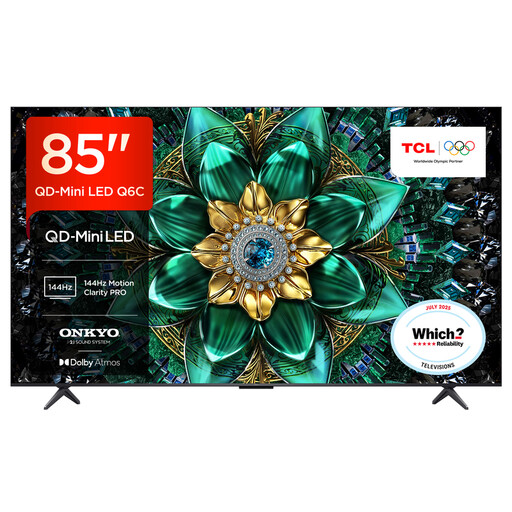
TCL 85Q6C 85-inch QD-Mini LED 4K TV

TCL 85Q6C 85-inch QD-Mini LED 4K Google TV

An 85-inch TV to consider where a large shared screen fits the seating distance and available space. The product name lists QD-Mini LED, 4K HDR, Google TV and an ONKYO 2.1 audio system. Confirm the intended HDMI port’s console 4K/120Hz and VRR modes; the supplied refresh-rate descriptions differ.

View on Joybuy

TCL 50Q6C 50-inch QD-Mini LED 4K TV

TCL 50Q6C 50-inch QD-Mini LED 4K Google TV

A 50-inch TV option for gaming and shared viewing, subject to your seating distance. Its product name lists QD-Mini LED, 4K HDR, Google TV and an ONKYO 2.1 audio system. Check the exact refresh modes and whether the HDMI input you plan to use accepts console 4K/120Hz; the supplied refresh-rate descriptions differ.

View on Joybuy

Samsung S90F 55-inch 4K OLED TV

Samsung S90F 55-inch 4K OLED Smart TV (2025)

A 55-inch OLED TV option for a room where games and other viewing share one screen. Check the S90F’s exact HDMI-port specifications for the 4K/120Hz and VRR modes you intend to use. This is the S90F, not the S95H named in the external RTINGS ranking.

View on Joybuy

TCL 55V6C 55-inch Direct LED 4K TV

TCL 55V6C 55-inch Direct LED 4K Google TV

A 55-inch TV option for mixed gaming and household viewing. Its product name specifies 4K HDR, Google TV and a 120Hz Game Accelerator labelled FHD. That FHD mode does not establish 4K/120Hz operation, so check the exact HDMI input capabilities if 4K high-refresh play matters to you.

View on Joybuy

LG UltraGear G8 27G850A 27-inch 4K gaming monitor

LG UltraGear G8 27G850A 27-inch 4K Nano IPS monitor

A smaller display option for close desk play rather than a shared living-room TV. The product name specifies HDMI 2.1 and DisplayPort 2.1, along with dual-mode 240Hz/480Hz operation. Check which 4K/120Hz, VRR and ALLM modes your console can use through HDMI; PC-facing refresh-rate figures do not answer that question.

View on Joybuy

Questions about console displays

Does a 120Hz or 144Hz TV automatically deliver console games at 4K/120Hz?

No. Sony UK says PS5 4K/120Hz depends on a suitable TV, connection, console settings and a game that supports the mode. For Xbox, check the TV’s selected input and the full connection path too; Xbox Support notes that inputs and intervening equipment can affect available video features.

Can I connect a console through a soundbar or AV receiver?

Yes, if the intermediary supports the video features your setup needs. Xbox Support warns that equipment between the console and TV can affect video features and quality, so check its passthrough specifications and test the console directly with the intended TV input when setting up.

Should I choose a TV or a monitor for console gaming?

A TV suits sofa-distance play and a screen shared for films or streaming; a monitor is worth considering for close, individual desk play. RTINGS distinguishes those typical viewing arrangements. Whichever you choose, confirm the console modes supported over HDMI on the exact model.

Do I need a TV Licence just to play console games in the UK?

Playing console games alone is not one of the viewing activities for which TV Licensing says you need to be covered. TV Licensing says coverage is needed if you watch TV channels or live TV on a streaming service, or use BBC iPlayer, so consider what else you will use the screen or console to watch.