What matters when choosing two monitors?
Start with the space needed for manuscript and proof windows, then check desk fit and computer compatibility. Colour features become a more important choice when the collection includes artwork or colour-sensitive proofs.
| Concern |
What to check |
Who this matters to |
| Consistent page layout |
Compare screen size and native resolution across the pair, then check whether text remains comfortable at your preferred scaling. |
When I compare line breaks and facing pages against a manuscript, I want the two screens to have a consistent working area; around 31% of consumers put matched layout first. |
| Desk fit and positioning |
Measure desk width and depth, and check stand adjustment or mounting compatibility. The Health and Safety Executive advises placing the main screen directly in front of you, with its top around eye level and the screen roughly an arm’s length away. |
If I spend long sessions adjusting pages, I need both screens positioned without crowding my desk or making me turn awkwardly; around 31% of consumers prioritise desk fit and positioning. |
| Laptop connections |
Check the exact computer’s supported external-display count and intended resolution, then match its ports, any dock and the monitors’ connections. Confirm charging support separately from video support. |
I want to sit down with my laptop and use both external screens without discovering that a port or dock cannot drive them; roughly 23% of consumers make connection compatibility their primary concern. |
| Artwork and proofs |
Confirm the colour space required by your artwork or publishing workflow and whether calibration is part of it. A monitor’s colour specification alone does not establish a print match. |
When the collection includes a cover or illustrations, I need to review those files as well as the text; around 15% of consumers put colour and proofing needs first. |
Joybuy monitor options
These options include 4K monitors for a matched text-work setup, a USB-C model for a laptop desk and an OLED model to consider when artwork is part of the job. If you need two matching screens, check the quantity supplied by each listing before ordering.
 No image available
BenQ MA270UP Nano Glossy 27-inch 4K IPS USB-C monitor
Consider this 27-inch 4K IPS model for a laptop-based writing desk where USB-C connectivity matters. Check the laptop’s video and charging compatibility, its support for two external screens and the listing quantity before planning a matching pair.
View on Joybuy
 No image available
iiyama ProLite XUB2792UHSU-B6 27-inch 4K UHD monitor
For manuscript and proof windows on matching screens, this 27-inch 4K UHD model is an option to assess as a pair. Check the stand’s adjustment range, whether the listing supplies one or two monitors, and whether your computer can drive both at the intended resolution. If laptop charging through the monitor matters, confirm its USB-C Power Delivery capability.
View on Joybuy
 No image available
LG 27UP650K white 27-inch 4K IPS monitor
This white 27-inch 4K IPS model is an option for keeping manuscript and layout views on separate screens. Its stated connections include HDMI and DisplayPort; check your computer’s two-display support and the quantity supplied by the listing if you intend to use a matching pair.
View on Joybuy
 No image available
ASUS ProArt PA27DCE-K 4K UHD OLED monitor
Consider this 4K OLED model if reviewing artwork is part of the collection’s layout work. Its product description warns of burn-in risk from prolonged high-brightness static images, which matters for editing software with fixed interface elements. Check the colour requirements of your proofing workflow and the listing quantity before choosing two screens.
View on Joybuy
 No image available
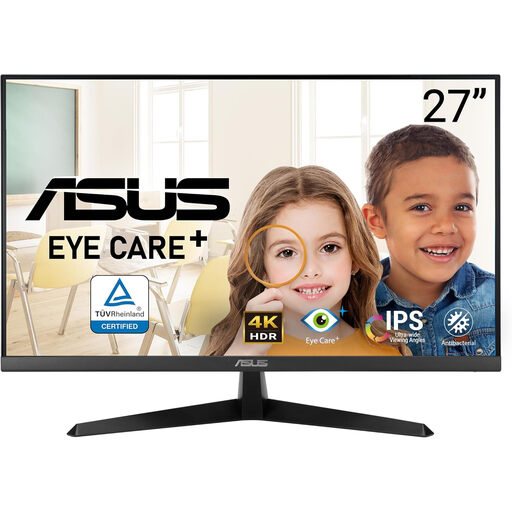
ASUS Eye Care VY27UQ 4K UHD 60 Hz monitor
This 4K UHD 60 Hz model is an option for one side of a manuscript-and-proof desk. Check whether its stand or a compatible mount will let you align two screens, and confirm the listing quantity and your computer’s two-display support.
View on Joybuy
Frequently asked questions
Will my laptop run two 4K monitors?
It can if the exact laptop and connection setup support two external displays at your intended resolution. Apple Support says display support varies by Mac model and display configuration; for a Windows PC, Microsoft Support explains how to configure connected monitors in Display settings. Check the computer’s specifications and any dock before ordering.
Can a USB-C monitor handle laptop video and charging?
Yes, for a compatible connection, but the monitor’s charging rating must meet the laptop’s needs. LG UK specifies USB-C display, data and charging up to 90 W for the 27UP850K-W, while BenQ lists 65 W power delivery for the PD2705U. Check how the second screen will connect separately.
How should I position two monitors for extended formatting work?
Put the primary screen directly in front of you and position the second so that using it does not require repeated awkward turning. The Health and Safety Executive advises placing the screen top around eye level and the screen roughly an arm’s length away. Check both stands and the available desk depth before buying.
What should I do with an old monitor when replacing it?
Use an appropriate electrical-waste collection route rather than treating the monitor as ordinary household waste. UK government guidance identifies the Waste Electrical and Electronic Equipment Regulations 2013, as amended, as the relevant framework; ask your retailer or local authority which collection options are available to you.


