Choose a conventional laptop and one external monitor if the family calendar will usually stay at a desk; check that the laptop, cable and monitor support the intended connection. A laptop with two built-in screens makes more sense when the workspace needs to move between rooms. If you mean two external monitors as well as the laptop screen, check the exact model’s display limit before buying.
Who each setup suits
Households with a fixed planning desk
If the shared calendar and school messages will usually be viewed in one place, a conventional laptop beside an external monitor provides two work areas. Check the laptop’s video output against the monitor’s input before choosing this arrangement.
Families who organise from different rooms
If the schedule moves between the kitchen, living room and study, a built-in second screen travels with the laptop. The ASUS Zenbook DUO and Lenovo Yoga Book 9i Gen 9 are examples with two integrated displays; their keyboard and stand arrangements also deserve attention.
Households planning two external monitors
If you want the laptop display plus two separate monitors for calendars, messages and administration, confirm the exact laptop’s external-display limit and connection method. Support for one external screen does not establish support for two.
What matters when choosing
Decide where the schedule workspace will be used, then distinguish one external monitor from two: those choices determine which display specifications and accessories matter.
| Concern |
What to check |
Who this matters to |
| Reliable connection at a fixed desk |
Match the laptop’s video-capable output, cable and monitor input. For separate work areas, check how to extend rather than duplicate the display. |
If my family calendar stays at one desk, I want it visible beside messages or documents without changing windows. Around 50% of consumers would put that fixed-desk connection first. |
| A second screen that moves with the laptop |
Check both panel sizes and how the detachable keyboard and stand work in the places you will use them. |
When I move the schedule between rooms, I need the second work area to come with me. That portability would be the primary concern for around 30% of consumers. |
| Support for two external monitors |
Read the exact model’s limits for display count, resolution and refresh rate; check the proposed dock or connection arrangement too. |
If I plan to keep calendars and communications on separate monitors alongside the laptop, one external-display connection is not enough. Around 20% of consumers would prioritise this three-display layout. |
Mistakes to avoid
-
Assuming every USB-C socket supports the planned monitors
Display capability depends on the exact laptop and connection method. Dell’s monitor guidance says that daisy-chaining requires Thunderbolt and advises checking device compatibility.
Compare the laptop’s external-display specification with the number of monitors, their required resolution and the cable or dock you intend to use.
-
Choosing built-in dual screens for a workspace that never moves
A detachable keyboard and stand change how a dual-screen laptop is set up. If the family schedule stays at one desk, those features may matter less than the complete laptop-and-monitor arrangement.
Consider a built-in dual-screen model when you will regularly use both displays away from a permanent monitor; otherwise, compare the two setups as you would actually use them.
-
Confusing one external monitor with two
The laptop screen plus one monitor makes a two-screen workspace. Adding two external monitors is a different requirement and needs a laptop that supports that display count.
Write down the intended layout before shopping, then check the exact model’s stated limit and connection options.
Two external monitors also need room on the desk and their own connection hardware.
Relevant brands to consider
These model-specific examples illustrate different ways to create the workspace; a brand name alone does not establish the display capability of another model.
ASUS
For a portable setup with two built-in screens, ASUS describes the Zenbook DUO UX8406 as having two 14-inch OLED touchscreens, a detachable keyboard and an integrated kickstand.
- ASUS also lists Thunderbolt 4, USB-A and HDMI connections for the UX8406.
- Check the exact variant’s panel specification, supplied accessories and typing arrangement before choosing it.
Lenovo
Lenovo describes the Yoga Book 9i Gen 9 as a dual-display laptop with two 13.3-inch OLED touchscreens.
- Lenovo lists a detachable keyboard, stylus, mouse and folio stand for the Gen 9 package.
- Check the contents of the exact version and retailer bundle; the Gen 9 description does not cover every Yoga Book configuration.
Apple
For a desk-based arrangement rather than two built-in panels, Apple lists support for up to two external displays on the M5 MacBook Air.
- Apple lists two Thunderbolt 4/USB-C ports for this model.
- Check the exact chip and model against the display resolutions and connection arrangement you intend to use.
HP
A specific HP Laptop 14 listing describes a USB-C port that can connect an external display, making it an example of the conventional laptop-and-monitor route.
- HP describes an optional dock for that listing as suitable for up to three additional monitors.
- Do not apply that capability to every HP laptop; confirm the exact port’s video support and dock compatibility.
Joybuy laptop choices
These laptops cover a fixed desk with a conventional laptop and an external monitor, plus one built-in dual-screen option for moving the schedule around. Check your intended monitor layout against each exact model before choosing.
 No image available
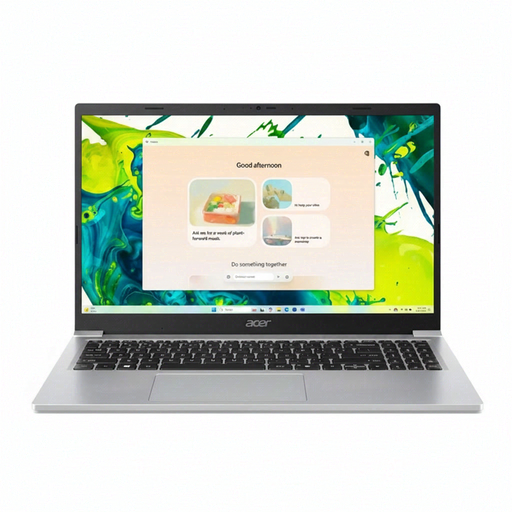
Acer Aspire Lite AL15-36P-C29Z, 15.6-inch Full HD
Consider this conventional laptop for a family desk where its screen will sit alongside an external monitor. Check that the listed HDMI connection matches the monitor input and cable you plan to use.
The named configuration has an Intel N150 processor, 8GB DDR4 RAM, a 128GB SSD and Windows 11 Home. If you intend to connect two external monitors, confirm the exact model’s display limit separately.
Joybuy
 No image available
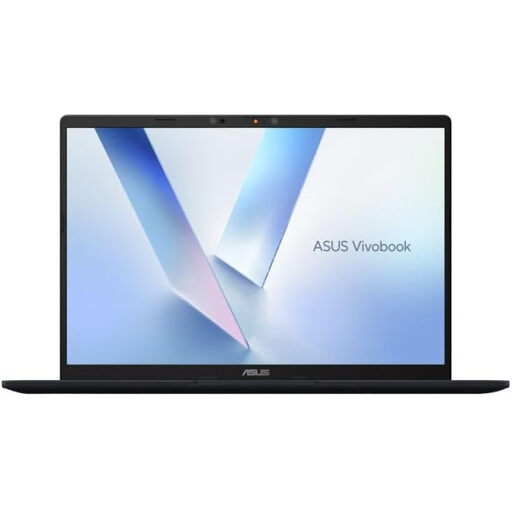
ASUS Vivobook 14 X1407QA-LY003W, Snapdragon X
This conventional laptop is an option for a desk monitor setup that can also move between rooms. Check which of its listed video connections suits your monitor and cable or dock.
The named configuration has 16GB RAM and a 512GB SSD. Confirm support for the exact number of external monitors you intend to connect.
Joybuy
 No image available
Acer Chromebook Plus 514 CB514-5H, 14-inch WUXGA
For a laptop-and-monitor planning desk, check that its listed USB-C DisplayPort connection matches the intended monitor and cable. Also confirm that the apps or services your household uses for scheduling work on a Chromebook.
The named configuration has a 1920 × 1200 display, an Intel Core i3-1315U processor, 8GB RAM and a 256GB SSD. Check the exact display limit if you need two external monitors.
Joybuy
 No image available
ASUS Zenbook DUO UX8406CA-QL135W, dual OLED touch
Choose this route when both schedule work areas need to travel with the laptop rather than remain attached to a desk monitor. Check that the detachable-keyboard and kickstand arrangement suits the surfaces where you will use it.
The named variant has two 14-inch OLED touchscreens, an Intel Core Ultra 7 255H processor, 16 GB LPDDR5X RAM and a 1 TB SSD. Panel-resolution descriptions conflict, so confirm the exact resolution and included accessories before buying.
Joybuy
 No image available
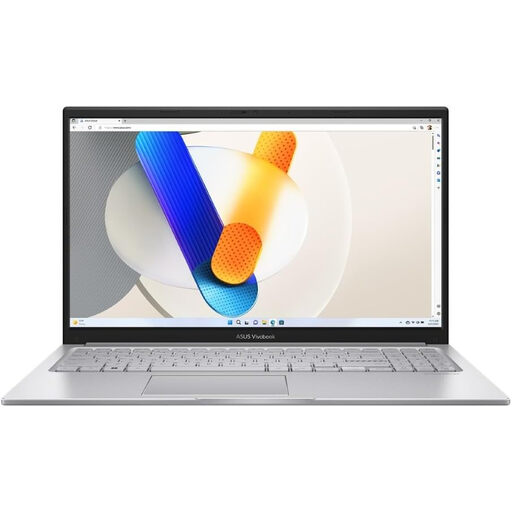
ASUS Vivobook 15 X1504VA, 15.6-inch
This conventional laptop suits consideration for a fixed family-planning desk with one external monitor. Check that its listed HDMI connection matches your monitor and cable.
The named configuration has an Intel Core 5 120U processor, 24 GB RAM and a 1 TB SSD. If your plan involves two external monitors, verify the exact model’s display limit before choosing it.
Joybuy
Common questions
Do two screens have to be built into the laptop?
No. A laptop display plus one external monitor also gives you two work areas for the family calendar and other tasks. On Windows, Microsoft Support explains how to detect and arrange connected displays; choose an extended layout if you need different content on each screen.
Can any USB-C laptop run two external monitors?
No. The connector alone does not establish the laptop’s external-display limit or whether your proposed dock or monitor chain will work. Check the exact model and connection method: Apple lists support for up to two external displays on the M5 MacBook Air, while Dell advises checking compatibility for Thunderbolt daisy-chaining.
What should I check when the schedule monitor is connected?
Check the cable connection and the operating system’s display-detection settings, then arrange the screens to match their positions on the desk. Microsoft Support provides Windows controls for detecting and arranging multiple displays; use an extended layout when the calendar and your other work need separate spaces.


