What matters when choosing
Decide whether the second workspace needs to travel with the laptop or stay at a desk. Then check the software configuration and, for external monitors, the exact display outputs; a connector count alone does not establish that two screens will extend independently.
| Concern |
What to check |
Who this matters to |
| Portable two-screen workspace |
Check the usable display layout and the keyboard and stand supplied with the exact configuration. |
When I move between venues, I need the handbook page and its reference material visible without setting up a monitor. Around 40% of consumers would put that portable, built-in workspace first. |
| InDesign configuration |
Check operating-system and processor compatibility, RAM, SSD capacity and display suitability against the software requirements. Adobe recommends 16 GB RAM for InDesign. |
If I am assembling a multi-page handbook in InDesign, I need the chosen configuration to run my design workflow, not merely carry two screens. For around 30% of consumers, that software-ready configuration would be the primary concern. |
| Independent desk displays |
Confirm the laptop's supported external-display count and resolutions, plus compatibility with any dock, cables and monitor inputs. |
At a regular desk, I want to position two separate monitors around the layout and source files. Around 30% of consumers would prioritise that flexible, independently extended workspace. |
Relevant brands to consider
These product lines illustrate different ways to build the workspace, rather than a ranking of entire brands. Check the precise model and configuration before applying a line's specifications to a purchase.
ASUS
ASUS describes the Zenbook DUO UX8406 as a built-in dual-screen Windows laptop for work that moves between locations.
- ASUS specifies two 14-inch 3K OLED touchscreens, a detachable keyboard and a built-in kickstand for the UX8406 line.
- Check the exact generation, screen specification and selected memory and storage configuration; a line-level specification does not identify every variant.
Lenovo
Lenovo offers a built-in dual-screen route through the Yoga Book 9i line and conventional Windows work-laptop configurations through ThinkPad.
- Lenovo specifies two 13.3-inch OLED displays and a keyboard, stylus, mouse and folio stand for the Yoga Book 9i Gen 9.
- For a ThinkPad and external-monitor setup, check the exact laptop's display-output documentation; a listed RAM or SSD configuration does not establish two-monitor support.
Apple
MacBook Air is a conventional laptop route for a desk with separate monitors, not a laptop with two built-in screens.
- Apple's current UK MacBook Air specifications state support for up to two external displays while the built-in display remains in use.
- The monitors and connection hardware are separate parts of the setup. Check the club's design software, fonts, shared files and print-production workflow for macOS compatibility.
Dell
Dell's conventional Windows laptops and docking hardware provide another route to a fixed-desk workspace.
- Dell specifies a dual-4K, 60 Hz display mode for its SD25TB4 Thunderbolt 4 dock.
- That dock specification does not establish the same result with every laptop. Check Dell's compatibility information and the intended host laptop and monitors.
Joybuy product choices
These choices represent two different ways to keep a handbook layout and reference material in view: a MacBook Air for a separately assembled external-monitor desk, and an ASUS Zenbook DUO with built-in dual displays for work on the move. Compare the setup each requires before comparing their configurations.
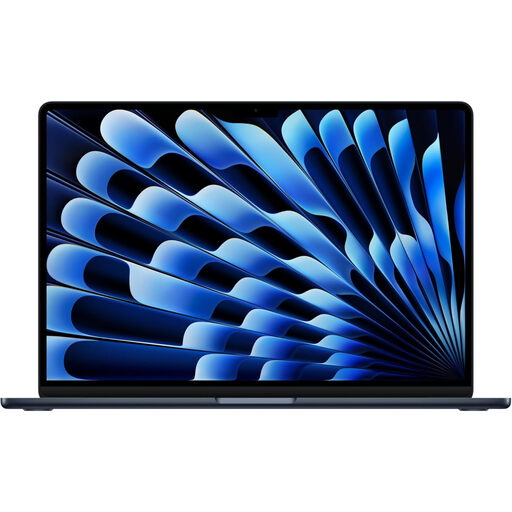 Image unavailable
Apple 13-inch MacBook Air (2026), M5, 24 GB, 1 TB SSD, Midnight
Consider this configuration if you want a macOS laptop for handbook work at a desk with separately chosen external monitors.
The listed variant has an M5 chip with a 10-core CPU and 10-core GPU, 24 GB unified memory and a 1 TB SSD. Apple's current MacBook Air specifications state support for up to two external displays while using the built-in display.
Monitors and any required cables or dock are separate setup requirements. Confirm the club's InDesign, font, file-sharing and print workflow is compatible with macOS.
View on Joybuy
 Image unavailable
ASUS Zenbook DUO UX8406CA-QL135W, 14-inch dual OLED touch laptop
Consider this built-in dual-screen model if the handbook page and reference material need to travel together.
The listed variant names an Intel Core Ultra 7 255H processor, 16 GB LPDDR5X RAM and a 1 TB SSD. Before buying, confirm the exact panels' resolution and the keyboard and stand supplied with this configuration.
If you will use current Windows InDesign, check the exact processor and operating system against Adobe's requirements as well as the memory specification.
View on Joybuy
Common questions
Will a USB splitter give me two separate external workspaces?
No, not if it simply splits one display signal: Microsoft Support says that arrangement duplicates the image rather than creating two independent signals. For separate layout and reference screens, check that the exact laptop or compatible dock supports two extended external displays.
How do I arrange two monitors on a Windows laptop?
After connecting supported displays, open Settings, then System and Display. Microsoft Support advises using Identify to distinguish the screens and dragging their icons to match their positions on the desk; select an extended layout if you want separate workspaces.
What laptop specification should I check for Adobe InDesign?
Check the exact laptop against Adobe's requirements for the InDesign version you intend to use. Adobe lists 8 GB RAM as the minimum and recommends 16 GB; also check the supported operating system and processor, storage and display resolution rather than judging by the laptop's product family alone.
Will any USB-C dock run two external monitors?
No; a dock's stated display modes do not automatically apply to every USB-C laptop. Check compatibility among the exact laptop, dock and monitors, including the required resolutions. Dell, for example, provides a compatibility check for its SD25TB4 dock.


