Recipe-index multitaskers
You keep recipes, source pages or images visible while entering records, editing descriptions or maintaining a database. Consistent work areas on two screens may matter more to you than gaming-focused features.


Two matching 27-inch QHD monitors are a straightforward choice if you want recipe sources and the active index visible in separate work areas. Prioritise USB-C video and suitable laptop charging if cable reduction matters more, or consider 4K for detailed images and layouts. Before buying either arrangement, check that your computer can drive the intended external displays and that both screens will fit your desk.
You keep recipes, source pages or images visible while entering records, editing descriptions or maintaining a database. Consistent work areas on two screens may matter more to you than gaming-focused features.
You want to connect a laptop with fewer desk cables and rearrange the workspace when needed. Check the laptop’s external-display support as well as any monitor charging feature.
You inspect food photography, scanned recipes, fine layouts or dense spreadsheets and may place more value on 4K detail than on a simple pair of QHD screens.
Decide how much space the reference and editing windows need, then check computer connections and physical screen placement before choosing a resolution or charging feature.
| Concern | What to check | Who this matters to |
|---|---|---|
| Separate work areas | Check desk space for two screens and whether the computer supports both external displays. | If I need source recipes beside the record I am editing, I want both windows visible without constant switching. Around 33% of consumers would put separate work areas first. |
| Laptop connections | Confirm USB-C video support, the external-display limit and whether monitor power delivery meets the laptop’s charging needs. | When I work from a laptop, fewer charging and display cables make the desk easier to rearrange. Roughly 27% of consumers would prioritise that connection need. |
| Image and layout detail | Consider whether 4K is useful for your images or layouts, and check supported resolution and refresh rate with both screens connected. | If I inspect scans, food images or fine page layouts, I care about seeing small details clearly. About 20% of consumers would make detail their primary concern. |
| Screen positioning | Check stand adjustments, base dimensions and mounting compatibility against the available desk space. | For long editing sessions, I need to place the main display in front of me and align the second screen comfortably. Around 20% of consumers would put physical fit first. |
A monitor’s USB-C features do not establish how many displays the connected computer can run. Apple Support says a Mac’s ports and model specifications determine its external-display options.
Check the exact computer model, supported display count, resolutions and refresh rates, then confirm video and charging support across the ports and cables you plan to use.
Depending on that connection plan, you may also need a compatible dock, adapter, cable or separate laptop charger.
Two monitor bases need room for suitable placement. The Health and Safety Executive advises keeping the main screen and keyboard centrally positioned, with the top of the screen around eye level and the display about an arm’s length away.
Measure the available width and depth, check the bases or mounting options, and decide which screen will be directly in front of you.
A Joybuy listing labelled Dell U2724D described USB-C 90 W charging, while Dell UK identifies the U2724D differently. That difference matters if laptop charging is part of your connection plan.
Match the full manufacturer model number and compare its ports, power delivery and included accessories with the listing before ordering.
Dell’s UltraSharp models offer points of comparison for an adjustable QHD pair or a 4K hub-based setup.
The PD2705Q is a 27-inch QHD option for a two-screen editing or database workspace where USB-C connectivity matters.
The 27UP850K-W is a 27-inch 4K option to examine when recipe images, layouts and laptop connectivity are priorities.
These monitors offer QHD options for separate recipe-reference and editing areas, alongside 4K options for closer inspection of images and layouts. Each is a single monitor: plan the full two-screen connection and desk space around the units you intend to use.
 No image available
Consider this model if close inspection of recipe images or layouts is a priority and you use a compatible laptop.
The product name identifies a 27-inch 4K UHD IPS monitor with a Nano Glossy finish, USB-C and a height-adjustable stand. Check the laptop’s support for the intended two-display setup and its charging requirements.
 No image available
This is another 4K option for viewing detailed recipe material while working from a laptop, provided the computer supports the planned displays.
The product name specifies a 27-inch 4K UHD IPS display, Google TV and USB-C with 65 W power delivery. Compare that charging figure with the laptop’s requirements, and confirm the monitor’s weight if it affects mounting.
 No image available
Consider this model when recipe photos, scans or detailed layouts make 4K resolution useful to your workflow.
The product name specifies a 27-inch 4K IPS display, 60 Hz refresh rate, 95% DCI-P3 coverage, HDMI and DisplayPort. Confirm the exact HDMI port count before planning connections.
 No image available
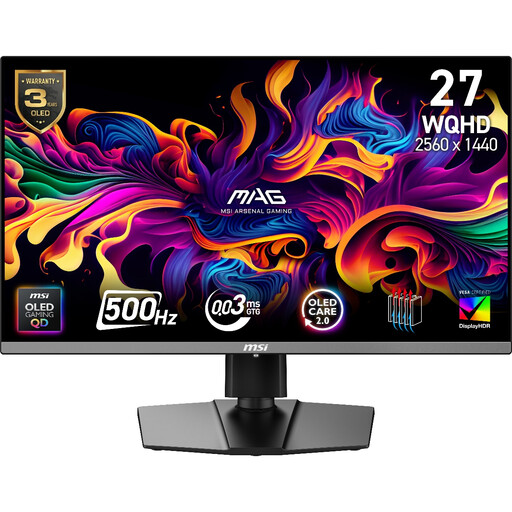
Its QHD resolution makes it an option for a separate reference or editing screen, although the gaming-focused specification is not necessary for recipe indexing.
The product name identifies a QD-OLED model with 2560 × 1440 resolution and a stated 500 Hz refresh rate. If laptop charging matters, check the required power against the listing’s stated 15 W USB-C power delivery.
 No image available
Consider this QHD model if you want separate research and data-entry areas and need to position the screens for longer editing sessions.
The product name specifies an IPS QHD display at 100 Hz. Check the exact unit’s ports before building a laptop connection plan around USB-C video or charging.
No: check the exact laptop model before buying two monitors. Apple Support says a Mac’s ports and technical specifications determine which external displays it can connect; for any computer, confirm the supported display count and the capabilities of the intended ports, dock and cables.
Extend the desktop if you want recipe sources on one screen and the active index on the other. Mirroring shows the same content on both; Apple Support and Microsoft Support provide settings for arranging connected displays on their respective systems.
Put the screen you use most directly in front of you and arrange the second so you can consult it without awkward positioning. The Health and Safety Executive advises placing the top of the main screen around eye level, about an arm’s length away, with the screen and keyboard centrally positioned.
No particular model is specified by the Health and Safety Executive’s display screen equipment guidance. Where workplace display screen equipment duties apply, employers must assess workstations, reduce risks, arrange breaks or changes of activity, and provide an eye test if a worker asks for one.