What should you check first?
Confirm two-display support and the available desk space before settling on resolution or specialist photo features. For identification work, iNaturalist advises basing conclusions on the photographs and other observation evidence rather than adding an identification the evidence cannot support.
| Concern |
What to check |
Who this matters to |
| Image detail |
Compare screen size and QHD or 4K resolution for the photographs you review. Consider colour controls if you also use a colour-managed photo workflow. |
When I compare leaf and flower photographs with references, I want to see the detail the images actually contain; around 42% of consumers put evidence review first. |
| Two-display connections |
Confirm your computer’s supported external-display count and the outputs, dock and cables required for your intended resolution. |
If I classify observations from a laptop, I need photographs and identification tools on separate working screens; around 33% of consumers put connection compatibility first. |
| Desk fit and adjustment |
Measure space for both displays and check stand adjustment or the exact clamp and grommet requirements of a dual mount. |
For long review sessions, I want to position both screens without crowding my notes and input devices; around 25% of consumers prioritise workstation fit. |
Brands to consider
These examples illustrate different ways to build the workstation; brand inclusion does not establish that a particular model fits your computer or desk.
Dell
Dell’s 27-inch UltraSharp hub monitors are relevant when you want adjustable displays and laptop-oriented connections.
- Dell UK lists the U2725QE with a 4K IPS Black panel, stand adjustment and up to 140 W power delivery. Its QHD U2724DE listing includes digital daisy chaining.
- Check the exact laptop and connection path: power delivery and a monitor’s hub do not establish support for two independent external displays.
BenQ
BenQ’s DesignVue and PhotoVue models are relevant if plant-image review is also part of a photography or editing workflow.
- BenQ specifies 4K resolution, 95% P3 coverage and a KVM switch for the PD2706U; its SW272U specification lists 4K, 99% Adobe RGB and P3 coverage, and hardware calibration.
- These manufacturer-specified features are most relevant when the rest of your photo workflow uses them; they do not establish more reliable plant identifications.
LG
LG’s 27QP88D-BS illustrates a QHD setup built around a repositionable dual-monitor stand.
- LG UK specifies a C-clamp or grommet Ergo Dual stand and daisy chaining at QHD/60 Hz for this model.
- LG identifies the 27QP88D-BS as discontinued. Check availability, desk fitting and computer compatibility before planning around this particular model.
Joybuy product choices
These 4K monitors are options for viewing plant photographs alongside references in a two-screen workspace. The list includes a larger 32-inch photography-oriented display; assess each monitor’s desk fit and your computer’s ability to drive the complete setup.
 No image available
BenQ MA270UP 27-inch 4K Mac Monitor
Consider this model if you review plant photographs on a Mac-centred desk and want to adjust screen height. Its title specifies a Nano Glossy IPS panel and USB-C.
Confirm that your computer and planned connections support two external displays; check Mac-specific functions against your own device.
View on Joybuy
 No image available
MSI MD272UPSW 27-inch 4K Smart Monitor with Google TV
This 27-inch 4K UHD monitor is an option when you want a display for observation images beside a separate reference screen. Its title specifies an IPS panel and USB-C 65 W charging.
Its multi-control feature does not mean one monitor provides two screens; check your computer’s two-display support and the connections required.
View on Joybuy
 No image available
iiyama ProLite XUB2792UHSU-B6 27-inch 4K UHD Monitor
The 27-inch 4K UHD format is worth considering for a photograph-and-reference workspace. Check the exact model’s USB-C functions if laptop charging or a particular connection arrangement matters to you.
Also confirm that your computer can drive both intended displays.
View on Joybuy
 No image available
LG 27UP650K 27-inch 4K IPS Monitor
This 27-inch 4K IPS model is an option for reviewing observation photographs while keeping references on a second display. Its title specifies HDMI and DisplayPort connections and 95% DCI-P3 coverage.
Inputs alone do not establish daisy chaining. Check how your computer will connect to both screens.
View on Joybuy
 No image available
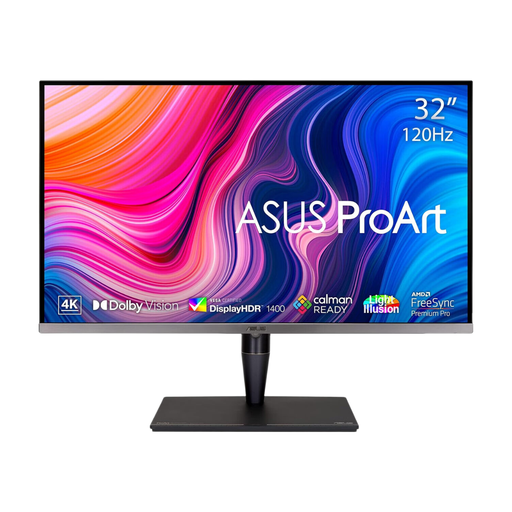
ASUS ProArt Display PA32UCG-K 32-inch 4K Monitor
Consider this larger display if plant-image review is part of a colour-managed photography workflow. Its title specifies a 4K IPS Mini LED panel and hardware calibration.
At 32 inches, check the space available for a second screen and confirm that your computer supports the intended two-display connection.
View on Joybuy
Common questions
Can any laptop run two external monitors for plant-observation work?
No: check the exact laptop’s supported external-display count before choosing the monitors. RTINGS notes that two video signals generally need two outputs or a suitable dock, adapter or daisy-chain arrangement; the ports and cables must also support your planned configuration.
Will a colour-accurate monitor make a plant identification reliable?
No: colour features can serve a controlled photo workflow, but identification still depends on the observation evidence. iNaturalist advises checking identifications independently and using clear photographs that show the relevant plant features.
Does a work-related two-monitor setup need a workstation assessment?
For employees who use display screen equipment daily as part of normal work for continuous periods of an hour or more, the Health and Safety Executive says employers must assess the workstation. That assessment considers the whole setup, the work and individual requirements; it is not a general rule for every personal home desk.
What should I do with an old monitor when buying a new one?
Check the seller’s arrangements for taking back an old monitor of the same type before ordering. GOV.UK describes an in-store electrical-waste take-back route; ask the seller how its process works if you need collection instead.


