
24/7 Customer Support

Free returns

Same-day & Next-day Delivery

Quality Guaranteed

Unlock Your Welcome Offers: FREE Delivery | Up to 80% OFF | Free 30-day JoyPlus trial
Download the APP
Creating the perfect gaming room is about more than just buying a powerful PC or the latest console. It's about building an immersive environment that enhances every moment, from intense competitive matches to exploring vast open worlds. However, the market is flooded with options, and it's easy to make costly mistakes. Before you start adding items to your basket, let's look at the common pitfalls that can prevent you from achieving the ideal gaming room setup.
Many gamers find themselves disappointed by accessories that look great online but fail in practice. Two frequent issues we see are:
To build a setup that is both impressive and practical, you need to look past the marketing and focus on a few core specifications. Understanding these will help you create a high-performance and comfortable PC gaming accessories ecosystem.
When choosing LED lights for your gaming room, you will see two main types: RGB and RGBIC.
smart ambient lighting. For a truly immersive effect that can sync with your games or music, RGBIC is the feature to look for.For immersive sound, the driver size in your headset is a critical factor. Drivers are the small speakers inside the earcups that create sound. Larger drivers, such as 50mm drivers, can generally move more air, resulting in a richer sound profile with more powerful bass and clearer details. Also, check for connectivity options. A headset with both a USB and a 3.5mm jack offers great versatility, allowing you to easily switch between your PC, PS5, Xbox and Nintendo Switch.
For console and PC gamers, the display is paramount. A high refresh rate, measured in Hertz (Hz), determines how many times per second the screen updates the image. A 144Hz native refresh rate provides exceptionally smooth motion, giving you a competitive edge in fast-paced games. Paired with Variable Refresh Rate (VRR) technology, it eliminates screen tearing for a fluid, uninterrupted picture. This is a non-negotiable feature for any serious gaming desk setup.
To help you navigate the options, we've matched some products to different types of gamers.
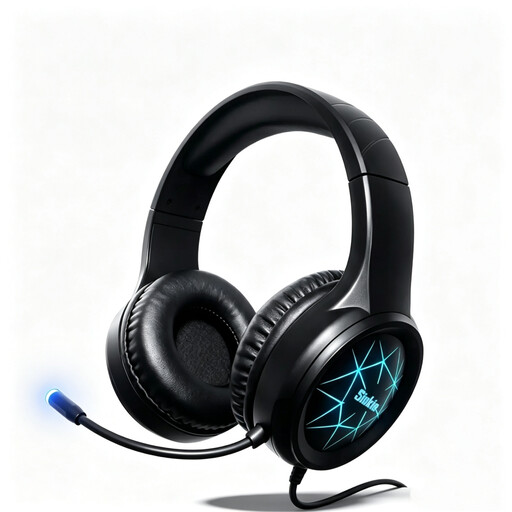
Why This Fits Their Persona: Ideal for gamers in the UK looking for a significant audio upgrade without a large financial commitment. It provides the core features needed for competitive and immersive play across all major platforms.
This directly counters the "forgetting audio" pitfall by delivering key features like large 50mm drivers and a noise-cancelling mic at an accessible price point.
Multi-platform compatibility with USB and 3.5mm connections for PC, PS5, Xbox and Switch. The over-ear design provides passive noise isolation.
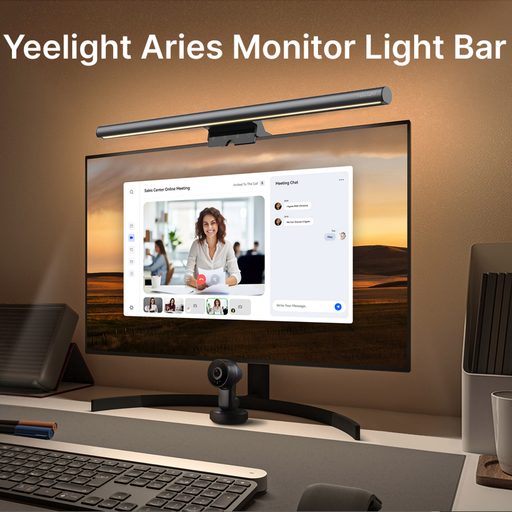
Why This Fits Their Persona: Perfect for the UK-based gamer, streamer or home-worker who spends long hours at their desk. It prioritises eye comfort and a clean, minimalist gaming desk setup.
This directly solves the "ignoring ergonomics" pitfall. Its anti-glare design illuminates the desk without reflecting off the screen, helping to reduce eye strain during extended sessions.
Saves valuable desk space compared to a traditional lamp. Features adjustable brightness and colour temperature (2700K–6500K) to suit any task, from gaming to reading.

Why This Fits Their Persona: For the creative gamer who wants their gaming room decor to be a unique expression of their style. The modular design allows for endless custom patterns on the wall.
This avoids the "Just Add RGB" trap by offering a highly customisable, app-controlled lighting system. The music sync mode creates a dynamic light show, far beyond a simple static strip.
DIY modular design allows you to create your own shapes. Features over 210 scene modes and music synchronisation, all controllable via a mobile app or the included remote.

Why This Fits Their Persona: For the UK gamer who wants a cinema-scale experience. This massive 98-inch screen is for those with a high-end PC or next-gen console who refuse to compromise on visual or audio quality.
This single unit comprehensively solves the pitfalls of poor visuals and audio. The QD-Mini LED panel and 144Hz VRR provide elite visuals, while the built-in Onkyo 2.1 sound system delivers powerful, immersive audio.
Features a native 144Hz refresh rate with VRR and AMD FreeSync Premium Pro for ultra-smooth gameplay. The integrated Onkyo sound system with a dedicated subwoofer provides cinematic audio without extra speakers.
LED lighting is remarkably energy-efficient. A typical 5-metre RGBIC LED strip uses approximately 15-30 watts of power at maximum brightness, which is significantly less than traditional incandescent bulbs. The running cost is minimal, usually amounting to just a few pence per day even with heavy usage, making it an affordable way to enhance your gaming room decor.
While you can use accessories from different brands, you will likely need to control each one through its own separate app or software. For a synchronised lighting setup where your mouse, keyboard and wall lights all react together, it is generally advisable to stick with products from a single ecosystem (e.g., Yeelight, Razer Chroma, Corsair iCUE).
Yes, when designed correctly. A quality monitor light bar illuminates your desk space without casting glare onto your screen. This reduces the contrast between your bright screen and the dark room around it, which is a primary cause of digital eye strain and fatigue. By providing a balanced, asymmetrical light source, they can make long gaming or work sessions much more comfortable.