
24/7 Customer Support

Free returns

Same-day & Next-day Delivery

Quality Guaranteed

Unlock Your Welcome Offers: FREE Delivery | Up to 80% OFF | Free 30-day JoyPlus trial
Download the APP
Choosing a home security camera can feel overwhelming. The market is flooded with options, all promising total peace of mind. Yet, many UK residents find themselves disappointed with a purchase that either comes with hidden costs or fails to perform when it matters most. As a Joybuy Product Recommendation Officer, my role is to help you navigate the marketing jargon and select a device that genuinely suits your needs.
Before you add any camera to your basket, let's look at the most common pitfalls that catch buyers out and how you can avoid them.
The most frequent complaint we hear concerns the "subscription trap." A camera might seem like a bargain at first, but you soon discover that essential features, like storing video clips for more than a few hours or accessing advanced detection, are locked behind a recurring monthly fee. For many, this turns an affordable one-off purchase into a significant ongoing expense. A reliable camera should offer you the choice of how you store your footage, not force you into a subscription.
Many outdoor cameras are labelled "weatherproof," but this term can be misleading. An IP65 rating, for example, means the device is protected from low-pressure water jets—fine for a bit of rain. However, it may not withstand a torrential downpour or the driving wind and rain common across the UK. Furthermore, the power adapter supplied with many outdoor cameras is often for indoor use only, creating a significant installation headache and potential safety hazard.
A 2K security camera sounds impressive, but high resolution is only one part of the picture. If the camera's lens quality is poor, its night vision is weak, or your WiFi security camera has a poor connection, the resulting footage can be blurry, lagging or completely unusable. A clear image depends on the entire system working together, especially in low-light conditions.
To ensure you get a camera that performs as expected, focus on these three core parameters.
This is the single most important factor for managing long-term costs.
A good system offers both, giving you the flexibility to choose.
For a security camera to be effective, you need to be able to identify what it's recording.
Consider the area you need to monitor.
Based on these practical criteria, here are a few options from our catalogue matched to specific user needs.
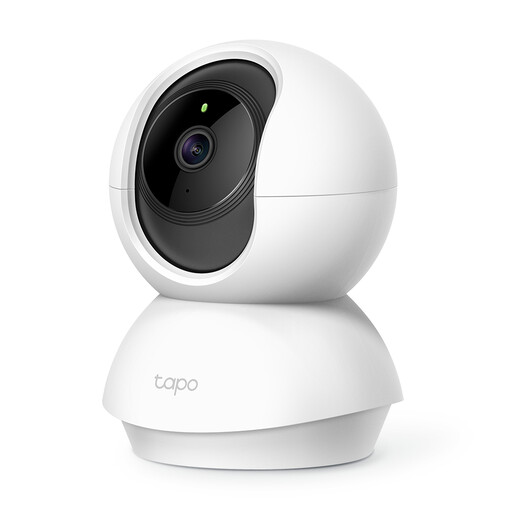
Why This Fits Their Persona: Ideal for renters or first-time buyers who want a versatile indoor security camera without a large outlay. It's perfect as a pet camera to check on animals during the day or for general monitoring of a main living area.
It directly counters the subscription trap by supporting a microSD card of up to 512GB, providing months of local recording with no recurring fees.
Offers 360° pan-and-tilt functionality at an entry-level price, allowing you to cover an entire room with a single, discreet device.
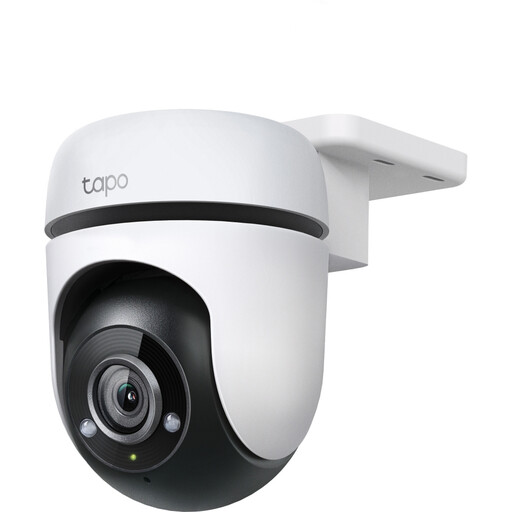
Why This Fits Their Persona: For UK homeowners needing to monitor a garden, driveway or the side of their house. This outdoor security camera is built to handle the elements while providing comprehensive coverage of larger outdoor spaces.
It addresses the "weatherproof" myth with a clearly stated IP65 rating for dust and water resistance. It also includes a local storage option to bypass subscription fees.
Combines 360° pan/tilt movement with a 30-metre night vision range, ensuring no blind spots and clear footage, even in very large gardens at night.

Why This Fits Their Persona: Excellent for families needing more than just surveillance. It functions as a high-quality baby monitor camera, a tool for checking on elderly relatives or a way for children to easily contact a parent.
It avoids the resolution illusion by pairing its sharp 2K resolution with colour night vision and dual-band WiFi for a stable, clear picture. It also offers both SD card and optional cloud storage.
The one-click calling button and two-way visual communication via the built-in screen make it exceptionally easy for non-technical users, like children or the elderly, to initiate a video call.
We have compiled a complete, real-time list of products that fully satisfy these strict selection criteria and UK safety regulations.
Yes, absolutely. Many modern cameras, including those highlighted above, are designed with this in mind. By choosing a model that supports local storage via a microSD card, you can record, store and review your footage without any recurring subscription costs. This is the most cost-effective and private way to manage your home security recordings.
Yes, it is legal to install a CCTV camera for home use on your own property. However, you must comply with data protection laws, including GDPR. The Information Commissioner's Office (ICO) guidance states that you must not capture footage beyond your property boundaries, such as in a neighbour's garden or through their windows. If your camera does cover any public space, like the pavement outside your house, you should display a clear and visible sign to inform people that recording is taking place.