Check your own library’s e-lending service before buying a device. A compatible tablet or device you already own gives you an app or browser route, while a dedicated e-reader makes sense when its particular borrowing or book-transfer method works with your library card and the titles you want. Rakuten Kobo offers direct Libby borrowing on supported UK models and participating libraries, but that does not cover every library or book.
Who each route suits
Readers checking their library first
If your priority is borrowing particular books, establish which service your council offers and whether your card, account and intended device work with it. Cardiff Council and Vale of Glamorgan Council describe different e-lending arrangements, while Libby says libraries choose their own collections.
Readers seeking a dedicated device
A focused e-reader is worth considering once you have a workable route for your loans. Rakuten Kobo’s direct Libby borrowing depends on a supported model, a participating library and the availability of the individual title.
Readers who also use library apps
If you borrow audiobooks or other app-based resources alongside e-books, check an app-capable tablet or a device you already own. Libby supports compatible iOS and Android devices, newer Fire tablets and browser reading; your library may offer additional services.
What matters when choosing
Start with your council’s service and your account, then choose between a reading-focused device and the flexibility of apps. A computer-based book transfer is another e-reader route, but only for eligible downloadable loans.
Tablet or existing app-capable device
Choose when: Your library’s loans open in an app or browser, particularly if you also use other digital-library resources. Libby lists compatible mobile devices and browser access.
Trade-off: A tablet also has other apps and notifications, so it is less single-purpose than a dedicated reader.
Dedicated e-reader
Choose when: You want a reading-focused device and have confirmed direct library borrowing, a usable Android library app or an eligible book-transfer route for that model.
Trade-off: Each route has its own limits: Rakuten Kobo restricts direct borrowing to supported libraries and titles, while its Adobe Digital Editions transfer method requires a downloadable loan and a computer.
| Concern |
What to check |
Who this matters to |
| Library and title access |
Check your council’s e-lending service, card sign-in and several books you expect to borrow. Confirm how each loan opens. |
If I cannot borrow my usual books with my own card, the device will not solve my phone-reading problem. Around 36% of consumers would put this compatibility check first. |
| Focused reading |
Confirm the e-reader’s library route first; then consider its display, lighting and text controls. Rakuten Kobo’s direct Libby route requires a supported model and participating library. |
I mainly want to settle into a book without using another general-purpose screen. For around 29% of consumers, that focused reading experience is the primary concern. |
| Apps and other media |
Check the operating system and installation route for the apps your library uses, including any audiobook or magazine service. |
My borrowing extends beyond e-books, so I need the relevant apps or browser available on the same device. That flexibility comes first for around 21% of consumers. |
| Book transfers |
Check for a downloadable EPUB or ACSM loan and a compatible reader; Rakuten Kobo’s Adobe Digital Editions method also needs a PC or Mac. |
I am willing to transfer eligible loans from a computer if it lets me read them on an e-reader. Around 14% of consumers would make that route their first priority. |
Mistakes to avoid
-
Assuming a Kindle e-reader works like a Fire tablet
Libby describes delivery of library books to Kindle e-readers as a US-only feature, whereas it supports newer compatible Fire tablets as app devices. Cardiff Council also says Amazon Kindle is not compatible with its listed e-lending services.
Check your own council’s service and the exact device type rather than treating all Amazon reading devices as interchangeable.
-
Taking UK Kobo support as a guarantee for every loan
Rakuten Kobo lists the UK for its Libby connection, but says local-library participation and title availability can differ.
Confirm that your library appears in the service, check the intended Kobo model and search for several books you actually want to borrow.
-
Relying on a neighbouring council’s device advice
Cardiff Council and Vale of Glamorgan Council describe their own e-lending services and access routes. One authority’s device guidance does not establish what works with another authority’s membership.
Use your own council library’s current digital-library instructions when deciding which app or device you need.
-
Expecting every loan to transfer to an e-reader
Rakuten Kobo’s Adobe Digital Editions method applies to downloadable library loans. Kobo says a title without a download option must instead be read in a browser.
Check representative titles and be sure you are willing to use the computer-based transfer process before choosing this route.
Brands to consider by route
Kobo
Dedicated e-readers with direct Libby borrowing on supported UK models, plus a computer-based transfer route for eligible downloadable loans.
- Rakuten Kobo says users of supported models can browse and borrow through a participating Libby/OverDrive library.
- Confirm your local library and intended titles: direct access is not available for every library or book.
BOOX
An Android e-ink route for readers who need access to apps rather than only a built-in library connection.
- BOOX describes its Go Color 7 as an open-Android device with Google Play access.
- That model description does not establish whether your library app, account and desired titles work on the exact device you choose.
PocketBook
An e-reader route with Libby functionality documented for particular models and firmware.
- PocketBook’s February 2026 Era firmware notes describe an app for library sign-in, borrowing, holds and offline reading.
- Check the exact model, firmware and your library rather than assuming the feature applies throughout the range.
Amazon
Fire tablets and Kindle e-readers need separate compatibility checks for library borrowing.
- Libby lists newer compatible Fire tablets among devices that can run its app.
- Libby labels its Kindle e-reader book-delivery feature as US-only; Cardiff Council says Amazon Kindle is incompatible with its listed e-lending services.
Joybuy devices for library reading
These devices cover Android e-ink reading and Android tablets, including a child-oriented tablet. Before choosing one for library loans, check that your council’s required app can be installed and that your account and expected books work on the exact device.
 No image available
Bigme B6 e-reader, 6-inch, white, 4GB+64GB
Consider this e-ink device if you want a reading-focused format with a potential Android app route; check your library app on the exact model before relying on it. The title specifies Android 14 and built-in Google Play, as well as a 36-level front light.
View on Joybuy
 No image available
Bigme HiBreak Pro Color, 6.13-inch, 8GB+256GB
This is an e-paper option for readers considering Android apps alongside books. Its listing specifies a 6.13-inch colour display and Android 14; confirm how to install your library app and whether it works with your account before buying.
View on Joybuy
 No image available
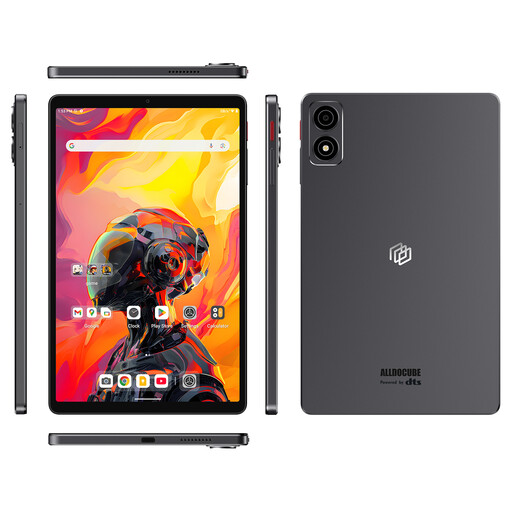
ALLDOCUBE iPlay 70 Mini Ultra, 8.8-inch, 12GB+256GB
Consider this tablet if your library reading depends on Android apps rather than direct e-reader borrowing. Its title specifies Android 14 and an 8.8-inch display; confirm installation and sign-in for your library’s app. The title states that no charger is included.
View on Joybuy
 No image available
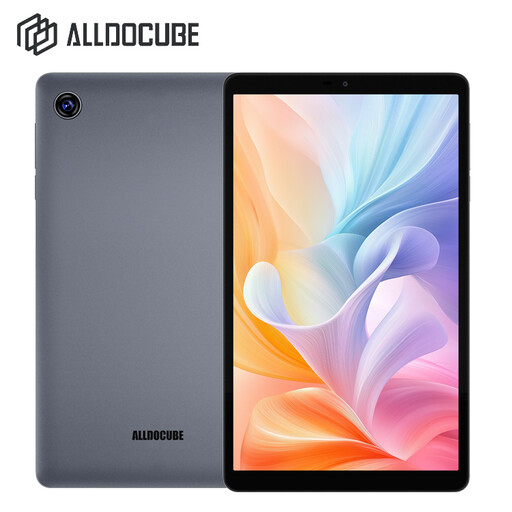
ALLDOCUBE iPLAY60 Mini, 8.68-inch, 4GB+64GB
This Android tablet offers an app-based route to investigate if you want to read on a device other than your phone. Its title specifies an 8.68-inch display and Android 15; check your library app and account on the exact model. No charger is listed as included.
View on Joybuy
 No image available
Alldocube Kido children’s tablet, 8-inch, blue case, 3GB+32GB
Consider this child-oriented tablet only if its setup suits the intended reader and your library app works on it. The title specifies Android 15, a child lock and a blue protective case; it also states that no adapter is included.
View on Joybuy
Common questions
Do I need a tablet to borrow UK library e-books?
No: a supported e-reader can also work if your library and intended books qualify for its borrowing route. Rakuten Kobo documents direct Libby borrowing for supported models and participating libraries; a compatible tablet or device you already own is an alternative when your loans use an app or browser.
Can a Kindle e-reader borrow Libby books from a UK library?
Do not rely on Libby’s Kindle e-reader delivery feature for UK loans: Libby describes it as US-only. A newer compatible Fire tablet is a different, app-capable device. Check your own council’s guidance; Cardiff Council, for instance, says Amazon Kindle is incompatible with its listed e-lending services.
Why might a library book not open on my e-reader?
The library, device route and particular title all matter. Rakuten Kobo says direct Libby availability varies by library and book; for its computer-transfer route, a title without a download option must be read in a browser instead. Check the book’s available reading methods before choosing hardware for it.


