Who this is for

People who leave an iPhone at home

If you want calls, messages or data during walks, commuting or errands without the paired iPhone, check for a cellular Apple Watch and an eligible same-provider plan. A GPS-only model depends on the phone or Wi-Fi. Apple Support provides this guidance for UK Apple Watch setup.

Android users considering LTE watches

If you need a Pixel Watch LTE or Galaxy Watch 4G to work outside phone range, confirm the operator arrangement before buying. Google Pixel Watch Help states that the LTE watch and Android companion need the same operator for full talk, text and data functionality.

UK mobile-plan switchers

If you already have a phone contract and want to add a watch, check the required airtime plan, supported watch model and activation process before ordering. Apple Support, Vodafone UK and O2 set plan-specific eligibility conditions for their watch arrangements.

What to check before buying

Cellular watch with a linked plan

Choose it when: You need calls, messages, apps or mobile data while the phone is off, at home or out of range and mobile coverage is usable.

Key trade-off: The watch must be a cellular version and the carrier must support the exact model, phone and eligible tariff.

GPS-only watch paired with a phone

Choose it when: Your watch will normally stay within Bluetooth range of the phone or can use a known compatible Wi-Fi network.

Key trade-off: It cannot connect directly to a mobile network when both the phone and Wi-Fi are unavailable.

Family or independent setup

Choose it when: The watch is being managed for a family member rather than paired as that person's everyday iPhone companion.

Key trade-off: Carrier support, numbers and activation conditions can differ from ordinary number-sharing plans.

Priority What to check Your needs
Standalone mobile connection Choose a GPS + Cellular, 4G or LTE watch variant. Confirm that an active compatible watch plan is required for mobile-network access away from the phone. I want to call, message or use data after leaving my phone behind, rather than relying only on Bluetooth or Wi-Fi.
Phone, watch and carrier compatibility Check the exact watch model, companion phone and operating-system requirements. Confirm whether the watch and phone must use the same provider and whether your tariff supports activation. I want to add a watch to my existing mobile setup without finding that my handset, network or plan prevents activation.
Local coverage Check the intended carrier's predicted coverage at the places where you expect to use the watch, including indoor locations. Compare the relevant provider rather than coverage in general. I need the watch to connect on regular walks, commutes or errands, not merely in an area with nominal network support. Ofcom's mobile checker covers provider-specific local coverage.

Common connection mistakes

  • Buying a GPS-only watch when you need mobile service

    GPS-only models can use Bluetooth or compatible Wi-Fi, but they cannot use a mobile network. Apple Support notes that direct mobile-network access requires a GPS + Cellular model with a mobile plan.

    Decide whether you need service when both the phone and Wi-Fi are unavailable. If so, confirm cellular, 4G or LTE model and plan support before buying.

  • Assuming any eSIM phone tariff will activate a watch eSIM

    Watch activation depends on carrier eligibility, not simply on whether your phone uses eSIM. Vodafone UK requires a Pay Monthly Airtime Plan and a cellular-enabled device for OneNumber.

    Ask the carrier to confirm the exact watch model, your tariff, number-sharing availability and activation process before ordering hardware.

  • Assuming every phone-linked service works independently

    On Apple Watch, general calls and data access are distinct from some SMS, MMS and third-party push notifications, which can require the paired iPhone to remain on and connected.

    Test the services that matter most to you, especially SMS, app alerts and calling, with the phone switched off and the watch using mobile data.

  • Selecting a supported carrier without checking local coverage

    Carrier compatibility does not guarantee a usable signal where you walk, commute or work. Ofcom notes that buildings, trees and walls can affect local service.

    Use Ofcom's postcode checker for the carrier you are considering, focusing on the main places where you expect to leave your phone behind.

Relevant brand references

Apple

Relevant for iPhone users deciding between Apple Watch GPS and GPS + Cellular models. Apple Support states that a cellular model with an eligible carrier plan can use mobile data and make calls away from the paired iPhone.

  • GPS + Cellular models can connect to a mobile network when Bluetooth and Wi-Fi are unavailable.
  • For ordinary setup, Apple Support says the iPhone and watch normally need the same provider and an eligible plan.
  • Some SMS, MMS and third-party push notifications may still require the paired iPhone to be powered on and connected.

Google Pixel Watch

Relevant for Android users who specifically want a Pixel Watch LTE arrangement rather than a Bluetooth and Wi-Fi-only watch.

  • Google Pixel Watch Help states that an activated LTE model can connect directly to its operator for calls, texts and streaming without the paired phone nearby.
  • Full talk, text and data functionality requires the Pixel Watch and Android companion to use the same operator.
  • Pixel Watch is not supported with iPhones.

Samsung Galaxy Watch

Relevant for Android users considering a Galaxy Watch 4G model with a carrier plan that supports the exact watch generation.

  • Samsung UK states that Galaxy Watch 4G models can use a 4G connection for calls, messages, notifications and music streaming without a nearby smartphone.
  • These capabilities apply to 4G versions rather than non-4G Galaxy Watch models.
  • Check current carrier support for the exact watch model and plan before purchase.

Joybuy smartwatch options

These Joybuy options are cellular smartwatch models for buyers who want calls, messages or mobile data away from a paired phone, subject to compatible phone, carrier plan and local coverage.
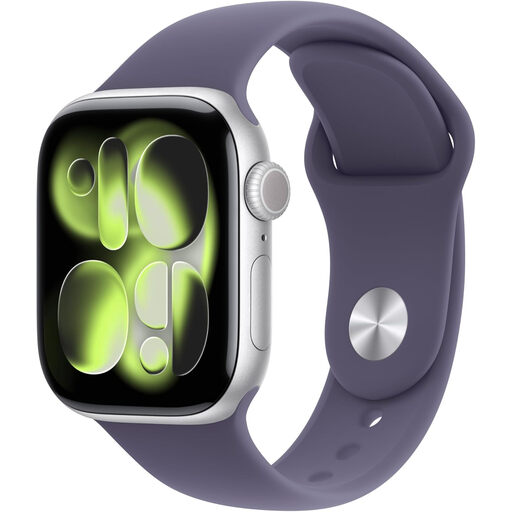
Apple Watch Series 11 GPS + Cellular 46mm in Silver Aluminium with Purple Fog Sport Band

Apple Watch Series 11 GPS + Cellular 46mm, Silver Aluminium, Purple Fog Sport Band S/M

For iPhone users who want calls and messages away from the paired phone.

GPS + Cellular; 46 mm case; Silver Aluminium Case; Purple Fog Sport Band, S/M.

Requires a cellular plan and an iPhone 11 or later with iOS 26 according to the product listing. For ordinary Apple Watch cellular setup, the phone and watch normally need the same provider and an eligible plan.

Joybuy
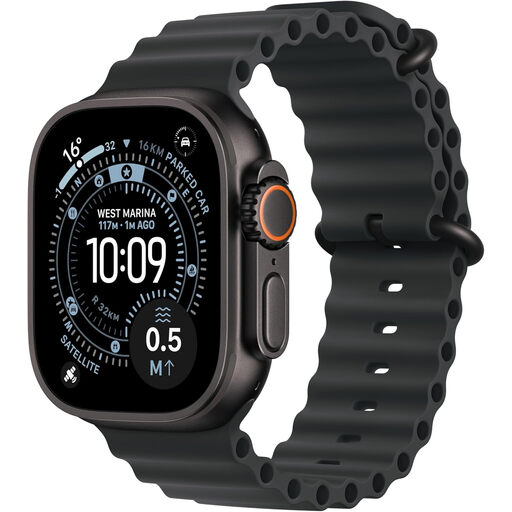
Apple Watch Ultra 3 GPS + Cellular 49mm in Black Titanium with Black Ocean Band

Apple Watch Ultra 3 GPS + Cellular 49mm, Black Titanium, Black Ocean Band

For iPhone users seeking a cellular Apple Watch for longer periods away from the handset.

GPS + Cellular; 49 mm case; Black Titanium Case; Black Ocean Band.

Confirm carrier and tariff eligibility before purchase. Some phone-linked services, including SMS, MMS and certain third-party notifications, can still depend on the paired iPhone being powered on and connected.

Joybuy
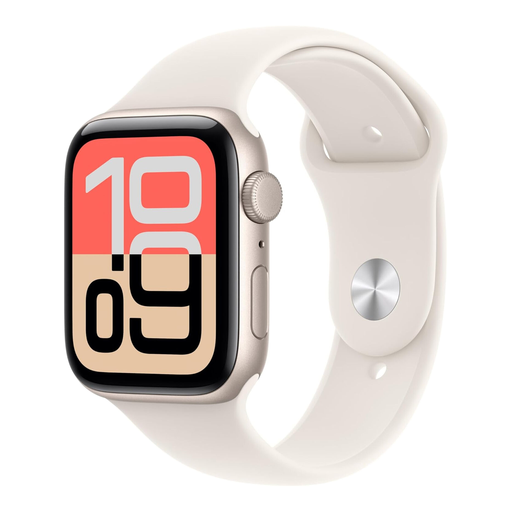
Apple Watch SE 3 GPS + Cellular 44mm in Starlight Aluminium with Starlight Sport Band

Apple Watch SE 3 GPS + Cellular 44mm, Starlight Aluminium, Starlight Sport Band M/L

For iPhone users who want calls and messages after leaving the iPhone behind.

GPS + Cellular; 44 mm case; Starlight Aluminium Case; Starlight Sport Band, M/L.

Check that your UK provider and current tariff can activate a plan for this exact model. Standalone service also depends on local coverage from the selected provider.

Joybuy
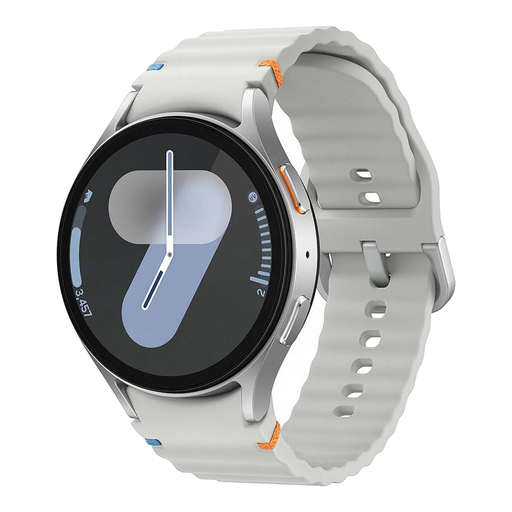
Samsung Galaxy Watch7 44mm 4G LTE Smart Watch in Silver

Samsung Galaxy Watch7 44mm 4G LTE Smart Watch, Silver

For buyers considering an Android-oriented LTE watch for calls and streamed audio away from the phone.

44 mm; 4G LTE; eSIM; Bluetooth; Wi-Fi; Silver finish.

The listing requires Galaxy Wearable app setup and LTE eSIM activation. Confirm compatible-phone requirements, carrier support for this exact variant and local coverage before buying.

Joybuy

Frequently asked questions

Can a cellular smartwatch work when my phone is switched off?

Yes, if the watch has an active supported mobile plan and usable coverage. Apple Support says a GPS + Cellular Apple Watch can connect to a mobile network when the iPhone is off or out of range, although SMS, MMS and third-party push notifications can still require the paired iPhone to be on and connected.

Do I need a separate mobile number for a cellular watch?

Not necessarily. Apple Support says a watch can display a separate number for billing or tracking while ordinarily sharing the iPhone's number, and Vodafone UK says its OneNumber plan shares the phone plan's data, minutes and messages with a compatible smartwatch. The arrangement depends on the carrier plan.

Must my phone and watch be on the same UK network?

For ordinary Apple Watch cellular setup, Apple Support says the paired iPhone and watch must use the same network provider. Google Pixel Watch Help says a Pixel Watch LTE and its Android companion must use the same operator for full talk, text and data functionality; supported family setups can follow different conditions.

What should I check before adding a smartwatch plan?

Confirm that the watch is the cellular, 4G or LTE variant, that your carrier supports that exact model, and that your phone, operating system and tariff meet the provider's requirements. Vodafone UK requires a Pay Monthly Airtime Plan and cellular-enabled watch for OneNumber, while O2 sets specific requirements for its Apple Watch plans.

Can I rely on a smartwatch as my only emergency-contact device?

Do not assume service will be available everywhere. A cellular watch needs an active service and usable connection to place calls, and Ofcom notes that coverage can be good, variable or poor depending on the provider and location; check the places where you expect to use it.