
24/7 Customer Support

Free returns

Same-day & Next-day Delivery

Quality Guaranteed

Unlock Your Welcome Offers: FREE Delivery | Up to 80% OFF | Free 30-day JoyPlus trial
Download the APP
As the lines between our professional and personal lives continue to merge, creating a home office that is both highly productive and genuinely enjoyable is more important than ever. For tech professionals, content creators and serious gamers, a standard desk and single monitor often fall short. You need a space that can handle demanding software, intensive multitasking and immersive entertainment without compromise.
This guide is designed to help you assemble the core components of an ultimate workstation setup. We will focus on the foundational elements that deliver performance, organisation and comfort, helping you build a professional home office setup that meets the demands of modern work and play.
Before diving into specific products, it's useful to understand the key features that define a truly capable workstation. Focussing on these aspects will ensure your investment serves you well for years to come.
Your desk is the literal foundation of your entire setup. For a multi-monitor workstation, space and stability are non-negotiable. Look for a surface that is at least 160 cm wide and 80 cm deep. This provides ample room for multiple large displays, your keyboard, mouse and other peripherals, while maintaining a comfortable viewing distance to reduce eye strain. Pay close attention to the weight capacity; a robust steel frame is essential for supporting heavy equipment securely.
A high-quality display is crucial for both productivity and immersion. For a 4K creator desk setup, a monitor with a 3840x2160 resolution offers exceptional clarity and screen real estate for detailed work like video editing or coding. For a combined gaming and work from home setup, consider features like a high refresh rate (165Hz or more) for smooth motion and OLED technology for superior contrast and near-instantaneous response times. Modern connectivity, such as Type-C with 65W power delivery, can also simplify your setup by charging your laptop with a single cable.
A powerful workstation often comes with a tangle of cables. A dedicated laptop docking station setup is the key to a clean and organised desk. A single hub can connect your laptop to multiple monitors, USB devices, a wired network and power. When selecting a dock, check the number and type of display outputs (e.g., HDMI, DisplayPort), the speed of the USB ports (10Gbps is excellent for fast data transfer) and the power delivery wattage to ensure it can charge your laptop efficiently.
Based on the principles above, we've selected a few standout components that can form the core of a powerful and organised workstation.
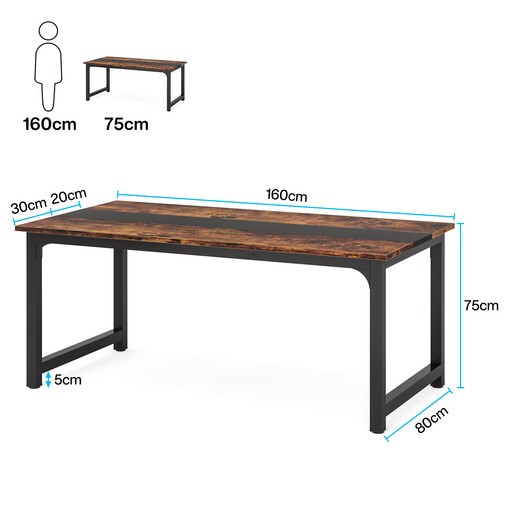
Why It Stands Out This desk provides the expansive surface area and robust support needed for a serious multi-monitor setup. Its minimalist design fits well in a modern home office, while its construction is focussed on pure function and stability.
Pros
Who is it for? Ideal for professionals, creators and gamers who require a large, unshakeable foundation for a substantial amount of heavy equipment.

Why It Stands Out This monitor combines premium specifications for both creative professionals and high-end gamers. The 4K resolution delivers incredible detail for work, while the OLED panel, 165Hz refresh rate and 0.03ms response time provide a competitive edge and stunning visual fidelity in games.
Pros
Who is it for? Perfect for the user who demands both professional-grade image quality for creative tasks and elite-level performance for gaming.
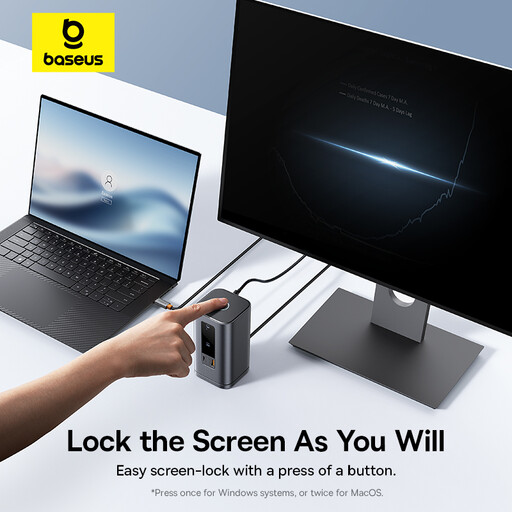
Why It Stands Out This docking station is a powerful solution for managing the complex connectivity needs of a modern workstation. It supports up to four monitors and offers a wide array of high-speed ports, all housed in a compact unit with a clever magnetic stand.
Pros
Who is it for? An essential tool for laptop users, especially those on Windows, who want to create a powerful multi-monitor desk setup with a single-cable connection for maximum convenience and minimal clutter.
These selections represent a powerful combination for an ultimate workstation setup, but every user's needs are unique. If you're looking for different specifications, sizes or alternative components to complete your desk, there are many other options to consider.
Explore our full range of computer workstation essentials to find the perfect fit for your space and workflow.
1. What is a good size for a workstation desk? For a multi-monitor workstation, a desk with a depth of at least 75-80 cm is recommended to maintain a comfortable viewing distance from your screens. A width of 160 cm or more provides ample space for two or three monitors alongside your keyboard, mouse and other accessories without feeling cramped.
2. Is a 4K monitor worth it for a professional home office setup? Absolutely, especially for a 4K creator desk setup. For tasks like programming, graphic design and video editing, the high pixel density of a 4K monitor allows you to see more of your work at once with greater clarity and sharper text. This can significantly reduce the need for scrolling and zooming, thereby improving workflow efficiency.
3. How do I best manage cables in a gaming and work from home setup? The most effective way to reduce clutter is by using a laptop docking station setup. This consolidates display, data, network and power connections into a single cable to your computer. To manage the remaining cables, consider using accessories like cable sleeves, reusable cable ties and under-desk cable management trays to keep everything tidy and out of sight.