Small-desk reference users
You want artwork and tools visible together, but still need space for a keyboard, drawing tablet or sketchbook. The screen’s width and stand footprint matter as much as its diagonal size.


Choose a 29-inch ultrawide if desk space is the limiting factor; consider a 34-inch 3440 × 1440 model if you have measured room for its screen and stand and want more space for artwork beside your working panels. For colour-sensitive reference work, check the exact model’s colour specifications against your workflow, and confirm laptop connections separately.
You want artwork and tools visible together, but still need space for a keyboard, drawing tablet or sketchbook. The screen’s width and stand footprint matter as much as its diagonal size.
You use reference artwork in a defined colour space and need to assess stated gamut, colour modes and calibration-related features against your software workflow.
You want to check whether one monitor connection can carry video and charge your laptop, and whether the available ports suit your peripherals.
For reference artwork on a small desk, settle physical fit before weighing colour features and laptop connectivity. A monitor arm can free the stand’s space, but the screen still needs horizontal clearance.
| Concern | What to check | Who this matters to |
|---|---|---|
| Desk fit | Measure clear desk width and usable depth, then compare them with the exact model’s screen and stand dimensions. For an arm, check mounting compatibility too. | If my drawing tools share the desk, I need the screen and stand to leave workable space; around 42% of consumers put physical fit first. |
| Artwork colour | Match the stated colour space and modes to your artwork and software; check whether a calibration report is supplied if your workflow calls for one. | When I use reference colours to guide creative work, I need to know how the display fits my colour-managed workflow. Around 33% of consumers prioritise that colour confidence. |
| Laptop setup | Confirm compatible video output, the monitor’s USB-C functions and whether its stated power delivery meets the laptop’s charging requirement. | If my laptop anchors a compact workstation, I want fewer separate connections without losing the ports I use; roughly 25% of consumers place connectivity first. |
Size alone does not settle the workspace choice. LG UK specifies its 29U511A-B at 2560 × 1080, while its 34WQ75C-B is specified at 3440 × 1440. The latter resolution gives more pixels for arranging an image beside other panels, but measure the particular monitor rather than using those sizes as desk dimensions.
Stand-equipped 34-inch examples vary: Dell UK lists its older P3424WE at 81.57 cm wide and 23.74 cm deep, while BenQ lists the PD3420Q at 825.8 mm wide and 244.3 mm deep. Neither set of measurements describes every 34-inch monitor.
Measure the available width and depth, then check the dimensions of the exact model and stand you intend to use.
If the stand occupies needed work space, an appropriate monitor arm may be another item to accommodate.
Colour coverage and calibration-related features differ by model. BenQ states that the PD3420Q offers 100% sRGB, 100% Rec.709 and 98% P3 coverage, plus a factory calibration report; those specifications do not replace colour management in your applications.
Check which colour space your source artwork uses and whether the monitor’s stated modes and calibration features meet that need.
Dell UK and LG UK specify up to 90 W USB-C power delivery for the P3425WE and 34WQ75C-B respectively, but that figure alone does not establish compatibility with a particular laptop.
Check the laptop’s supported video connection and charging requirement alongside the monitor’s USB-C functions and the ports your setup needs.
Screen position, lighting and the space for your keyboard and other tools still affect how you use a compact desk. The Health and Safety Executive advises attention to the wider display-screen workstation, not just the display.
Plan where the screen and work tools will sit, and adjust the workstation for the way you use it.
These model-specific examples illustrate different checks to make; a brand name alone does not establish desk fit or colour suitability.
LG UK lists both a 29-inch 2560 × 1080 option, the 29U511A-B, and a 34-inch 3440 × 1440 option, the 34WQ75C-B.
The PD3420Q is a 34-inch option for consumers comparing specified creative colour features.
Dell’s P3425WE is a 3440 × 1440 ultrawide to consider for a laptop-centred workstation.
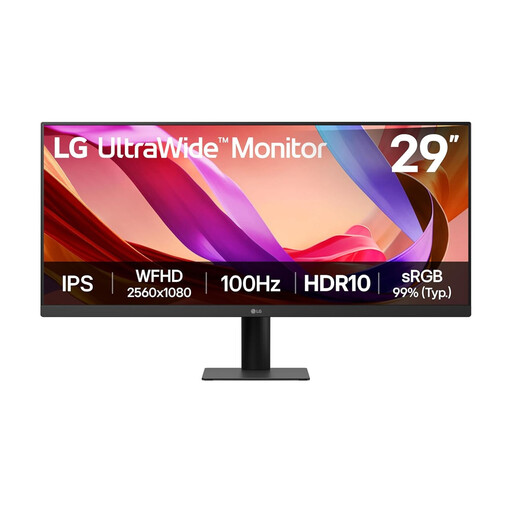
This 29-inch option is for consumers considering a smaller-screen ultrawide for reference artwork. Its fit still depends on the space available for the exact screen and stand.
 No image available
Consider this 29-inch model if a smaller ultrawide screen is your starting point for viewing reference artwork on a shared desk; check its exact stand footprint against your available space.
The listing identifies a 21:9 IPS display with 2560 × 1080 resolution, HDMI and DisplayPort inputs. Check its stated colour features against your artwork workflow rather than assuming they meet a particular calibration requirement.
It may fit, but compare your clear desk width and usable depth with the exact monitor’s dimensions. Dell UK lists the older P3424WE at 81.57 cm wide and 23.74 cm deep with its stand; BenQ lists the PD3420Q at 825.8 mm wide and 244.3 mm deep with its stand. Those are model-specific examples, not dimensions for all 34-inch screens.
Not necessarily: a 29-inch 2560 × 1080 ultrawide is an option when physical space is the priority. Consider a 34-inch 3440 × 1440 model if you have room for it and want more pixels for artwork alongside drawing or editing panels.
Yes, if the particular monitor provides the required functions and your laptop supports the video connection and can use the available charging power. Dell UK and LG UK list up to 90 W USB-C power delivery for the P3425WE and 34WQ75C-B respectively; check your laptop’s requirements and the monitor’s connection specifications.
Confirm the complete model suffix and the specifications of that exact variant. Dimensions, ports, colour features and supplied accessories should be checked for the product you are ordering, rather than transferred from a similarly named monitor.