What to check before buying
Flat 34-inch display
Consider it when: You prefer a flat surface for inspecting linework and want documented display controls. BenQ UK lists CAD/CAM mode and a factory calibration report for the PD3420Q.
Allow for: The PD3420Q measures 825.8 mm wide by 244.3 mm deep with its stand, and its stated USB-C power delivery is 65 W.
Curved 34-inch USB-C display
Consider it when: A compatible laptop, wired network and peripherals are central to your desk setup. Dell UK and LG UK list 3440 × 1440 models with USB-C charging and Ethernet connections.
Allow for: A curved panel is a preference, not a requirement for drawings. Check the exact stand footprint and laptop compatibility; Dell UK labels its P3424WE currently unavailable.
Narrower 29-inch display
Consider it when: Desk width rules out an approximately 82 cm-wide 34-inch chassis. LG UK lists the 29WQ600-W at 688.5 mm wide with its stand.
Allow for: Its 2560 × 1080 resolution leaves less native space for detailed side-by-side documents. LG UK labels this particular model discontinued.
For consumers comparing architectural drawings on a small desk, the deciding constraint may be drawing space, laptop connections or the room available for the screen and stand.
| Concern |
What to check |
Who this matters to |
| Drawing workspace |
Compare native resolution and confirm your computer can output it. BenQ UK, Dell UK and LG UK list 34-inch 3440 × 1440 examples; LG UK lists a 29-inch 2560 × 1080 example. |
If I keep two detailed drawings open, I need enough room to inspect both without repeatedly swapping windows; around 42% of consumers put drawing workspace first. |
| Laptop connections |
Check USB-C video support on your laptop, its charging requirement and the monitor’s power-delivery rating. Confirm the ports needed for your peripherals. |
With a laptop and peripherals on a crowded desk, I want fewer connections to manage; roughly 33% of consumers prioritise laptop integration. |
| Desk fit |
Measure usable width and depth against the exact dimensions with stand, leaving room for cables and input devices. Check whether the screen can sit centrally. |
When the desk is narrow, I would accept less drawing space rather than crowd out the keyboard or sit off-centre; about 25% of consumers make physical fit their primary concern. |
Joybuy products for drawing comparisons
These choices offer two ways to approach a small-desk drawing setup: a 29-inch ultrawide when width is a concern, and a 34-inch UWQHD model when you want to assess a larger drawing workspace. Check each monitor’s full stand dimensions against your desk.
 No image available
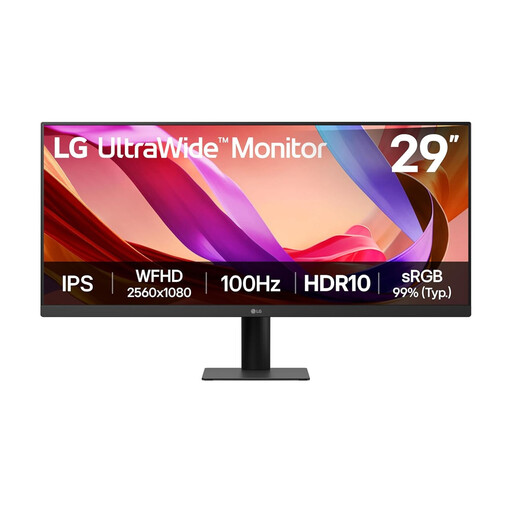
LG UltraWide 29U511A 29-inch 1080p IPS monitor
Consider this narrower format if a larger ultrawide would crowd your desk and you can accept less drawing workspace.
The product title specifies a 100 Hz refresh rate, HDR10, HDMI and DisplayPort. Check the full stand footprint, cable clearance and exact native resolution against your setup.
View on Joybuy
 No image available
Lenovo R34w-30 34-inch UWQHD gaming monitor
Consider this larger ultrawide if keeping drawing material side by side matters more than minimising screen width.
It is a curved model, so it will not suit a preference for a flat drawing surface. Confirm its native resolution and dimensions with stand, then allow space for the keyboard and cables.
View on Joybuy
Common questions
What size and resolution should I start with for comparing architectural drawings?
Start by checking whether your desk can take a 34-inch 3440 × 1440 ultrawide and its stand. BenQ UK, Dell UK and LG UK list models in that format, which provides more native workspace than the 29-inch 2560 × 1080 LG example. If a roughly 82 cm-wide chassis will not fit comfortably, the narrower format is a compromise rather than an equivalent workspace.
Should I choose a flat or curved ultrawide for drawings?
Choose a flat model if you prefer a flat drawing surface and the display controls matter to your work; BenQ UK documents CAD/CAM mode for the flat PD3420Q. A curved model may suit a laptop-led setup when its particular connections meet your needs. Neither panel shape removes the need to check desk fit and your drawing software setup.
Can one USB-C cable replace my laptop charger and dock?
It can do so only when the laptop supports video and charging through the relevant USB-C connection and the monitor supplies enough power and the ports you need. Dell UK and LG UK list up to 90 W power delivery for the P3424WE and 34WQ75C-B respectively; BenQ UK lists 65 W for the PD3420Q. Check your laptop’s requirements and the cable needed for the connection.
How should I position a large ultrawide on a small desk?
Check the monitor’s dimensions with its stand before positioning it directly in front of you, with room for your keyboard and cables. The Health and Safety Executive advises placing the top of the screen around eye level and the screen about an arm’s length away; assess whether your desk allows that position with the model you choose.


