Choose a 34-inch 3440 × 1440 ultrawide if its stand fits your desk and you want more vertical pixels for a report beside your dashboard. If desk width is the tighter constraint, a 29-inch 2560 × 1080 ultrawide retains a 21:9 layout but gives you less vertical room. For a laptop or two-computer setup, check connection and charging compatibility before making docking features part of the decision.
Who needs this workspace?
Space-limited dashboard readers
You need a dashboard and report visible together without crowding out your keyboard or paperwork. Check the exact stand dimensions: Dell UK lists its 34-inch P3424WE at 81.57 cm wide and 23.74 cm deep with stand, while LG UK lists the 29-inch 29WN600 at 688.1 mm wide and 209.4 mm deep with stand.
Single-laptop productivity users
You want a wider workspace and fewer connections across the desk. A model such as LG’s 34WQ75C-B offers USB-C connection and Ethernet, but its usefulness as a laptop hub depends on your laptop and cable.
Two-computer desk workers
You regularly switch between a laptop and another computer. Samsung UK describes the S65TC’s built-in KVM as allowing one keyboard and mouse to control two sources; check how you intend to connect and display both sources.
What matters when choosing?
Measure the usable desk surface first, then decide whether extra report height matters more than a smaller footprint. Consider docking and device switching after those two checks.
| Concern |
What to check |
Who this matters to |
| Desk fit |
Measure usable width and depth against the exact monitor’s with-stand dimensions; allow room for cables and your other desk items. |
If my keyboard and documents must stay on the desk, a screen that only just fits across it will not solve the problem. Around 42% of consumers put physical fit first. |
| Side-by-side workspace |
Compare native 2560 × 1080 and 3440 × 1440 resolution, particularly the vertical pixels available for a report. |
I need to read report content while keeping dashboard controls in view, so losing vertical room would affect my work. Roughly 33% of consumers prioritise this workspace need. |
| Laptop and device connections |
Check the laptop’s video-output mode, the monitor’s charging output and cable requirements; for two computers, check KVM and picture-by-picture functions. |
Switching computers or reconnecting a laptop would interrupt my setup, so the connections need to suit my devices. About 25% of consumers make that workflow their primary concern. |
Mistakes to avoid
-
Choosing by diagonal size alone
Screen size does not tell you how much desk surface the stand occupies. Dell UK lists the P3424WE at 81.57 cm wide and 23.74 cm deep with stand; LG UK lists the 29WN600 at 688.1 mm wide and 209.4 mm deep with stand.
Measure usable width and depth, including space for cables and any monitor-arm clamp, before ordering.
If the stand crowds your working area, fitting a monitor arm or rearranging the desk may become part of the setup.
-
Assuming USB-C means one-cable docking
A USB-C socket alone does not establish that a laptop can send video to the monitor or use its charging and data functions as intended.
Check the laptop’s port specification, the monitor’s manual and the cable required for the connection you want.
Depending on the laptop’s capabilities, you may need a separate video cable, charger or dock.
-
Treating HDR10 as DisplayHDR certification
HDR compatibility is not the same claim as meeting a VESA DisplayHDR performance tier. VESA says only displays meeting its specifications may carry the DisplayHDR logo.
For dashboard and report work, decide on fit, resolution and connections first. If HDR matters for other content, check certification for the exact model.
-
Matching a listing by a similar model name
A Joybuy listing titled Samsung S65UA identifies S65TC in its technical details. Those model names should not be treated as interchangeable.
Compare the complete model code, ports, panel details and applicable warranty information before relying on a listing for a specific variant.
Relevant monitor brands
LG
LG UK describes both compact 29-inch 21:9 monitors and 34-inch 3440 × 1440 models relevant to multi-window work.
- The 34WQ75C-B is specified with USB-C connection, up to 90 W power delivery and Ethernet.
- Features vary by model; check the exact stand dimensions and do not treat an HDR10 label as DisplayHDR certification.
Dell
Dell UK documents 34-inch curved ultrawides with laptop-hub features and adjustable stands.
- Dell specifies the P3424WE at 3440 × 1440 with 90 W USB-C charging and Ethernet; its listed with-stand dimensions give you a concrete footprint to compare with your desk.
- A 34-inch stand still needs substantial width and depth. Confirm availability separately for any model you consider.
Samsung
Samsung UK positions the 34-inch ViewFinity S65TC for connected laptop and two-source workflows.
- Samsung specifies Thunderbolt 4, up to 90 W charging, Ethernet, KVM and picture-by-picture functions for the S65TC.
- Check the full model code when comparing S6 listings: similarly named variants should not be assumed to have identical connections.
Joybuy ultrawides for this desk setup
These monitors include a compact 29-inch option and several 34-inch options for keeping a dashboard beside a report. Compare each one with your usable desk space; treat gaming features or laptop connections as relevant only if they serve your own setup.
 No image available
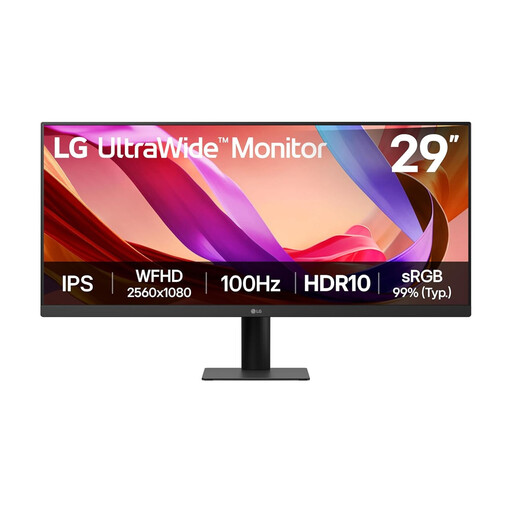
LG UltraWide 29U511A 29-inch IPS monitor
Consider this 29-inch option when desk width takes priority over the extra report height of a 34-inch 3440 × 1440 screen.
The product title states UWFHD 1080p, IPS, 100 Hz, DisplayPort and HDMI. Check its with-stand width and depth against your desk before choosing it.
Joybuy
 No image available
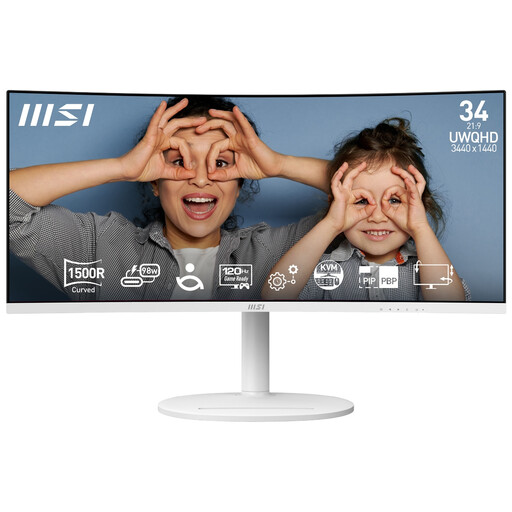
Modern MD342CQPW 34-inch curved monitor, white
Consider this larger screen if you have room for a 34-inch monitor and want a dashboard and report open together.
The product title states 3440 × 1440 resolution, 120 Hz and 1500R curvature. If laptop docking or keyboard-and-mouse switching matters to you, confirm the connections and compatibility for your devices before buying.
Joybuy
 No image available
LG UltraGear 34G630A-B 34-inch VA monitor
Consider this 34-inch ultrawide if its footprint suits your desk and you also want the gaming-oriented features named in its title.
The title specifies a VA panel, WQHD resolution and 240 Hz. Check the stand footprint and the connection requirements of any laptop you plan to use.
Joybuy
 No image available
Lenovo R34w-30 34-inch UWQHD gaming monitor
This is another 34-inch ultrawide to consider when a wider screen fits your dashboard-and-report setup.
Its product title states UWQHD resolution. Check its with-stand width and depth before committing desk space, and verify any connections your workflow requires.
Joybuy
 No image available
Gawfolk 34-inch UWQHD curved gaming monitor
Consider this 21:9 screen for side-by-side windows only after checking that a 34-inch monitor will leave enough working space on your desk.
The title states 165 Hz and 1500R curvature. Check the exact HDMI version for your source device, as the title and detailed port information differ, and confirm the stand footprint before ordering.
Joybuy
Questions about small-desk ultrawides
Do I need a 34-inch ultrawide to view a dashboard beside a report?
No: a 29-inch 2560 × 1080 ultrawide can give you a 21:9 side-by-side layout when desk width is limited. Choose a 34-inch 3440 × 1440 option if its stand fits and the extra vertical pixels matter for your report; check the exact model’s dimensions rather than relying on screen size alone.
Will USB-C carry video, data and laptop charging through one cable?
Only if the monitor, laptop and cable support the required functions. LG UK says its 34WQ75C-B USB-C connection offers display, data and up to 90 W charging with the specified cable; check your laptop’s video-output mode and charging requirements before relying on that arrangement.
Does an HDR10 label mean a monitor is DisplayHDR certified?
No. VESA treats DisplayHDR as a separate certification with defined performance requirements. If HDR performance matters alongside your office work, check whether the exact monitor model carries a VESA DisplayHDR certification rather than relying on an HDR10 label.


