Colour-conscious album proofers
If you review photographs before sharing a proof or approving a design, the display’s stated colour spaces, calibration information and your colour-managed software workflow matter alongside its size.


Choose a 39.7-inch 5120 × 2160 ultrawide if seeing a two-page album spread alongside editing controls is your priority; a 34-inch 3440 × 1440 model offers fewer desktop pixels in a smaller panel. For either size, check that the screen can sit at a suitable height and distance on your standing desk, that your computer can drive it, and that its colour and calibration features meet your proofing workflow.
If you review photographs before sharing a proof or approving a design, the display’s stated colour spaces, calibration information and your colour-managed software workflow matter alongside its size.
If you keep a spread, image browser and layout controls visible while moving between sitting and standing, check whether you can position the whole screen comfortably at both heights. The UK Health and Safety Executive’s display-screen guidance addresses screen position and the wider workstation, not screen size alone.
If you want one connection for the display, charging and peripherals, check your laptop’s supported video output and charging requirement against the exact monitor and cable before planning a single-cable desk.
For album-spread preview at a standing desk, establish the workspace you need, then check screen placement, computer connections and the space the monitor occupies.
| Concern | What to check | Who this matters to |
|---|---|---|
| Spread-viewing space | Compare native resolution and your usual spread-and-tools layout: 5120 × 2160 provides more horizontal and vertical desktop pixels than 3440 × 1440, subject to display scaling and computer output. | If I inspect page relationships with editing panels open, I need enough room to see both without constantly rearranging windows. Around 33% of consumers put spread-viewing space first. |
| Standing-desk fit | Measure desk depth and standing eye height; check the stand’s adjustment range or both the monitor mount and arm’s stated ratings. | When I raise the desk, I need the screen to remain at a workable height and distance rather than choosing by diagonal size alone. This is the first concern for around 27% of consumers. |
| Laptop docking | Check supported external-display modes, USB-C video or Thunderbolt compatibility, cable capability and the laptop’s charging requirement. | If I reconnect my laptop regularly, I want fewer cable changes without giving up the display mode or charging I need. Around 20% of consumers prioritise that connection. |
| Desk footprint | Measure usable width and depth, including the stand base or arm clamp; weigh a smaller 34-inch panel against the workspace available on a larger display. | If desk space is tight, I would rather accommodate a manageable screen than gain pixels I cannot position well. For around 20% of consumers, footprint takes priority. |
HDR10 support does not establish print-matching accuracy. VESA distinguishes its tested DisplayHDR tiers from general HDR claims, while the colour information needed for photographic proofing depends on the exact display and workflow.
Check the model’s stated colour spaces, calibration information and how your software handles colour. If HDR performance matters, check for the specific DisplayHDR certification rather than relying on HDR wording.
A workflow that calls for profiling may also require calibration hardware and time to set it up; LG says the hardware calibrator for its 40WP95CP-W is sold separately.
The UK Health and Safety Executive advises positioning the top of a screen around eye level and placing it about an arm’s length away. A VESA mounting pattern identifies a mounting interface, not whether a particular arm and desk can support the monitor.
Measure standing eye height and available desk depth, then check the screen’s weight, the stand’s range or the arm’s load rating, and the desk-clamp fit.
Depending on the setup, a suitably rated arm or changes to the desk may be needed to achieve the intended position.
A USB-C connector alone does not establish which video mode the computer supports or how much power the monitor can deliver. Published power-delivery figures also differ between the professional displays discussed here.
Check the laptop’s external-display and charging specifications, the monitor’s input and power-delivery rating, and the cable required for the intended connection.
A separate laptop power supply, compatible cable or dock may still be needed.
Lenovo UK showed the ThinkVision P40w-20 as out of stock on 7 October 2026. That does not change its published specifications, but availability can affect which model you can actually buy.
Before ordering, confirm the seller’s current listing and exact model variant, then check its specifications and purchase terms.
These examples illustrate different specifications to check for album-spread review; a brand’s inclusion does not establish that a particular model suits your desk or computer.
Dell UK lists the 39.7-inch UltraSharp U4025QW with a 5120 × 2160 curved IPS Black panel for a high-resolution workstation.
LG UK lists the 39.7-inch 40WP95CP-W with a 5120 × 2160 Nano IPS panel and Thunderbolt 4 connectivity.
BenQ’s 34-inch PD3420Q is a 3440 × 1440 alternative when a smaller panel and its published colour-work features suit the desk better than a 39.7-inch display.
Lenovo’s 39.7-inch ThinkVision P40w-20 provides another 5120 × 2160 specification comparison for a Thunderbolt-oriented workstation.
These 34- and 49-inch ultrawides offer different screen shapes for reviewing spreads. Compare vertical resolution, standing-desk positioning and the colour information needed for your workflow rather than choosing by width alone.
 No image available
Consider this 32:9 screen if a very wide spread-and-tools layout matters to you. The title lists a 49-inch QD-OLED panel and Double Quad HD resolution; check whether its vertical workspace suits your usual page view. Confirm the stand’s height range, desk fit and calibration suitability before using it for standing-desk proofing.
 No image available
Consider this 34-inch option if you want a 3440 × 1440 workspace with listed height, swivel and tilt adjustment. Check the stand’s usable height at your desk and the colour-gamut and calibration information required for your proofing work.
 No image available
Its stated 3440 × 1440 resolution makes this a 34-inch option for viewing an album spread on an ultrawide desktop. Check how the screen can be positioned at standing height, as well as the exact colour and calibration details your workflow needs; the title’s colour-reproduction claim is not an accuracy measurement.
 No image available
The 49-inch 32:9 panel may suit a spread with other windows alongside it, but its 1440-pixel vertical resolution differs from the 2160-pixel professional displays discussed above. The title lists height adjustment while the accompanying product information describes tilt adjustment, so confirm the exact stand before planning a standing setup. Check calibration details separately; the stated 120% sRGB figure does not establish colour accuracy.
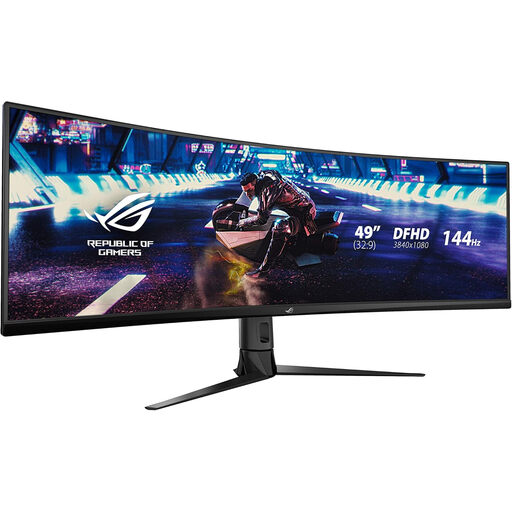 No image available
Consider this wide screen only after checking that its DFHD workspace shows your album pages and tools at a useful scale; the stated 3840 × 1080 resolution has fewer vertical pixels than the 3440 × 1440 and 5120 × 2160 examples. Confirm standing-height positioning, desk fit and calibration suitability for photographic proofing.
No: a 39.7-inch 5120 × 2160 screen gives you more desktop pixels when spread detail and adjacent controls take priority, while a 34-inch 3440 × 1440 screen may be easier to accommodate. Compare your actual application layout, viewing distance and available desk space before choosing.
You need a screen position that works at your standing height and a desk or mount suited to the monitor. The UK Health and Safety Executive advises placing the top of the screen around eye level and the screen about an arm’s length away; also check desk depth, monitor weight and the stand or arm’s adjustment and support ratings.
No: HDR10 support alone does not establish colour accuracy or print matching. Check the exact model’s colour spaces and calibration information alongside your colour-managed software process; VESA’s DisplayHDR certification addresses tested HDR performance tiers, which is a separate question.
Only if the laptop, monitor and cable support the video mode you intend to use and the monitor’s power delivery meets the laptop’s needs. For the models discussed here, BenQ lists 65 W for the PD3420Q, Dell up to 90 W for the U4025QW, LG up to 96 W for the 40WP95CP-W and Lenovo up to 100 W Smart Power for the P40w-20; those monitor ratings do not establish compatibility with your laptop.
The UK Health and Safety Executive says employers must assess the workstation when workers use display screen equipment daily as part of their normal work for continuous periods of an hour or more. The assessment concerns the workstation, job and individual requirements; it does not prescribe a monitor size.