Control window reflections before choosing an ultrawide: the Health and Safety Executive advises positioning a screen so it does not directly face windows or bright lights. For artwork alongside application panels, compare a 39.7-inch 5K2K display if desk space and fine detail matter most, or a more compact 34-inch 3440 × 1440 display if that workspace is sufficient. In either case, check the exact model’s coating and colour specifications rather than relying on brightness or screen size alone.
Who is this for?
Bright-window reference users
If you keep artwork or photographs on screen beside a window, positioning the display to avoid reflections matters before you judge fine detail. The Health and Safety Executive advises arranging the desk and screen to avoid glare.
Colour-managed creative users
If colour decisions affect your design or image work, compare the exact model’s stated sRGB, Rec.709 or P3 coverage and calibration-related features, not just its dimensions.
Single-cable laptop workspace builders
If you want references and work applications on one display, check whether the monitor’s USB-C or Thunderbolt connection meets your laptop’s video-output and charging needs.
What matters when choosing?
For a desk beside a bright window, settle the screen’s position and reflection path first. Then decide how much workspace and which documented colour features your artwork needs.
39.7-inch 5K2K ultrawide
Consider it when: You need room for detailed artwork alongside editing tools and can accommodate a large display. Dell UK lists the U4025QW at 5120 × 2160; LG UK lists the 40WP95CP-W at the same resolution.
Trade-off: The larger screen needs more desk space, and its resolution does not prevent window reflections.
34-inch 3440 × 1440 creative ultrawide
Consider it when: A more compact workspace is enough and you value a documented matte coating and colour modes, as specified for the BenQ PD3420Q by BenQ UK.
Trade-off: It has less native screen resolution than the cited 5K2K models; its stated brightness does not establish readability in direct sunlight.
| Concern |
What to check |
Who this matters to |
| Window reflections |
Check the coating and whether the stand or a compatible mount lets you turn the screen away from reflected light. The Health and Safety Executive also advises adjusting curtains or blinds to prevent intrusive light. |
If the window appears in my screen, I need to change the viewing angle before I can inspect artwork comfortably. Around 42% of consumers put reflection control first. |
| Colour reliability |
Match the exact model’s stated sRGB, Rec.709 or P3 coverage and calibration information to your output workflow. Dell UK, BenQ UK and LG UK publish different specifications for the models discussed here. |
When I compare colours in a design file, I need specifications relevant to where that work will be used. Colour reliability is the primary need for around 33% of consumers. |
| Workspace and laptop connection |
Compare native resolution and physical size, then check your laptop’s supported display output and charging requirement against the monitor’s connection. |
I want a reference image beside my working application without committing to a screen my desk or laptop cannot accommodate. Around 25% of consumers prioritise workspace and connection needs. |
Buying pitfalls
-
Choosing brightness while the screen still faces the window
A reflected window can remain intrusive on a brighter display. The Health and Safety Executive advises arranging the desk and screen to avoid glare or bright reflections.
Check the intended screen position when the room is brightest. See whether turning the display or adjusting curtains or blinds addresses the reflection.
Changing the layout may require a monitor arm, curtains or blinds.
-
Assuming wide gamut means accurate colour in every workflow
Published gamut coverage, colour modes and calibration information differ between models; a gamut figure alone does not establish accuracy for every type of artwork.
Check the exact model’s specifications against your sRGB, Rec.709 or P3 workflow, and use the appropriate display mode.
A colour-managed setup may also involve time spent adjusting settings or obtaining a compatible calibrator.
-
Assuming any USB-C laptop will provide full display output and charging
A USB-C connector alone does not establish which video settings or charging level a laptop and monitor can use together.
Check your laptop’s display-output support, intended resolution and refresh rate, and charging requirement against the monitor and cable.
You may need a compatible cable, dock or separate laptop charger.
Relevant brands to compare
Dell
The UltraSharp U4025QW is a large, high-resolution option for artwork and application panels on one screen.
- Dell UK specifies a 39.7-inch 5120 × 2160 display, with stated 100% sRGB and 99% DCI-P3 coverage.
- Allow room for the display and check its position relative to the window; resolution does not remove reflections.
BenQ
The PD3420Q offers a 34-inch creative-workspace option with a documented matte screen.
- BenQ UK specifies 3440 × 1440 resolution, 100% sRGB, 100% Rec.709 and 98% P3 coverage for this model.
- Its smaller native workspace may be less suitable if you need detailed references and several panels visible at once. A matte coating does not eliminate direct reflections.
LG
The 40WP95CP-W is another 39.7-inch 5K2K option to compare for a large creative workspace.
- LG UK specifies 5120 × 2160 resolution, DCI-P3 98% typical coverage, Thunderbolt 4 and hardware-calibration support.
- Check the exact model suffix and computer compatibility. Its auto-brightness feature does not establish that window reflections will disappear.
Joybuy ultrawide options
These ultrawides offer different screen sizes for keeping artwork beside other applications, including 34-inch and wider 49-inch layouts. For a bright-window desk, check placement and colour requirements against each model rather than treating any display as a substitute for glare control.
 No image available
Acer X Predator X49X 49-inch QD-OLED ultrawide
Consider this wide display if you want reference artwork beside several work panels and have room to position it away from the window.
The stated configuration is 32:9 with a 1800R curve and 240 Hz refresh rate; the title lists HDMI, DisplayPort and USB-C. Check desk fit and how the screen looks in your room’s brightest conditions.
View on Joybuy
 No image available
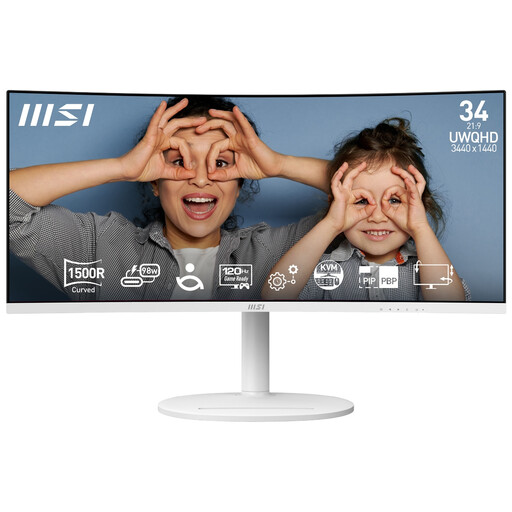
Modern MD342CQPW 34-inch curved monitor, white
This is a more compact ultrawide option when a reference image and working application need to share the screen.
Its stated resolution is 3440 × 1440, with a 120 Hz refresh rate and 1500R curve. If your decisions depend on precise colour, check model-specific calibration information; keep direct window reflections out of the screen.
View on Joybuy
 No image available
LG UltraGear 34GX900A-B 34-inch OLED monitor
Consider this 34-inch ultrawide if its screen size suits your reference-and-application layout and you can manage how long static artwork stays displayed.
The product name states a 240 Hz refresh rate. The listed OLED burn-in risk matters for extended static-image use: use the screen-protection features, and assess window reflections at the intended desk position.
View on Joybuy
 No image available
CRUA 49-inch 5120 × 1440 curved ultrawide
The broad 32:9 canvas may suit references beside work applications if your desk can accommodate its width.
The product name specifies a 1500R VA panel and 165 Hz refresh rate. For window-side, colour-critical work, check the screen coating and calibration information for this exact model before deciding.
View on Joybuy
Frequently asked questions
Will a brighter ultrawide solve glare from a nearby window?
Not reliably on its own. The Health and Safety Executive advises positioning the desk and screen to avoid glare or bright reflections, often by not facing windows or bright lights directly. Address the reflection path before using a brightness specification to compare displays.
Is 5K2K worth choosing over a 34-inch ultrawide for reference artwork?
A 39.7-inch 5120 × 2160 display is worth considering when you need more room for fine references alongside application panels and have space for it. A 34-inch 3440 × 1440 display may be enough for a smaller workspace; compare the exact models’ colour specifications and remember that neither resolution controls window reflections.
What should I check before connecting a laptop with one cable?
Check that the laptop can output the monitor’s intended resolution and refresh rate through the relevant USB-C or Thunderbolt port, and compare its charging requirement with the monitor’s stated power delivery. For example, Dell UK specifies up to 90 W USB-C power delivery for the U4025QW, while BenQ UK specifies 65 W for the PD3420Q.


