For a mobile viewport, DevTools and reference material on one computer, start with a 39.7- to 40-inch 5K2K display: the 5120 × 2160 models cited by Dell UK and LG UK offer more vertical pixels than Dell UK’s 5120 × 1440 49-inch example. A 49-inch 32:9 display makes more sense when two broad desktop areas are the priority, but check the exact model for picture-by-picture if those areas must come from separate computers. Neither layout replaces a final menu check on a real phone.
Who is this for?
Front-end developers checking responsive navigation
Keep a mobile-sized browser viewport beside DevTools and implementation or design material. Chrome for Developers describes Device Mode as an approximation, so use the desktop layout to inspect changes, not to sign off the phone interaction.
Two-computer QA and review users
If a test machine and a second computer must appear together, check for picture-by-picture on the exact monitor. Sharing a keyboard and mouse is a separate question: Lenovo lists eKVM on the ThinkVision P40w-20, but that feature should not be assumed on other ultrawides.
Long-session workers planning one large display
A single wide screen still needs room to sit directly in front of you. The Health and Safety Executive advises placing the screen roughly an arm’s length away, with its top around eye level; check desk depth and stand or arm placement before choosing a size.
What matters when choosing?
39.7- to 40-inch 5K2K, 21:9
Choose when: One computer needs to show the mobile viewport, DevTools and supporting work together; Dell UK and LG UK each specify a 5120 × 2160 model in this format.
Trade-off: This is a continuous wide desktop, not two separate full-width screens. Check your computer’s output capability before planning to use the panel at its intended settings.
49-inch Dual QHD, 32:9
Choose when: Two broad side-by-side work areas matter more, particularly if the exact model can show two computer inputs; Dell UK lists picture-by-picture on the U4924DW.
Trade-off: Dell UK specifies the U4924DW at 5120 × 1440, leaving fewer vertical pixels than its 5120 × 2160 U4025QW. A 49-inch diagonal alone does not establish two-input support.
| Concern |
What to check |
Who this matters to |
| Viewport and tool space |
Compare native resolution and test whether your browser, DevTools and reference windows fit at your intended scaling. |
If I’m inspecting a mobile menu on one computer, I need enough height for the viewport while keeping my tools visible. Around 42% of consumers put that working space first. |
| Two computer inputs |
For separate computers, confirm the exact model’s picture-by-picture input combinations and any keyboard-and-mouse switching. |
When I’m comparing work from two computers, arranging windows on one machine will not show both sources. About 33% of consumers primarily need that two-source setup. |
| Desk fit and docking |
Measure desk depth and stand clearance; check laptop video output and charging requirements against the monitor’s connections. |
I’ll be at this desk for long sessions, so central screen placement and a workable laptop connection come before extra width. Roughly 25% of consumers prioritise those practical setup needs. |
Mistakes to avoid
-
Treating desktop emulation as a final phone test
Chrome for Developers says Device Mode approximates the mobile experience; it does not run the page on mobile hardware.
Use the ultrawide to inspect layouts and breakpoints, then check the menu interaction on a real phone before release.
-
Assuming two windows and two inputs need the same features
Two browser windows from one computer need desktop space. Two physical computers also need a way to display both inputs; picture-by-picture and KVM functions vary by model.
Identify your video sources, then check the exact monitor’s split-mode and keyboard-and-mouse switching arrangements.
-
Choosing width before checking the desk
A screen that cannot be placed centrally at a comfortable distance may be awkward to use. The Health and Safety Executive advises a position directly in front of the user, roughly an arm’s length away.
Measure usable desk depth as well as width, including space for the stand or a monitor arm.
Positioning the display appropriately may require a monitor arm, a deeper desk or another workstation adjustment.
-
Using diagonal size as a measure of viewport height
Dell UK specifies the 49-inch U4924DW at 5120 × 1440 and the 40-inch U4025QW at 5120 × 2160. The wider example therefore has fewer vertical pixels.
Compare native resolutions and try your intended window layout rather than choosing by diagonal size alone.
Brands to consider for these workflows
Dell UltraSharp
Dell UK lists distinct UltraSharp formats for a taller continuous workspace and a wider two-panel arrangement.
- The U4025QW is specified at 5120 × 2160 with a height-adjustable stand, USB hub and up to 140W EPR power delivery.
- The U4924DW is specified at 5120 × 1440 with Picture-by-Picture and Picture-in-Picture.
- Check features by model: the U4924DW’s input modes and the U4025QW’s resolution do not describe every UltraSharp display.
LG UltraWide
LG UK specifies the 39.7-inch 40WP95CP-W as a 5120 × 2160 option with Thunderbolt 4 connectivity.
- The listed connections include Thunderbolt 4, USB 3.0, HDMI and DisplayPort, with up to 96W laptop charging.
- Confirm that your computer supports the display output and charging arrangement you intend to use.
Lenovo ThinkVision
Lenovo UK specifies the P40w-20 for a 21:9, two-computer setup that needs explicit switching features.
- The P40w-20 combines a 5120 × 2160 IPS panel with True Split picture-by-picture, eKVM and two Thunderbolt 4 ports.
- Check current availability and the input arrangement required for your two computers before planning around this model.
Joybuy ultrawide options
These choices cover a 34-inch workspace for windows from one computer and 49-inch options for broad side-by-side layouts. If you need to show two computers, confirm the exact model’s input and split-screen functions before buying.
 No image available
Acer X Predator X49X 49-inch QD-OLED monitor
Consider its wide panel if you want two broad work areas, but check how much vertical room your mobile viewport and tools need.
Listed configuration: 49-inch, 32:9, QD-OLED, 1800R curve and 240Hz.
If you need two physical computer inputs, confirm the supported split-screen combinations and keyboard-and-mouse switching for this model.
Joybuy
 No image available
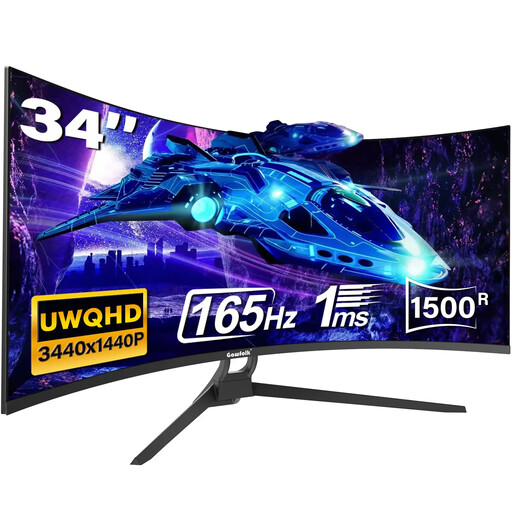
Gawfolk 34-inch UWQHD curved monitor
Consider this 21:9 format when one computer needs a continuous space for a browser and supporting windows; check whether the available viewport height suits your layout.
Listed configuration: 34-inch, UWQHD, 1500R curve and 165Hz.
The title mentions Type-C; confirm its video, data and charging capabilities if your setup depends on them. Check picture-by-picture separately if you need two computers on screen.
Joybuy
 No image available
CRUA 49-inch curved DQHD monitor, black
Its wide format suits a planned side-by-side desktop layout if 1440 vertical pixels leave enough room for your mobile viewport and tools.
Listed configuration: 5120 × 1440, 32:9, 1500R curve and 165Hz, with two HDMI 2.1 and two DisplayPort 1.4 connections.
Check picture-by-picture if separate computers must appear together. Also confirm the stand’s height-adjustment range and that the display will fit your desk.
Joybuy
Common questions
Is a 49-inch ultrawide better for checking two screens?
Not automatically: a 49-inch 32:9 display suits two broad desktop areas, while the 5120 × 2160 40-inch Dell UK example has more vertical pixels for a mobile viewport and DevTools than its 5120 × 1440 49-inch example. If “two screens” means two computers, check picture-by-picture on the exact model.
Can Chrome Device Mode replace a check on a real phone?
No. Chrome for Developers describes Device Mode as an approximation rather than a test running on mobile hardware. Use it to inspect viewport layouts, then check the menu’s final interaction on a real device.
Will one USB-C or Thunderbolt cable handle video, peripherals and charging?
Only if the laptop’s output, the monitor’s connections and its power delivery meet your requirements. LG UK specifies Thunderbolt 4 and up to 96W charging for the 40WP95CP-W; Dell UK lists up to 140W EPR power delivery for the U4025QW. Check the exact host and monitor combination before relying on a one-cable setup.
How much desk space should I allow for a large ultrawide?
Allow enough width and depth to put the screen directly in front of you at a suitable viewing distance, as well as space for its stand or arm. The Health and Safety Executive advises roughly an arm’s-length distance and placing the top of the screen around eye level; measure your actual workstation before choosing the display size.


