A 34-inch-class WQHD ultrawide is worth considering when recipe sources, index fields and notes need to stay visible together, provided its stand and screen fit the shared desk. Prioritise a built-in KVM switch if two computers must share one keyboard and mouse; if one laptop is normally connected, check USB-C video and charging compatibility instead. For regular work, screen choice is only part of arranging a suitable workstation.
Who this setup suits
Recipe researchers using one laptop
If you move between recipe sources, a spreadsheet or CMS and reference material, a wide display can give those windows room alongside each other. For a laptop-led setup, check USB-C video, charging requirements and stand adjustment rather than assuming every USB-C monitor offers the same connections.
People alternating between two computers
If the desk changes between computers but keeps one keyboard and mouse, look for a built-in KVM switch and confirm how both systems connect. Samsung describes this function on its ViewFinity S65UC; USB-C charging alone does not establish that a monitor can switch peripherals.
People building an index over long work sessions
Screen position, available desk space and input-device placement matter alongside display size. The UK Health and Safety Executive advises considering the whole workstation, including furniture, lighting and the work being done.
What to check before buying
Decide whether the shared desk chiefly needs two-computer switching or a convenient connection for one laptop. Then check the working layout and how each person can position the screen.
| Concern |
What to check |
Who this matters to |
| Switching computers |
Confirm a built-in KVM, both video connections and the USB arrangement for the keyboard and mouse. |
If I alternate between two computers, I want to keep using the same keyboard and mouse without reconnecting them. Roughly 36% of consumers put that switching need first. |
| Laptop docking |
Check the laptop’s USB-C video support and charging requirement against the exact monitor’s power delivery and ports. |
When I bring one laptop to the desk, fewer separate connections make it easier to settle in and start indexing. Around 27% of consumers chiefly want that docking arrangement. |
| Parallel workspace |
Consider a 3440 × 1440 display and whether your browser and index tools remain usable side by side. |
I need to refer to a recipe source while entering its details, rather than repeatedly changing windows. Approximately 27% of consumers make that working layout their primary concern. |
| Desk fit and adjustment |
Measure usable width and depth, including room for the stand and input devices; check the adjustments each user needs. |
At a desk used by more than one person, I need to reposition the screen without crowding the rest of the workspace. Roughly 10% of consumers put desk fit and adjustment first. |
Shared-desk buying pitfalls
-
Assuming every USB-C connection handles the whole desk
A USB-C socket does not, by itself, establish video output, suitable laptop charging, Ethernet or keyboard-and-mouse switching. BenQ explains that USB-C monitor video commonly uses DisplayPort Alt Mode.
Check the laptop’s video and power requirements against the exact monitor’s USB-C functions, then check hub, network and KVM functions separately.
-
Choosing screen width before measuring the desk
A wide screen still needs space for its stand, keyboard and mouse, and a position that works for each user. The Health and Safety Executive’s workstation guidance considers equipment and furniture together with working conditions and tasks.
Measure clear desk width and depth, and check the stand’s adjustment options before choosing a model.
-
Treating specialist features as essential to indexing
Conferencing hardware, high refresh rates and colour-management tools serve different tasks; they do not resolve a mismatch in desk fit or device connections.
Identify the recipe-index workflow’s required display, docking or switching functions first, then consider specialist features only if you will use them.
Relevant brands to consider
Samsung
The ViewFinity S65UC is relevant when two computers need to share a keyboard and mouse.
- Samsung’s UK business specifications describe a built-in KVM, USB-C and LAN on the 34-inch S65UC.
- Confirm the exact model code and connection arrangement; KVM does not settle whether the screen fits the desk.
LG
The 34BA75QE-B is an option to examine for a laptop connection and adjustable screen position.
- LG specifies a 34-inch 3440 × 1440 curved IPS display, USB-C power delivery up to 90 W, RJ45 and tilt, height and swivel adjustment.
- Check the laptop’s charging needs and any required switching function; those specifications do not establish a built-in KVM.
Dell
Dell’s Pro ultrawides are relevant when laptop charging and wired networking matter at the desk.
- Dell specifies a 34.1-inch WQHD screen, USB-C power delivery up to 90 W and RJ45 Ethernet for the P3425WE.
- Check the precise model’s connections and whether conferencing features on other Pro variants serve your work.
AOC
The CU34E4CV is worth examining for a 34-inch WQHD display with USB-C docking.
- AOC specifies USB-C docking and 90 W power delivery for the CU34E4CV.
- Check its exact ports, stand adjustment and any switching function needed for two computers.
BenQ
The PD creative-display range is relevant when recipe-index work is paired with a defined colour-management or Mac workflow.
- BenQ describes USB-C, HDMI, DisplayPort, a USB hub and KVM setup capability for the PD3420Q.
- Check how its specialist workflow features apply to your devices rather than treating them as requirements for data entry.
Ultrawide monitors on Joybuy
These 34-inch-class choices cover wide recipe-index workspaces, with different considerations for two-computer switching, laptop connections and screen adjustment. Match each model’s connections to your devices and measure its footprint for the shared desk.
 No image available
Modern MD342CQPW 34-inch curved monitor, white
Consider this model if the shared desk needs a built-in KVM to use one keyboard and mouse with two computers. Its 3440 × 1440, 21:9 display provides space to arrange recipe sources beside index fields; the listing also describes USB-C video with power delivery up to 98 W.
Confirm how both computers connect to the KVM, whether the power delivery suits your laptop and whether the monitor and stand fit the desk.
View on Joybuy
 No image available
LG UltraGear 34GX900A-B 34-inch OLED monitor
This 3440 × 1440 ultrawide suits a side-by-side recipe-source and index layout when a compatible laptop is the usual device. Its listed USB-C connection offers power delivery up to 65 W, so compare that rating with the laptop’s needs.
The listing cautions that the OLED screen can be susceptible to burn-in. Consider its panel-protection guidance if static recipe pages or index fields will remain on screen for long periods, and check the stand’s desk footprint.
View on Joybuy
 No image available
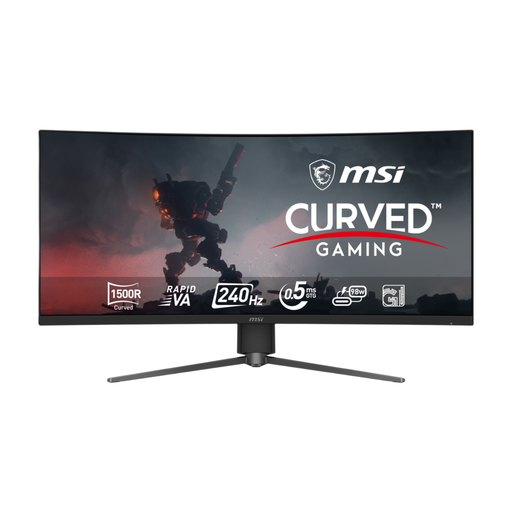
MSI MPG 346CQRF X24 34-inch curved monitor
Its 3440 × 1440 workspace suits parallel recipe references and index fields, while the listed USB-C DisplayPort Alt Mode connection and power delivery up to 98 W may suit a compatible laptop. The listing also describes height, tilt and swivel adjustment.
Check the laptop’s video and charging requirements, the desk footprint and any KVM or Ethernet function you require before relying on this model for a shared-device setup.
View on Joybuy
 No image available
LG UltraGear 34G630A-B 34-inch VA monitor
This 3440 × 1440, 21:9 display is an option when a wide indexing layout and repositioning the screen between users matter most. The listing describes height, tilt and swivel adjustment.
Its stated 15 W USB-C power delivery needs checking against your laptop’s charging requirement. If two computers must share a keyboard and mouse, also confirm the required switching connections; measure the stand and available desk space.
View on Joybuy
 No image available
Philips Evnia 6000 34M2C6500 34-inch monitor
Its listed 3440 × 1440 workspace suits keeping recipe sources alongside index work. Height, swivel and tilt adjustment may help users reposition the screen at the shared desk.
Check the desk footprint and the exact model’s connections. If you need laptop charging or keyboard-and-mouse switching, confirm those functions before choosing it.
View on Joybuy
Common questions
Is a 34-inch ultrawide a sensible size for recipe-index work?
It can be if you want recipe sources and index fields visible together and the screen fits your desk. Several of the models discussed here have a 3440 × 1440 display; check whether your browser and indexing tool remain comfortable in the window sizes you plan to use.
Does a shared desk need a KVM switch?
A built-in KVM is useful when two computers need to use the same keyboard and mouse, but it is not essential if people simply take turns connecting one laptop. Samsung specifies a KVM on the ViewFinity S65UC; check the video inputs and USB connections required for both computers on any model you consider.
Will a USB-C monitor cable work with any laptop?
Not necessarily: the laptop port must support the video connection the monitor uses, and the monitor’s power delivery must suit the laptop if you expect it to charge. BenQ explains that USB-C monitor video commonly uses DisplayPort Alt Mode, so check the laptop and exact monitor specifications together.
When does a shared work desk need a workstation assessment?
The UK Health and Safety Executive says employers must carry out a workstation assessment when workers use display screen equipment daily as part of normal work, continuously for an hour or more. Its guidance considers the equipment, furniture, work conditions and task; that condition does not mean every private monitor purchase requires a formal employer assessment.


