Choose a USB-C or Thunderbolt ultrawide that can charge your laptop only after checking that the laptop supports video over that connection and can operate adequately at the monitor’s stated charging output. The monitor still needs a mains socket. For close render inspection, a 40-inch 5120 × 2160 screen offers more pixel area than a 34-inch 3440 × 1440 model; the smaller option may suit a tighter desk or a preference for a flat panel, depending on the exact model.
Who this is for
Laptop users seeking a single-cable desk
If sockets are scarce, you may want the monitor to carry video and data while charging a compatible laptop. Check the laptop’s display output and charging requirements rather than assuming every USB-C connection does all three jobs.
Colour-conscious 3D artists
If you judge materials and lighting on screen, compare the exact model’s stated colour-space coverage, modes and calibration options. Manufacturer colour specifications do not replace a colour-managed workflow.
Render reviewers with limited desk space
One ultrawide can provide room for a render and its tools, but its width, stand and viewing position must fit the desk. Compare the dimensions and mounting options of the exact model before choosing a larger screen.
What matters when choosing
40-inch 5K2K
Consider it when: Fine render detail and room for adjacent tools matter most, and your desk can accommodate a large screen.
Trade-off: The larger screen needs more physical space; laptop charging over its display cable still depends on compatibility and adequate power delivery.
38-inch WQHD+
Consider it when: You want more vertical workspace than a 3440 × 1440 screen without choosing 5120 × 2160 resolution. Dell UK lists the U3824DW at 3840 × 1600.
Trade-off: It has fewer pixels than the named 5K2K models and still needs its own mains socket.
34-inch WQHD
Consider it when: A smaller physical screen is more important than maximum pixel area; BenQ’s flat PD3420Q is one option if you also prefer an uncurved panel.
Trade-off: 3440 × 1440 gives you fewer pixels than 5K2K, and the PD3420Q’s stated 65W charging output may not meet every laptop’s needs.
| Concern | What to check | Who this matters to |
|---|
| Single-cable connection |
Confirm laptop video output and USB-C charging support, then compare its power requirements with the monitor’s output and check the cable. |
I want to leave the laptop charger unplugged at a desk with few sockets, without losing my display or peripheral connections. Around 31% of consumers would put that single-cable need first. |
| Colour confidence |
Compare stated colour-space coverage, available modes and calibration support for the exact model; check whether calibration hardware is included. |
When reviewing materials and lighting, I need to know which colour space my screen is set up to show. Colour handling would be the primary concern for roughly 25% of consumers. |
| Render workspace |
Compare native resolutions and confirm the computer and connection support the display mode you intend to use. |
I need enough room to inspect a render while keeping reference images or controls visible. About 25% of consumers would prioritise that screen workspace. |
| Desk fit |
Measure available width and depth, stand footprint and viewing distance; check mounting and adjustment options. |
A wide panel is only useful to me if I can position it comfortably alongside the rest of my equipment. Desk fit would come first for around 19% of consumers. |
Buying pitfalls
-
Assuming USB-C will replace the laptop charger
A monitor’s charging output may be insufficient for a particular laptop, especially during demanding work. A USB-C connector alone does not establish video or charging compatibility.
Check the laptop manufacturer’s display and charging requirements against the exact monitor’s connection and Power Delivery specifications. Allow for the monitor’s own mains lead.
-
Equating wide colour coverage with an accurate workflow
A stated gamut does not establish that the monitor is set to the right colour space or calibrated for the work you are reviewing.
Choose the project’s working colour space, then check the monitor’s modes, calibration documentation and compatible hardware.
LG says a hardware calibrator is sold separately for the 40WP95CP-W.
-
Choosing by diagonal size without measuring the desk
A large curved screen may leave too little room for a comfortable viewing position, stand, keyboard or graphics tablet.
Measure desk width and depth, and check the exact model’s stand footprint, adjustment range and mounting requirements.
-
Using screen size as a shortcut for electricity use
Size alone does not provide a like-for-like basis for comparing models’ energy information.
Compare the exact models’ UK energy labels and product information sheets under the same intended use. GOV.UK identifies electronic displays as within the scope of energy labelling.
Brands to consider for this setup
Dell
Dell’s named UltraSharp hub models offer several screen sizes for a laptop-centred desk.
- Dell UK specifies 5120 × 2160 resolution and Power Delivery up to 90W for the U4025QW; its U3425WE is a 3440 × 1440 alternative with up to 90W Power Delivery.
- Check the chosen model’s physical dimensions and whether its charging output meets your laptop’s requirements.
LG
LG’s 40WP95CP-W is a large, high-resolution ultrawide with Thunderbolt connectivity.
- LG UK lists 5120 × 2160 resolution, DCI-P3 coverage of 98% typical and laptop charging up to 96W for the 40WP95CP-W.
- LG says a hardware calibrator is sold separately. Check the full model suffix when comparing listings.
BenQ
BenQ’s flat PD3420Q focuses on documented colour modes and calibration information in a 34-inch format.
- BenQ lists 3440 × 1440 resolution, 100% sRGB and Rec.709 coverage, 98% P3 coverage and a factory calibration report for the PD3420Q.
- Its stated 65W USB-C Power Delivery and pixel area need to be weighed against your laptop requirements and render-detail needs.
Joybuy product choices for render review
These ultrawides offer 34-inch and 49-inch single-screen options. Choose by the render detail you need to inspect, the space available on your desk and whether the exact monitor and laptop can support your intended cable setup.
 Image unavailable
Acer X Predator X49X 49-inch curved QD-OLED monitor
Consider this 32:9 screen if you want a particularly wide space for a render and adjacent tools. Its stated features include a 1800R curve and 240Hz refresh rate; check its native resolution against the detail you need to inspect, as well as desk dimensions and mount capacity.
Before relying on one cable instead of a laptop charger, confirm the laptop’s video and charging support against the exact monitor listing.
View on Joybuy
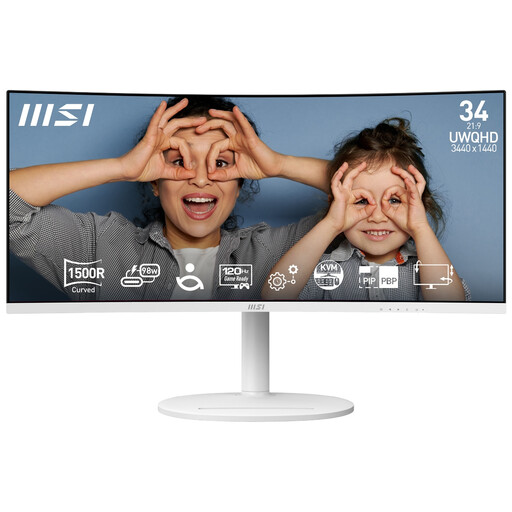 Image unavailable
Modern MD342CQPW 34-inch curved monitor, white
This 3440 × 1440 screen is a 34-inch option for viewing a render alongside tools. It has a stated 1500R curve and 120Hz refresh rate; decide whether its pixel area meets your inspection needs rather than treating screen width as a substitute for resolution.
If colour-critical review or one-cable laptop charging matters, check the exact listing’s colour modes and connection details against your workflow and laptop. Measure the space available for its stand.
View on Joybuy
 Image unavailable
LG UltraGear 34GX900A-B 34-inch OLED monitor
This 34-inch WQHD ultrawide is an option for a single-screen render workspace, with a stated 240Hz refresh rate. Check whether its resolution and colour modes suit the detail and colour decisions you need to review.
If you plan to leave static render tools on screen for extended periods, account for the listing’s OLED burn-in warning and use its screen-protection features. Confirm laptop display and charging compatibility before relying on one cable.
View on Joybuy
Questions and answers
Can an ultrawide free up the socket used by my laptop charger?
It can, if the laptop accepts charging and sends video through the relevant connection, and the monitor delivers enough power for that laptop and workload. The monitor itself still needs a mains socket; compare the laptop manufacturer’s charging requirements with the exact monitor’s output.
Is a USB-C connector enough for a one-cable setup?
No. Check whether the laptop supports the required display connection, such as DisplayPort Alt Mode or Thunderbolt, as well as USB-C charging. Confirm the monitor’s data and charging capabilities and the cable specification too.
How should I compare monitor electricity use?
Compare the exact models’ UK energy labels and product information sheets rather than assuming a smaller screen uses less electricity. GOV.UK identifies electronic displays as products within the scope of energy labelling; use the same usage assumptions when comparing models.
What should I do with an old monitor?
Check an appropriate local electrical-equipment collection or retailer take-back option rather than putting the monitor in ordinary household waste. The UK Waste Electrical and Electronic Equipment Regulations cover producer obligations and equipment marking; collection arrangements depend on the route available to you.


