For a drawing canvas and references side by side, a 40-inch 5K2K ultrawide is worth considering when canvas height matters: Dell UK and LG UK specify 5120 × 2160 resolution for the U4025QW and 40U990A-W. A 49-inch Dual QHD screen favours horizontal room but has 1440 vertical pixels, while a 34-inch ultrawide is a smaller-screen route if its colour features and workspace meet your needs. Check your computer’s display output, the monitor’s connections and your desk fit before choosing.
Who these displays suit
Illustrators keeping references beside a canvas
If you want artwork, reference images and tool panels visible together, compare both screen width and vertical resolution. The 5120 × 2160 formats specified by Dell UK and LG UK are relevant when retaining canvas height is important.
Creative users with colour-sensitive work
If colour-space documentation and calibration options affect your work, assess those features on the exact model rather than choosing by width alone. BenQ UK, for example, specifies sRGB and P3 coverage for the PD3420Q; stated coverage does not itself guarantee colour matching.
Laptop users managing several windows
If drawing software, references and messages share your desktop, a wide display can give each a place. For a one-cable setup, check that the specific monitor, laptop and cable support the video signal and charging you require.
What matters when choosing
For drawing with references in view, decide whether canvas height or room for more windows matters most, then assess colour requirements and whether the display will work at your desk.
40-inch 5K2K ultrawide
Choose when: You want references alongside a drawing canvas while retaining 2160 vertical pixels, as specified for Dell’s U4025QW and LG’s 40U990A-W.
Consider: The large screen needs suitable desk space, and your computer must support the display mode you intend to use.
49-inch Dual QHD ultrawide
Choose when: Broad horizontal placement for drawing tools, references and other windows matters more than canvas height; Samsung’s S95UC represents this format.
Consider: Dual QHD has 1440 vertical pixels, and a 49-inch display needs enough desk width and viewing distance.
34-inch ultrawide
Choose when: You prefer a smaller screen and want to compare model-specific creative features, such as the colour spaces BenQ UK specifies for the PD3420Q.
Consider: The PD3420Q’s 3440 × 1440 resolution gives you less vertical canvas space than a 5120 × 2160 display; colour coverage alone does not establish colour matching.
| Concern | What to check | Who this matters to |
|---|
| Canvas and reference space |
Compare native resolution and your planned window layout, particularly 2160 versus 1440 vertical pixels. |
If I keep artwork, references and tools open together, I need enough height for the canvas rather than width alone; around 50% of consumers put usable workspace first. |
| Colour for illustration |
Check the exact model’s stated colour spaces and, for colour-critical work, its calibration options and your software workflow. |
For artwork shared or reviewed across devices, I want documented colour features I can use in my workflow; roughly 30% of consumers put colour documentation and calibration first. |
| Connections and desk fit |
Confirm the computer’s video output, any required USB-C power delivery and cable capability, plus desk depth and stand or mount fit. |
When I draw from a laptop at a fixed desk, the display must connect as intended and sit at a usable distance; around 20% of consumers put connection and desk fit first. |
Buying pitfalls
-
Judging workspace by diagonal size alone
A 49-inch Dual QHD screen offers considerable width but has 1440 vertical pixels; Dell UK and LG UK specify 2160 vertical pixels for their cited 5K2K models. The difference matters if the drawing canvas needs more height.
Sketch out your intended canvas-and-reference layout and compare native resolutions before choosing a screen size.
-
Assuming every USB-C connection handles video and charging
Connector shape does not establish which display mode or power-delivery functions a laptop, monitor and cable can use together. Samsung Business UK specifies USB-C charging up to 90 W for the S95UC, subject to the connected laptop’s requirements.
Check the exact monitor input, laptop video output, charging requirement and cable specification before ordering.
A separate charger, suitable cable or dock may be needed if the intended one-cable arrangement is incompatible.
-
Reading colour coverage as a colour-matching promise
A stated gamut describes a model specification, not the result of your entire drawing and delivery workflow. Calibration and software colour management also matter.
Use published sRGB or P3 figures to narrow the choice, then check calibration support and the applications you use for colour-critical work.
-
Overlooking where a large screen will sit
A wide display may be difficult to position on a shallow desk. The Health and Safety Executive advises placing the top of the screen at eye level and the screen about an arm’s length away.
Measure desk width and depth, check the stand footprint and confirm mounting compatibility if you plan to use an arm.
Achieving a usable position may require a suitable monitor arm or changes to the workstation.
Relevant brands for reference
Dell
Dell UK’s UltraSharp U4025QW is a reference point for the large, high-resolution creator-and-productivity route.
- Dell UK specifies a 39.7-inch 5120 × 2160 IPS Black Thunderbolt hub monitor with a 120 Hz refresh rate.
- Check the space available for this screen and whether your computer supports the connection and display mode you want.
LG
LG UK documents 5K2K ultrawides including the UltraFine 40U990A-W and the distinct 40WP95CP-W.
- LG UK specifies a 5120 × 2160 Nano IPS screen and Thunderbolt 5 for the 40U990A-W; it lists hardware calibration for the 40WP95CP-W.
- Check the complete model suffix: LG UK identifies the similarly named 40WP95C-W as discontinued.
BenQ
BenQ UK’s PD3420Q illustrates a 34-inch ultrawide with documented colour-space specifications.
- BenQ UK specifies a 3440 × 1440 IPS display with 100% sRGB and 98% P3 coverage for the PD3420Q.
- Its 1440 vertical pixels do not provide the canvas height of the cited 5K2K models; stated gamut coverage is not a guarantee of colour matching.
Samsung
Samsung Business UK’s S95UC represents the 49-inch Dual QHD route for placing many windows across a wide display.
- Samsung Business UK specifies DisplayPort, two HDMI inputs and USB-C charging up to 90 W for the S95UC.
- Its Dual QHD format has 1440 vertical pixels, and its large curved screen calls for a careful desk-fit check.
Joybuy monitor choices
These monitors offer 49-inch or 34-inch ultrawide layouts for keeping drawing and reference windows in view. Compare their stated resolutions and features against the 40-inch 5K2K route discussed above; the products here do not represent that route.
 Image unavailable
Acer Predator X49X 49-inch QD-OLED ultrawide monitor
Consider this 32:9 Dual QHD screen if placing several windows across the display matters more than retaining the vertical canvas space of a 5K2K model.
The product name specifies a 1800R curve and 240 Hz refresh rate. Check your computer and cable for the display mode you intend to use, and measure the available desk space.
Joybuy
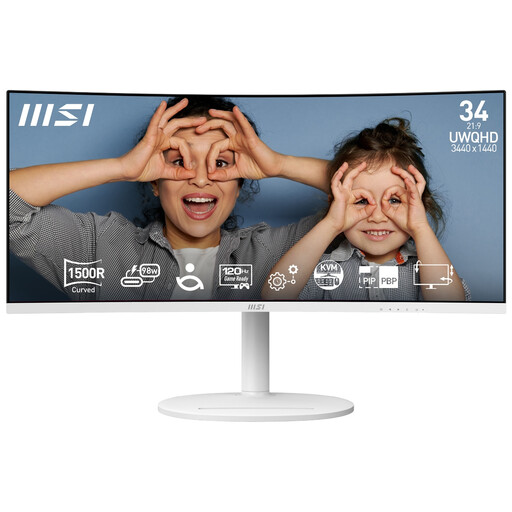 Image unavailable
Modern MD342CQPW 34-inch curved monitor, white
Its 3440 × 1440 workspace is a 34-inch option for arranging a drawing window beside references.
The product name specifies a 1500R curve and 120 Hz refresh rate. Check desk fit and confirm the display connection and any laptop-charging requirement before purchase.
Joybuy
 Image unavailable
LG UltraGear 34GX900A-B 34-inch OLED monitor
This 34-inch ultrawide is worth assessing if you want drawing and reference windows together and are considering an OLED screen.
The product name specifies WQHD and 240 Hz. Its listing warns that the OLED screen is susceptible to burn-in, so consider how long static drawing-tool panels will remain on screen and check the stated screen-protection features.
Joybuy
 Image unavailable
CRUA 49-inch curved Dual QHD monitor
Its 5120 × 1440, 32:9 layout suits a wide arrangement of drawing tools and references if 1440 vertical pixels leave enough canvas height for you.
The product name specifies a 165 Hz VA panel and 75 × 75 mm VESA mounting. Check that your desk or chosen mount can accommodate the large screen; the listing advises using at least two people to move it.
Joybuy
 Image unavailable
Lepow HC-SJ34MZ5 34-inch curved ultrawide monitor
The stated 3440 × 1440 resolution makes this a 34-inch option to consider for drawing with a reference window alongside it.
The product name specifies a 165 Hz refresh rate. If colour matching is central to your work, check the exact model’s colour-space and calibration information before choosing it.
Joybuy
Common questions
Is a 49-inch Dual QHD monitor better for drawing than a 40-inch 5K2K model?
Not if vertical canvas space is your priority. Samsung Business UK identifies the S95UC as a 49-inch Dual QHD display, a format with 1440 vertical pixels, while Dell UK and LG UK specify 5120 × 2160 for the U4025QW and 40U990A-W. Compare your intended window layout rather than relying on diagonal size.
How much desk space should I allow for a large ultrawide?
Measure the screen and stand footprint against your usable desk width and depth before ordering. The Health and Safety Executive advises placing the top of the screen at eye level and the screen about an arm’s length away; check whether the supplied stand or a compatible arm lets you achieve that position.
Can one USB-C or Thunderbolt cable run the display and charge my laptop?
Yes, but only when the particular monitor, laptop and cable support the required video and power functions. Samsung Business UK specifies USB-C charging up to 90 W for the S95UC; compare the exact monitor input and cable specification with your laptop’s display output and charging requirements.
What should I check about monitor safety and disposal?
For a monitor intended for Great Britain, check the exact product documentation with the seller and ask about electrical-equipment collection or take-back when the monitor reaches end of life. GOV.UK sets out requirements for electrical equipment placed on the Great Britain market and provides guidance on waste electrical and electronic equipment; do not assume a particular marking or collection service from a product name alone.


