What to check when choosing
For an event-calendar desk with limited sockets, decide which requirement would determine your choice first: laptop charging, room for timelines, two-computer control or artwork specifications.
| Concern |
What to check |
Who this matters to |
| Laptop-charger socket |
Check the laptop’s USB-C video and charging support against the monitor’s power-delivery rating; confirm the required cable. |
If I have few sockets, I want the monitor connection to charge my laptop as well as show the calendar. Around 36% of consumers would put freeing the laptop-charger socket first. |
| Calendar workspace |
Check native resolution, desk clearance and stand adjustment; confirm your laptop can output the chosen resolution. |
Long timelines and planning documents are easier for me to organise when I can keep more of them in view. Around 29% of consumers would make workspace their primary concern. |
| Two-computer control |
Check for a built-in KVM, the connections both computers need and Picture-by-Picture if both displays must remain visible. |
When I move between an office computer and a laptop, I want to avoid a second keyboard and mouse. For around 21% of consumers, two-computer control would come first. |
| Event artwork |
Check the exact model’s panel and documented colour coverage; consider how artwork will be checked on other output devices. |
If I also prepare sponsor graphics, I need colour specifications I can assess rather than choosing by screen width alone. Around 14% of consumers would prioritise artwork requirements. |
Relevant brands to consider
These examples refer to specific monitor lines and models, not to every ultrawide made by each brand.
LG
LG UK presents the curved IPS 34BA75QE as a 34-inch WQHD ultrawide with USB-C power delivery, RJ45, speakers, KVM and Picture-by-Picture.
- Its stated 90W USB-C power delivery is relevant to a compatible laptop-led desk, while KVM and Picture-by-Picture address two-device work.
- Check laptop compatibility, desk dimensions and the exact model and bundle before planning around those features.
Dell
Dell UK lists the Pro 34 Plus USB-C Hub Monitor P3425WE as a 34.1-inch WQHD IPS ultrawide with RJ45 Ethernet and up to 90W USB-C power delivery.
- Its listed connections address laptop charging and wired networking at a workstation.
- Confirm that your laptop supports the required USB-C video and charging functions, and check the cable arrangement you need.
ASUS ProArt
ASUS UK lists the ProArt Display PA34VCNV as a 34.1-inch WQHD IPS monitor with 96W USB-C power delivery, RJ45 and stated colour specifications for creative work.
- ASUS lists 100% sRGB and Rec.709 coverage and a Delta E below 2 for this model, making its specifications worth examining when calendar work includes event artwork.
- Its stated maximum refresh rate is 60Hz; colour specifications alone do not ensure a match with a printer, projector or another display.
Samsung ViewFinity
Samsung Business UK presents the 34-inch ViewFinity S65UC with a 21:9 screen, USB-C connectivity, LAN and a built-in KVM switch.
- The documented KVM is relevant when two computers need to share a keyboard and mouse.
- Check the exact variant’s connections and charging specification rather than assuming other ViewFinity monitors have the same arrangement.
Joybuy products for this setup
These ultrawide options offer different screen sizes for event-calendar work. Decide how much desk space you can give the monitor, then check the exact USB-C connection against your laptop before relying on it to reduce socket use.
 No image available
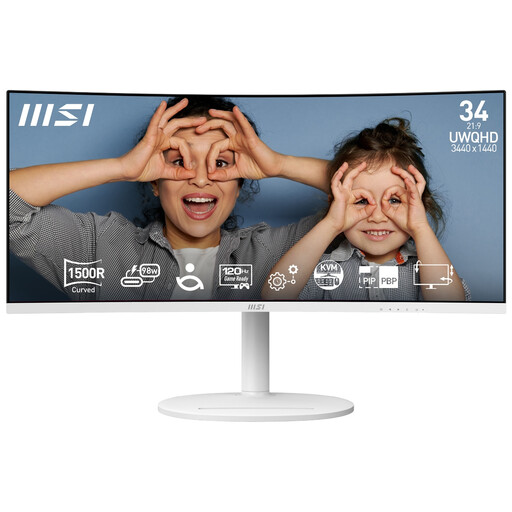
Modern MD342CQPW 34-inch Curved Monitor, White
Consider this 34-inch option if you want a wide screen for arranging event-calendar timelines.
The named variant has 3440 × 1440 resolution, a 1500R curve and a 120Hz refresh rate.
Before planning to use one cable, check USB-C video and charging compatibility with your laptop, cable inclusion and the monitor’s dimensions. The monitor still needs a mains socket.
View on Joybuy
 No image available
Acer X Predator X49X 49-inch QD-OLED Monitor
Consider this wider format if your calendar and two-computer workflow warrant it, but measure the available desk space before choosing it over a 34-inch screen.
The named variant is 49 inches with a 32:9 aspect ratio, QD-OLED panel, 1800R curve and 240Hz refresh rate.
Check the KVM and display connections your computers require, along with laptop USB-C charging compatibility and cable inclusion. The monitor still needs a mains socket.
View on Joybuy
Common questions
Will a USB-C ultrawide free up a plug socket?
It can free the socket used by your laptop’s separate charger if the laptop supports USB-C video and charging and the monitor supplies enough power. The monitor still needs its own mains connection; LG UK, for example, lists AC input and a power cord for the 34WR55QC-B.
What should I check before relying on one USB-C cable?
Check your laptop’s USB-C display output and charging specifications, then compare its charging requirement with the monitor’s stated power-delivery limit. ASUS UK lists USB-C DisplayPort Alt Mode and 96W power delivery for the PA34VCNV, but the connector shape alone does not establish that your laptop supports the same setup.
When is a built-in KVM useful for event planning?
A KVM is useful when you regularly work on two computers and want them to share one keyboard and mouse. Samsung Business UK documents this function for the ViewFinity S65UC; check that both of your computers can make the display and USB connections the chosen monitor requires.
Does UK electrical-equipment guidance cover every part of the UK in the same way?
No. GOV.UK guidance from the Office for Product Safety and Standards describes the Electrical Equipment (Safety) Regulations 2016 requirements for equipment placed on the Great Britain market; Northern Ireland has different arrangements. Check the rules applicable to where the monitor is supplied and the documentation for the exact product rather than treating the Great Britain guidance as a UK-wide conclusion.


