Colour-reference creative workers
If artwork, photography or brand assets stay visible while you work, the exact monitor's stated colour coverage and calibration information matter more than width alone.


For reference artwork beside your working windows, look for an ultrawide with enough desk space and colour documentation that matches how you use the artwork. If spare sockets are the tighter constraint, prioritise a USB-C display connection with sufficient laptop charging power; confirm that your laptop supports both functions before expecting one monitor cable to replace its charger and display connection.
If artwork, photography or brand assets stay visible while you work, the exact monitor's stated colour coverage and calibration information matter more than width alone.
If your laptop supports the required USB-C functions, a monitor that carries its display signal and charging—and connects needed peripherals—may reduce separate desk connections.
A broad ultrawide can keep reference artwork beside creative software and communication windows without adding a second powered display. Desk fit still needs checking.
Decide whether colour decisions, fewer laptop connections or side-by-side workspace will determine your choice, then check the relevant specifications on the exact model.
| Concern | What to check | Who this matters to |
|---|---|---|
| Colour reference | Check coverage for the colour spaces you use, plus any calibration report and its stated measurement conditions. | When I use artwork to judge colours, screen width alone cannot tell me whether the display fits my workflow. Around 36% of consumers put colour-reference information first. |
| Laptop connections | Confirm USB-C video support, the monitor's Power Delivery limit and any required cable or hub ports. | With few sockets free, I want to avoid a separate laptop charger or dock where my devices allow it. Roughly 36% of consumers make fewer connections their primary concern. |
| Single-screen space | Check native resolution, desk width and stand depth; consider Picture-by-Picture if you need two input sources. | I need reference artwork visible beside my active application without setting up another monitor. Around 28% of consumers prioritise that single-screen workspace. |
USB-C on the monitor is not enough on its own: the laptop must support video over USB-C and accept the available charging power. The monitors discussed here have different stated Power Delivery limits.
Compare the laptop's video and charging requirements with the exact monitor's specifications, and check its cable requirements. LG says the supplied USB-C cable is required for the stated operation of the 34WQ75C-B.
If those requirements do not match, you may still need the laptop charger or a separate dock.
A wide desktop helps keep artwork visible, but model-specific colour coverage and calibration information are separate considerations when that artwork guides colour decisions.
Compare the colour spaces your work uses with the exact model's published figures and calibration documentation; do not substitute diagonal size or curvature for those checks.
Product features do not establish current availability or the terms that will apply to an order.
Check availability, seller details, delivery coverage, warranty information and any optional cover before committing to a particular listing.
A 34-inch-class ultrawide also needs room for its stand. BenQ lists the PD3420Q at approximately 825.8 mm wide with a stand depth of 244.3 mm.
Measure usable desk width and depth, then check the dimensions and adjustment range of the model and stand you intend to use.
A stand that does not fit may require a different desk arrangement or a suitable monitor arm.
The PD3420Q is a creative-focused 34-inch ultrawide with published colour specifications and USB-C connectivity.
The P3425WE and UltraSharp U3425WE represent Dell's 34.1-inch WQHD IPS hub-monitor options.
The 34WQ75C-B combines a 34-inch 3440 × 1440 IPS screen with USB-C and RJ45 connectivity.
The L340WQ-HAS listing describes a 34-inch curved VA WQHD monitor with USB-C charging and Picture-by-Picture.
These ultrawides offer different amounts of single-screen space for keeping artwork beside other windows. Check laptop USB-C compatibility, colour documentation and desk fit for the model you are considering.
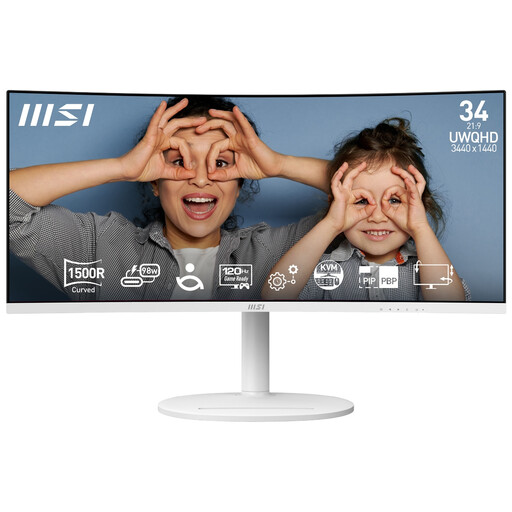 Image unavailable
For artwork beside active windows, this model has a stated 34-inch, 3440 × 1440 ultrawide screen. Its title also specifies a 1500R curve and 120 Hz refresh rate.
Before planning a single-cable laptop setup, confirm USB-C video and charging compatibility. If the artwork informs colour decisions, check the colour-measurement and calibration documentation for this exact model.
 Image unavailable
For a particularly broad single-screen workspace, this model's title specifies a 49-inch, 32:9 Double Quad HD display with an 1800R curve and 240 Hz refresh rate.
Check that your desk or mount accommodates the panel before choosing it. Confirm USB-C video and charging compatibility with your laptop, and review colour documentation if the screen will be used to judge artwork colours.
It can when your laptop supports video and charging over USB-C and the monitor supplies enough power for your use. LG states that the 34WQ75C-B supports display, data and up to 90 W charging over its USB-C connection; check your laptop's requirements and the specified cable before relying on that arrangement.
A 3440 × 1440 ultrawide provides a broad desktop on which to arrange artwork beside an application. That resolution does not establish colour suitability, so check the exact monitor's colour specifications if you use the artwork to make colour decisions.
Compare coverage for the colour spaces your work uses, together with any calibration report and its measurement conditions. BenQ publishes sRGB, Rec.709 and P3 figures and an average Delta E figure for the PD3420Q; LG publishes 99% sRGB coverage (typ.) for the 34WQ75C-B. These are specifications for those individual models.
Use an appropriate electrical-equipment recycling or take-back route rather than ordinary household waste. GOV.UK sets out the UK waste electrical and electronic equipment framework, while local arrangements vary; check your council's accepted items and collection options. The London Borough of Brent, for example, lists monitors among equipment accepted for electrical recycling.