Small-desk browser QA testers
You want the filter form, search results and browser tools in view, but still need room for a keyboard and test devices. Measure the available width and depth before deciding that a 34-inch screen belongs on the desk.


Choose a 29-inch ultrawide when desk clearance matters more than fitting every testing window on screen at once; consider a 34-inch 3440 × 1440 model when its screen and stand fit and you need more room for filters, results and browser tools. If you also switch between computers, check laptop video compatibility and look for an explicit KVM feature when one keyboard and mouse must serve both devices.
You want the filter form, search results and browser tools in view, but still need room for a keyboard and test devices. Measure the available width and depth before deciding that a 34-inch screen belongs on the desk.
You may want fewer cables between a laptop and the monitor, with charging, networking or USB peripherals available where the particular monitor and laptop support them. Check the laptop’s display output and charging requirements before relying on a USB-C connection.
You compare outputs from two computers or move between test machines. Picture-by-Picture can display two sources, whereas sharing a keyboard and mouse requires a monitor with a suitable KVM feature.
Start with the space the monitor and stand can occupy, then decide how much screen workspace the filter test needs. Treat laptop docking and two-computer control as separate requirements.
| Concern | What to check | Who this matters to |
|---|---|---|
| Desk fit | Measure usable width, stand depth and the space needed in front for a keyboard. Compare those measurements with the exact model’s dimensions with stand. | On a shallow desk, I need the screen to leave working room for my keyboard and test device. Roughly 46% of consumers put desk fit first. |
| Visible workspace | Compare native 2560 × 1080 and 3440 × 1440 resolution against the windows and tools you need to read together. | When checking a filter change, I want to see the controls and results without covering one with the other. Around 36% of consumers make visible workspace their primary concern. |
| Laptop and device connections | Check the laptop’s required USB-C video mode and charging needs; confirm an explicit KVM feature if peripherals must switch between computers. | If I move between two test machines, I need to know whether my display connection and keyboard-and-mouse setup will work with both. About 18% of consumers prioritise these connections. |
A screen’s diagonal does not tell you how much desk width its panel needs or how far its stand extends towards the keyboard. LG lists its 34WL75C at 814 mm wide and 250.8 mm deep with stand, compared with 688.1 mm and 209.4 mm for the 29WN600-W.
Measure your usable desk area and check the dimensions with stand for the exact model you intend to buy.
A USB-C connector alone does not establish that the laptop can send video to the monitor or receive enough power through it.
Check the laptop’s supported display mode and charging requirement against the monitor’s stated USB-C video and power-delivery specifications. AOC specifies DisplayPort Alt Mode for the CU34V5C/BK’s USB-C video connection.
Showing two computer outputs on one screen does not, by itself, mean a connected keyboard and mouse can control both.
If you need to share those peripherals between test machines, check that the exact monitor model explicitly lists KVM functionality.
Refresh rate and gaming-focused features do not tell you whether the filter panel, results and tools will fit legibly or whether the stand will fit the desk.
Check physical dimensions, native resolution and the connections your testing workflow needs before weighing features aimed at other uses.
The P3425WE is a 34.1-inch option to examine for a laptop-centred testing desk.
LG’s ultrawide examples show why physical size and resolution need to be considered together.
The CU34V5C/BK is a 34-inch route to examine when a wider workspace and USB-C laptop connection both matter.
Its ultrawide models are worth comparing when screen positioning or switching between computers is important.
These models cover a smaller 29-inch ultrawide and several 34-inch options for viewing browser work side by side. Compare each screen’s footprint and connections with your desk and test devices; the list itself does not establish which one will fit your workspace.
 No image available
Consider this model if you want room for filter controls and results and plan to check a two-computer workflow.
Its product name specifies 3440 × 1440 resolution, 120 Hz and 1500R curvature. Confirm the dimensions with stand against your usable desk space, and check your laptop’s USB-C video and charging requirements before relying on a docking setup.
 No image available
This 34-inch ultrawide is an option to assess when you need space for multiple browser windows and can accommodate its stand.
The product name specifies WQHD resolution and 240 Hz. For prolonged static browser screens, check the stated OLED care and screen-protection guidance; also confirm desk clearance and any laptop-charging requirements.
 No image available
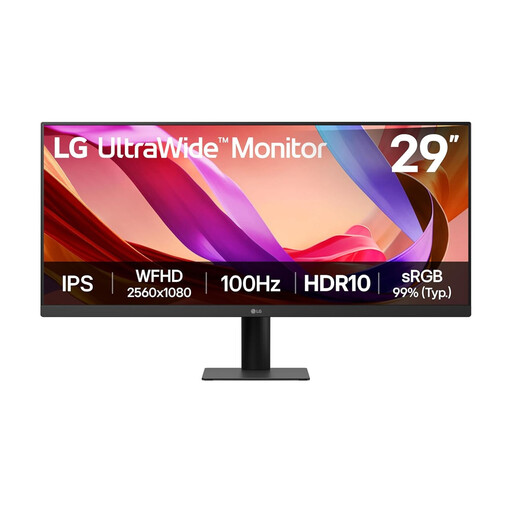
Consider the smaller screen route when preserving physical desk space matters more than maximum room for simultaneous browser tools.
The product name specifies UWFHD 1080p, 100 Hz, HDMI and DisplayPort. Check whether its workspace suits your filter-and-results layout, and confirm its exact width and depth with stand before buying.
 No image available
This is a 34-inch option for a wider browser-testing layout if the screen and stand leave sufficient working room.
The product name specifies UWQHD resolution. Confirm its dimensions with stand and check the exact connections if laptop docking or KVM switching is part of your setup.
 No image available
Assess this model if a 34-inch workspace suits your filter-testing layout and its footprint works on your desk.
The product name specifies 3440 × 1440 resolution, HDMI and DisplayPort inputs, and height, swivel and tilt adjustment. Confirm the dimensions with stand; check the exact model’s connections separately if you need USB-C docking or KVM switching.
It might, but you need the exact monitor’s dimensions and your usable desk measurements to decide. LG lists its 34WL75C at 814 mm wide and 250.8 mm deep with stand; leave room for your keyboard and test devices as well as the monitor.
Only if the laptop supports the monitor’s required video mode and the monitor’s power delivery meets the laptop’s charging needs. AOC specifies DisplayPort Alt Mode for video on its CU34V5C/BK, so check the laptop’s port specification rather than relying on the connector shape.
No. Picture-by-Picture shows two sources at once; a KVM also allows a keyboard and mouse to control two connected computers. Samsung describes a built-in KVM for its ViewFinity S65VC, but check that feature on whichever exact model you choose.
Yes, it can apply to workers who work at home permanently or long term, or routinely divide their working time between home and another workplace, according to the Health and Safety Executive. Ask your employer about assessing your workstation; monitor size alone does not determine whether your particular desk arrangement is suitable.