What to check before buying
For contact-form work on a small desk, establish whether the monitor can be positioned comfortably before deciding how much screen workspace or connectivity you need.
| Concern |
What to check |
Who this matters to |
| Desk fit and positioning |
Measure usable width and depth, then compare the exact monitor dimensions with its stand. Leave room to position the keyboard and screen comfortably. |
If my desk is shallow or narrow, a screen that merely fits may still leave me sitting awkwardly. Around 42% of consumers with this primary need put desk fit and positioning first. |
| Editor and preview space |
Compare native resolution and physical size; consider how much text and how many windows you need visible at your normal viewing distance. |
Keeping my form editor and browser preview alongside each other matters more to me than minimising screen width. For around 33% of consumers, that workspace is the primary concern. |
| Laptop and device connections |
Check USB-C video compatibility and charging power against your laptop; check for a KVM only if you switch between two computers. |
I want fewer connections on a cramped desk, or I need to share controls between computers. Connectivity comes first for around 25% of consumers with this need. |
Joybuy product choices
These ultrawides cover a compact 29-inch route and several 34-inch options for keeping a contact-form editor and preview on one screen. Choose by desk fit and required connections rather than treating screen size alone as the answer.
 No image available
Modern MD342CQPW 34-inch curved monitor, white
Consider this 34-inch model if you want an editor and preview visible together and have room for a wide display. Its title specifies 3440 × 1440 resolution, 120 Hz and 1500R curvature.
Measure the available desk space before ordering. If laptop docking is important, check the laptop’s video and charging requirements against this exact model.
View on Joybuy
 No image available
LG UltraGear 34G630A-B 34-inch VA monitor
This 34-inch WQHD model is an option for working with a form editor and preview on one screen. Its title specifies a VA panel and 240 Hz refresh rate.
Check stand fit and keyboard space on your desk. If you need the monitor to charge a laptop, confirm that its connection and charging capability meet the laptop’s requirements.
View on Joybuy
 No image available
LG UltraGear 34GX900A-B 34-inch OLED monitor
This 34-inch WQHD option gives you a wide format for the editor and preview; its title specifies an OLED panel and 240 Hz refresh rate.
Measure the stand area as well as the screen width. The product information warns of burn-in with static images displayed for extended periods, which matters if a form editor stays on screen for long sessions. Check the model’s screen-protection guidance and your laptop’s connection requirements.
View on Joybuy
 No image available
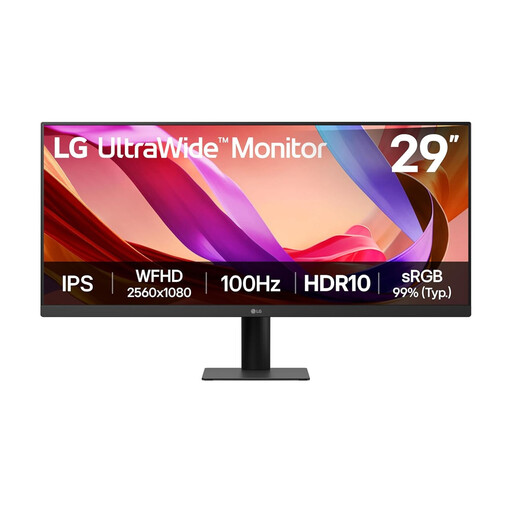
LG UltraWide 29U511A 29-inch IPS monitor
Consider this smaller ultrawide when desk width matters more than having as much workspace as a 34-inch option. Its title specifies a 1080p IPS display, 100 Hz refresh rate, DisplayPort and HDMI.
Check that its full setup leaves a comfortable viewing position. If you want laptop video or charging over USB-C, confirm the exact connections before choosing it.
View on Joybuy
 No image available
Lenovo R34w-30 34-inch UWQHD monitor
This 34-inch UWQHD option suits a desk where a wide editor-and-preview arrangement can fit comfortably.
Compare its complete dimensions with your usable desk area before buying. If laptop docking matters, check the exact port configuration and your laptop’s compatibility.
View on Joybuy
Common questions
How much desk space should I allow for an ultrawide monitor?
Allow for the exact model’s full width and stand depth, plus room for your keyboard, cables and viewing position. For comparison, LG lists the 29WQ600-W at 688.5 mm wide and 223.8 mm deep with its stand, while BenQ lists the PD3420Q at 825.8 mm wide and 244.3 mm deep. Neither measurement is a universal minimum for its screen size.
Should I choose 3440 × 1440 or 2560 × 1080 for contact-form layout?
Choose 3440 × 1440 when the desk accommodates a suitable 34-inch monitor and you want more room for an editor, preview and reference content. A compact 29-inch, 2560 × 1080 route makes more sense when limiting physical width takes priority and you can accept less pixel workspace.
Will a USB-C ultrawide both display video and charge my laptop?
It can do both only when the exact monitor, laptop and connection support the required video mode and charging power. For example, LG specifies up to 90 W USB-C power delivery for the 34WQ75C-B, while BenQ specifies 65 W for the PD3420Q; check your laptop’s requirements rather than relying on the presence of a USB-C socket.
Does a contact-form layout need a flat rather than curved screen?
No particular panel shape is required for laying out a contact form. A flat screen may suit your preference when judging straight lines, but that is a personal selection criterion, not evidence that a curved monitor cannot be used for this work. Check the format alongside desk fit, resolution and the connections you need.


