Who is this setup for?

Album designers reviewing whole spreads

If you need to judge two landscape pages together while keeping thumbnails and editing controls in view, a continuous canvas avoids placing a bezel between the pages. Dell and LG each document 5120 × 2160 ultrawide models relevant to this layout.

Photographers preparing printed albums

Screen space is only part of the decision when you are checking colour for print. Compare the exact monitor’s colour specifications, then calibrate the display and use the intended output profile for soft-proofing; Adobe describes this profile-based preview in Photoshop.

Editors who keep another workspace open

If your layout sits beside folders, retouching tools or client references, decide whether those windows should share one screen or occupy a separately positioned display. The computer’s supported display arrangement and connections matter in either setup.

What matters when choosing?

One 39.7–40-inch 5K2K ultrawide

Choose it when: you want the spread and adjacent controls on one uninterrupted 5120 × 2160 canvas, as offered by the Dell U4025QW and LG 40U990A-W.

Trade-off: the large panel needs suitable desk space and a computer connection that can drive its native resolution.

One 34-inch 3440 × 1440 ultrawide

Choose it when: a smaller single screen suits your desk and you can work with less vertical pixel space; BenQ documents the PD3420Q at this resolution.

Trade-off: fitting the pages, thumbnails and toolbars together may require more compromises in viewing scale than on a 5120 × 2160 display.

Two separate displays

Choose them when: independently positioning a proofing screen and a tools or reference screen matters more than an uninterrupted spread.

Trade-off: a spread crossing both panels meets a bezel, and the computer must support the intended dual-display arrangement.

Concern What to check Who this matters to
Spread workspace Compare native resolution and usable screen dimensions; check desk fit and whether the computer can drive that resolution. I want to inspect both pages without losing room for thumbnails and controls. Around 42% of consumers would put a seamless spread workspace first.
Print-colour review Check the exact model’s colour modes and calibration options, then obtain the intended printer or output profile. When approving an album for print, I need a colour-managed preview rather than relying on screen size alone. For roughly 33% of consumers, print-colour confidence would be the primary need.
Connections and layout Confirm the computer, dock and cable support the intended display setup; check power delivery if needed. I need my laptop and second workspace to work together without changing the way I arrange my tools. About 25% of consumers would prioritise connection and workspace flexibility.

Mistakes to avoid

  • Choosing by screen width alone

    A 34-inch 3440 × 1440 ultrawide and a 5120 × 2160 ultrawide leave different amounts of vertical pixel space for album pages and controls.

    Compare native resolutions alongside physical dimensions, and use the display’s recommended resolution where possible; Microsoft notes that lower-than-native settings can make text less sharp.

  • Assuming a colour specification completes the print workflow

    A monitor’s stated gamut does not account for the album printer, paper or application’s output settings.

    Check the exact model’s calibration options and soft-proof using the intended output profile before approving colour-critical spreads.

    LG states that the hardware calibrator for its 40WP95CP-W is sold separately.

  • Assuming a USB-C or Thunderbolt port settles compatibility

    The computer, dock and cable also affect the resolution and display arrangement you can use. Dell notes that display daisy-chaining requires Thunderbolt and that some M-series chips may not support certain features.

    Check the whole connection path before ordering, then confirm native resolution, scaling and screen arrangement after setup.

Brands to consider for this setup

Dell

Dell UK lists the UltraSharp U4025QW as a 39.7-inch, 5120 × 2160 ultrawide with USB-C hub connectivity and up to 90 W power delivery.

  • For this model, Dell specifies 100% sRGB, 99% DCI-P3/Display P3 and average Delta E below 2.
  • Check desk fit, computer support and your calibration workflow before treating those specifications as a solution for printed-album review.

LG

LG UK documents the 40-inch 40U990A-W at 5120 × 2160 with Thunderbolt 5. Its separate 39.7-inch 40WP95CP-W is also a documented 5K2K ultrawide.

  • LG specifies 98% DCI-P3 and hardware-calibration readiness for the 40WP95CP-W.
  • LG says that model’s hardware calibrator is sold separately; check specifications against the exact LG model you intend to buy.

BenQ

The 34-inch PD3420Q is a smaller colour-focused ultrawide with a documented 3440 × 1440 resolution and PIP/PBP support.

  • BenQ specifies 100% sRGB, 100% Rec.709, 98% P3, average Delta E at or below 3 and a calibration report for the PD3420Q.
  • Its 1440 vertical pixels leave less pixel space for pages and controls than the documented 2160-pixel-high 5K2K models.

Ultrawide monitors on Joybuy

These 34-inch and 49-inch ultrawides are options for putting a spread and other windows on one screen. Compare their stated formats with the vertical workspace you need; colour-critical print review also calls for a suitable calibration and proofing workflow.

Acer X Predator X49X 49-inch curved ultrawide monitor

Acer X Predator X49X 49-inch QD-OLED ultrawide

Consider its continuous 32:9 screen if keeping a spread and other windows together matters to you.

The listed variant is curved and has a 240 Hz refresh rate and USB-C among its connections. Check the resolution your computer can deliver, desk fit and the colour workflow needed for print review.

View on Joybuy

CRUA 49-inch curved ultrawide monitor

CRUA 49-inch curved ultrawide, 5120 × 1440

Its wide 32:9 canvas may suit a spread alongside other windows, provided you can work with 1440 vertical pixels.

The title specifies a 165 Hz VA panel, two HDMI 2.1 inputs and two DisplayPort 1.4 inputs. Check that your desk or mount can accommodate the screen, and assess calibration needs separately from its stated colour coverage.

View on Joybuy

Lepow HC-SJ34MZ5 34-inch ultrawide monitor

Lepow HC-SJ34MZ5 34-inch ultrawide, 3440 × 1440

Consider this smaller ultrawide if a broad canvas is useful and you can allow for less vertical pixel space than a 5120 × 2160 screen.

The title specifies a curved display and 165 Hz refresh rate. Check the intended connection and colour-calibration path before choosing it for print-critical work.

View on Joybuy

Gawfolk 34-inch UWQHD curved ultrawide monitor

Gawfolk 34-inch UWQHD curved ultrawide, 165 Hz

The 21:9 format gives you a single wide screen for arranging an album spread beside tools.

The title specifies a 1500R curve, HDMI 2.1, DisplayPort 1.4 and Type-C. Its colour-coverage figures conflict across the listing, so confirm the exact specification and calibration options before using it for print review.

View on Joybuy
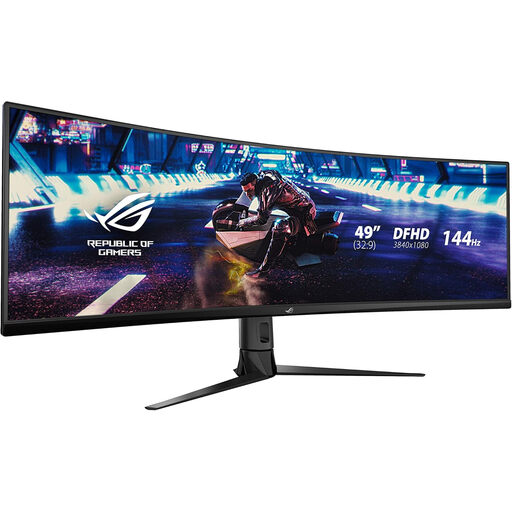
ASUS ROG STRIX XG49VQ DFHD curved ultrawide monitor

ASUS ROG STRIX XG49VQ DFHD curved ultrawide, 144 Hz

This 49-inch option suits consumers considering a very wide screen for side-by-side windows, but its DFHD format calls for particular attention to available vertical workspace.

Check whether the page detail and controls you need fit comfortably, as well as desk placement, computer connectivity and your print-colour workflow.

View on Joybuy

Common questions

Is a 3440 × 1440 ultrawide enough to preview an album spread?

It can be enough if the pages and controls remain readable at your preferred viewing scale, but it gives you less vertical pixel space than a 5120 × 2160 display. BenQ documents the PD3420Q at 3440 × 1440, while Dell and LG document 5120 × 2160 alternatives; compare the page layout you actually use rather than width alone.

Will wide colour coverage make my printed album match the screen?

No: a monitor’s gamut specification does not cover the printer, paper and output profile. Calibrate or profile the display as appropriate, and use the intended output profile for soft-proofing; Adobe describes profile-based soft-proofing in Photoshop.

Can one ultrawide replace two displays for album work?

One ultrawide can provide a continuous spread with room for other windows, but it cannot give you two independently positioned physical panels. If separate screen placement is important, check that your computer, dock and cables support both displays; Microsoft documents how detected displays can be arranged in Windows.