Colour-managed render reviewers
You check renders against a defined web, Rec.709 or P3 delivery target. Documented colour modes, gamut coverage and calibration information matter more to you than panel size alone.


Choose by the colour space of the render you need to judge, then decide how much room you need for the preview and your 3D tools. A 34-inch, 3440 × 1440 model takes less desk space; a 39.7-inch, 5120 × 2160 model offers more screen space but needs a larger workstation and a compatible connection. Neither size settles colour accuracy or acoustic suitability: check the display mode, software colour management and audible behaviour against your requirements.
You check renders against a defined web, Rec.709 or P3 delivery target. Documented colour modes, gamut coverage and calibration information matter more to you than panel size alone.
You want a render preview, application panels and references visible on one ultrawide screen, without a join between two monitors.
You need to fit and position a display in a study while managing reflections, lighting and cables. If audible operation is a strict requirement, check it for the exact model before buying.
Set the render’s delivery colour space first, then weigh screen space against desk fit and connection requirements.
| Concern | What to check | Who this matters to |
|---|---|---|
| Colour workflow | Match a documented display mode to the delivery colour space; check calibration information and colour management in your render viewer. | If I am judging a web or video render, I need to see it in the intended colour space rather than assume a wider gamut will help. Around 45% of consumers would put that colour-workflow need first. |
| Workspace and fit | Compare resolution and physical dimensions, including the stand; confirm the computer’s video connection and charging needs. | With a preview, controls and references open together, I want enough screen space without crowding my desk. For around 33% of consumers, that workspace-and-fit decision would be the primary concern. |
| Study setup | Check screen finish, stand adjustment and placement under your study lighting; confirm audible behaviour if silence matters. | For longer sessions in my study, reflections and awkward screen positioning would get in the way of reviewing a render. Roughly 22% of consumers would make the workstation setup their first concern. |
Dell UK, ASUS UK and BenQ UK specify different colour-space options for the U4025QW, PA34VCNV and PD3420Q. A display preset that does not match the render’s target can undermine the judgement you are trying to make.
Start with the final delivery colour space, then check for a matching monitor mode and a suitable colour-managed review workflow.
Dell UK specifies the U4025QW at 39.7 inches, compared with the approximately 34-inch ASUS PA34VCNV and BenQ PD3420Q. The larger screen also needs room for its stand and a workable viewing position.
Measure desk width, depth and shelf clearance; check the stand footprint or the exact monitor-and-arm compatibility if you plan to use a mount.
Dell UK specifies up to 90 W power delivery for the U4025QW, ASUS UK 96 W for the PA34VCNV and BenQ UK 65 W for the PD3420Q. Those ratings alone do not establish whether your laptop can send video through the intended connection or receive enough power.
Check the laptop’s video-output support and charging requirement alongside the monitor’s ports.
If the connection or power requirement does not match, you may still need a separate power adapter, cable, dock or adapter.
The UK Health and Safety Executive identifies poorly designed workstations and work environments as possible contributors to fatigue and eye strain. A screen finish or adjustable stand does not replace suitable lighting and positioning.
Arrange the screen to limit reflections, adjust its position and include breaks or changes of task in the workstation setup.
Dell UK positions the UltraSharp U4025QW as a 39.7-inch curved 5K2K display with hub functions for a large single-screen workspace.
The ASUS PA34VCNV is a 34.1-inch curved IPS model for a colour-conscious desktop setup with USB-C docking.
The 34-inch BenQ PD3420Q offers documented colour-space options and design-oriented display modes, including Animation and Darkroom.
These ultrawide choices span a large 49-inch screen for arranging multiple windows and a smaller 29-inch screen for a more contained desk setup. Check either model’s colour workflow before relying on it for final render judgements.
 No image available
Consider its 49-inch, 32:9 screen if you want a render preview beside 3D application panels and have room for the display. The listed model has a 1800R curve, 240 Hz refresh rate, HDMI, DisplayPort and USB-C connections. Check its exact colour modes, desk and mount fit, host connection and audible behaviour against your requirements.
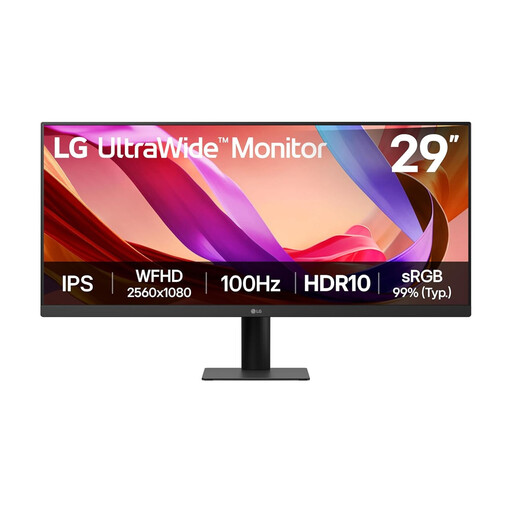 No image available
This 29-inch ultrawide is a smaller-screen option for viewing a render alongside application controls. Its listed specifications include a 1080p IPS display, 100 Hz refresh rate, HDMI and DisplayPort. Check whether its colour settings and calibration suitability meet your render target, and whether its screen space and audible behaviour suit your study.
Look for documented coverage and a display mode matching the render’s delivery colour space. For web or Rec.709 review, check the stated sRGB or Rec.709 options; consider P3 coverage when the output workflow requires P3. Calibration information and a stated Delta E figure can help you shortlist models, but also check colour management in the operating system and review software.
It can if the laptop supports the required USB-C video mode and the monitor supplies enough charging power for it. Dell UK states up to 90 W for the U4025QW, ASUS UK 96 W for the PA34VCNV and BenQ UK 65 W for the PD3420Q; compare the exact monitor connection with your laptop’s video and power requirements.
Check the energy information for the exact models you are comparing rather than judging consumption from screen size alone. GOV.UK includes electronic displays in its energy-information guidance; use the stated figures and their conditions for a like-for-like comparison.
For workers who use display screen equipment daily for continuous periods of an hour or more, the UK Health and Safety Executive says employers must assess the workstation and reduce risks. That concerns the whole setup, including screen position and lighting, rather than requiring a particular monitor model.
Check the retailer’s take-back arrangements or your local authority’s electrical-waste collection route. GOV.UK describes the UK’s waste electrical and electronic equipment framework as supporting recovery, reuse and recycling.