
24/7 Customer Support

Free returns

Same-day & Next-day Delivery

Quality Guaranteed

Unlock Your Welcome Offers: FREE Delivery | Up to 80% OFF | Free 30-day JoyPlus trial
Download the APP
A universal TV stand can solve several common UK home set-up problems: shallow media furniture, limited wall space, awkward viewing angles and the need to move a screen between rooms. However, a stand that looks compatible on a product page may still be unsuitable once you check the TV’s mounting pattern, weight or available clearance.
Before buying, watch for three common pitfalls:
The right choice depends on your room, television, furniture and how often you need to move or adjust the display.
Start with the television manufacturer’s manual or specification label. Check:
The word “universal” usually means that a stand accommodates multiple mounting patterns, not that it fits every television without checking. If you cannot find the VESA measurement, search the TV model number in its manual or contact the manufacturer before ordering.
For a shallow cabinet, universal TV feet may be more practical than a deep pedestal. Look at the footprint, the position of the feet and whether the pads grip the furniture surface.
Anti-slip pads can help reduce movement, but they do not compensate for an overloaded or uneven cabinet. The furniture should be flat, level and strong enough to support the combined weight of the TV and stand. Keep the screen centred where possible, and avoid placing heavy objects on a shelf that could shift the balance.
A freestanding TV stand is useful when wall mounting is unsuitable, particularly in rented accommodation. It should still be positioned away from walkways, pets and areas where children may pull on cables.
A height-adjustable TV stand can help align the screen with seated eye level or create space for a soundbar. Check the actual adjustment range rather than assuming that “adjustable” means a large height change.
For flexible layouts, a mobile TV stand or TV stand with wheels can be convenient in a home office, classroom, studio or open-plan room. Locking brakes should be engaged whenever the stand is stationary. Do not roll a loaded stand over thick carpet, thresholds, cables or uneven flooring.
If you use a soundbar, measure its height and depth, then compare these with the clearance beneath the television. A soundbar shelf can be useful, but it should not obstruct the screen, remote sensor or ventilation openings.
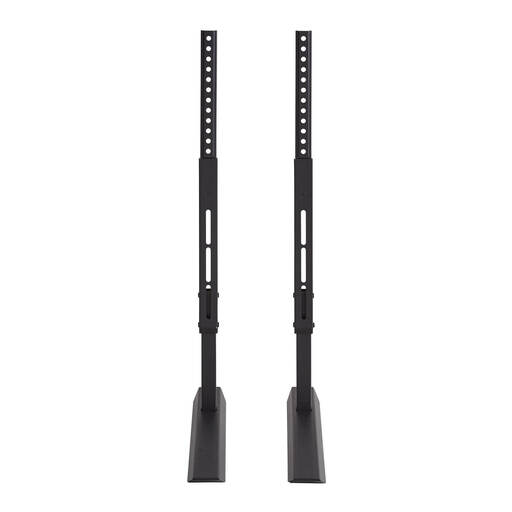
Why This Fits Their Persona: A suitable option for renters, students or homeowners who want to replace bulky original feet without installing a wall bracket.
Its stated 32–77 inch range should still be checked against your TV’s mounting pattern, while the stable footprint is designed for furniture with limited depth.
Anti-slip pads and 8 inches of height adjustment provide a practical way to create space for a soundbar.
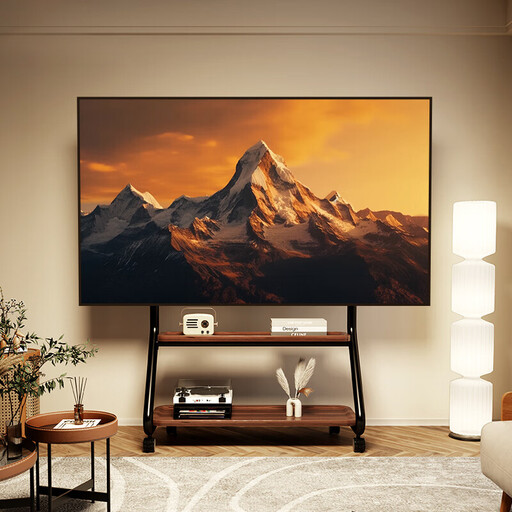
Why This Fits Their Persona: Suits users who want a more substantial mobile display solution for a living room, home office or multi-purpose space.
The listed compatibility covers 32–75 inch TVs, while the product information directs buyers to verify VESA compatibility and the labelled load limit before assembly.
Alloy-steel frame, wooden shelf and four 360-degree rotating wheels with locking brakes.
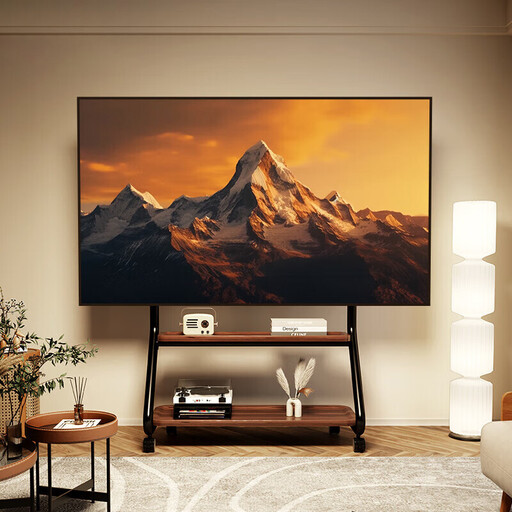
Why This Fits Their Persona: Designed for households, offices or presentation spaces using a larger television that may need to be repositioned.
Its 50–90 inch range addresses larger displays, but buyers must confirm the television’s VESA pattern, weight and the stand’s stated limit before purchase.
A mobile format supports flexible room layouts; confirm floor clearance and lock the wheels before use.
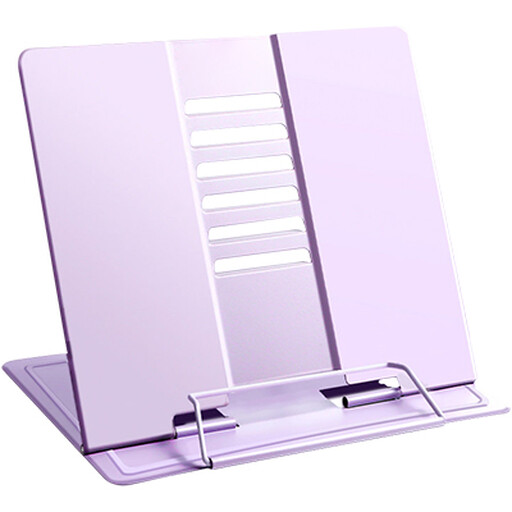
Why This Fits Their Persona: A practical companion for students, home-office users and readers who want to raise a book or tablet to a more comfortable working position.
Its multi-gear adjustment helps users choose an angle instead of relying on a fixed, low reading position.
Thickened construction and multiple angle settings; check the dimensions against your book or device.
We have compiled a complete, real-time list of products that fully satisfy these strict selection criteria and UK safety regulations.
Before mounting or placing your equipment:
No. “Universal” indicates broad compatibility, but the TV must still match the stand’s VESA mounting pattern, weight limit and size range. Always check these details before ordering.
It depends on the carpet and the stand’s design. Thick carpet can make movement and braking less stable. Keep the stand on a firm, level surface, lock all wheels while stationary and avoid rolling it over uneven flooring.
Lifespan depends on load, assembly quality, movement and the condition of the floor or furniture. Tighten fixings when required, do not exceed the stated capacity and inspect brackets, wheels, shelves and anti-slip pads periodically for wear.