For a university laptop, start with the exact software, operating system, processor architecture, peripherals and minimum specifications your department requires; then choose a configuration that meets them without paying for unneeded performance. Windows is the more straightforward fit for the engineering examples from the University of Bath and the University of Nottingham, while macOS or ChromeOS can work where your course confirms compatibility; portability, access needs and backup arrangements also matter.
Who this guide is for
Students using specialist software
If your course requires named applications or teaching hardware, check compatibility with your department before choosing a laptop. The University of Bath and the University of Nottingham give course-specific engineering guidance.
Students studying on campus and at home
If you carry a laptop between lectures, shared spaces and home, consider its weight, screen, battery expectations, camera and connections alongside everyday coursework. The University of Hertfordshire highlights these practical checks.
Students managing cost or access needs
If you need dependable access without assuming a new, high-specification laptop is essential, check whether your existing device, institution-provided options or relevant disability support could meet your needs before spending. Jisc has reported that some surveyed students lacked access to a suitable device during their studies.
What to prioritise when choosing a university laptop
Check course compatibility first, then weigh portability, overall affordability and the setup you need for accessible work and file recovery.
| Concern |
What to check when buying |
Who this matters to |
| Course compatibility |
Ask your department for named applications and versions, supported operating systems and processor architectures, required memory or graphics, and any hardware or exam-tool requirements. The University of Bath and the University of Nottingham provide engineering-specific examples. |
If my course depends on particular software or connected equipment, I need to know it will work before buying. Around 36% of consumers prioritise compatibility with required course software and hardware. |
| Portability and collaboration |
Compare actual weight and screen size, and check the camera, microphone, charging arrangements and ports you will use at both study locations. The University of Hertfordshire recommends considering weight, screen size, battery life and connections. |
If I move between lectures, group work and home, I want a practical screen and useful connections without carrying more than I need. Around 29% of consumers put mobile study and collaboration first. |
| Cost and useful life |
Check your current laptop against the department’s requirements before replacing it. Ask your institution about software access or loan options, and account for any course-required accessories. |
If my current device might still manage my course, I want to avoid paying for a replacement or graphics capability I do not need. Around 21% of consumers prioritise affordable, lasting access. |
| Accessible work and file recovery |
Check any required input or display setup with your institution, and choose a backup method that works with your connection. The UK National Cyber Security Centre advises keeping an external backup device disconnected when it is not in use. |
If my setup needs to support accessible working or protect coursework, I want to check those needs before settling on a laptop. Around 14% of consumers put accessible work or recovering files first. |
Buying pitfalls to avoid
-
Assuming every laptop runs every course tool
A device suited to essays and browsing may not run a course’s specialist software or connect to its teaching hardware. The University of Bath identifies Windows-only software for its mechanical-engineering students, while the University of Nottingham cautions that some ARM-based devices may not support required engineering software or interfaces.
Ask your department for its exact application, operating-system, processor and peripheral requirements before choosing a model.
Equipment purchased before an applicable assessment may not be reimbursed.
Laptop brands to consider for these study routes
Apple
MacBook Neo is a compact macOS option to consider when your department confirms compatibility.
- Apple’s UK specifications list an A18 Pro chip, 8GB unified memory, 256GB or 512GB storage and one USB-C port that supports an external display on MacBook Neo.
- These specifications do not establish suitability for specialist software. The University of Bath advises against a MacBook for its mechanical-engineering work.
Lenovo
The LOQ 15i Gen 10 is one Windows example to investigate when a course confirms graphics-intensive requirements.
- Lenovo lists a LOQ 15IRX10 configuration with an Intel processor, an RTX 5060 laptop GPU and 16GB RAM.
- Those specifications apply to the listed configuration, not every model in the range, and do not mean that every course needs a gaming-class GPU.
HP
The OmniBook family includes conventional laptops and Flip formats for students comparing keyboard-first and convertible setups.
- HP describes 14-inch Flip options within the family.
- Processors differ across the range; check the complete model and its software compatibility rather than assuming one family specification applies to every configuration.
Acer
The Chromebook Plus 516 is a ChromeOS example for students whose course permits that operating system.
- Acer lists a 16-inch WUXGA Chromebook Plus 516 family.
- Specifications vary by model and region, and the screen or ChromeOS features do not establish that required university desktop applications will run.
Joybuy laptop choices for university study
These Joybuy listings are Windows laptops with different processor, memory, storage, display and graphics configurations. Check your department’s application and processor-architecture requirements before deciding which specification you need.
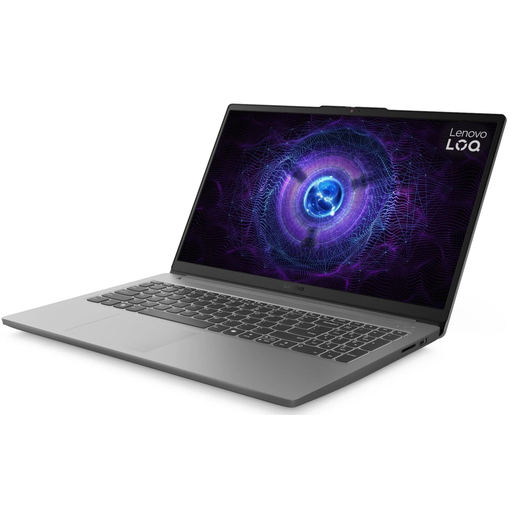 Image unavailable
Lenovo LOQ 15IAX9, i5-12600HX, 16GB RAM, 1TB SSD
A Windows laptop to assess if your course calls for a dedicated graphics configuration; confirm the exact software and hardware requirements first.
Intel Core i5-12600HX, 16GB RAM, 1TB SSD and Windows 11 Home.
The product description lists RTX 4050 graphics, a 15.6-inch FHD display and Wi-Fi 6.
View on Joybuy
 Image unavailable
ASUS Vivobook 14 X1407QA-LY003W Copilot+ PC, 16GB RAM, 512GB SSD
A portable Windows option to assess for study and collaboration; check that your course software supports its processor architecture.
Snapdragon X, 16GB memory and a 512GB SSD.
The product description lists a 14-inch WUXGA anti-glare display, a weight of 1.49kg, two USB4 Type-C ports with DisplayPort support and HDMI 2.1.
View on Joybuy
 Image unavailable
Lenovo LOQ Essential 15ARP11, Ryzen 7 170, 16GB RAM, 1TB SSD
A Windows configuration to compare against your course’s stated processor and graphics requirements rather than assuming a dedicated GPU is necessary.
AMD Ryzen 7 170, 16GB RAM, 1TB SSD and Windows 11 Home.
The product description lists GeForce RTX 5050 graphics, a 15.6-inch FHD 144Hz display and HDMI 2.1.
View on Joybuy
 Image unavailable
Lenovo IdeaPad Slim 3 15.3-inch, Ryzen 5 7535HS, 24GB RAM, 512GB SSD (83K7009MUK)
A Windows option to compare with your course’s application and multitasking requirements.
AMD Ryzen 5 7535HS, 24GB DDR5 RAM, 512GB PCIe SSD and Windows 11 Home.
The product description lists a 15.3-inch WUXGA anti-glare display, HDMI, a 1.59kg weight and a full-size keyboard with numeric keypad.
View on Joybuy
 Image unavailable
Lenovo IdeaPad 1 15-inch Full HD, Ryzen 3 7320U, 8GB RAM, 128GB SSD
An everyday-study option to check against the applications and storage needs of your course.
AMD Ryzen 3 7320U, 8GB RAM, 128GB SSD and Windows 11 Home in S Mode.
The product description lists a 15.6-inch Full HD display, Wi-Fi 6, USB-C, a 1.58kg weight and up to 10 hours of battery life. It also states that S Mode limits app installation to Microsoft Store apps and that switching out of S Mode is irreversible.
View on Joybuy
Frequently asked questions
Can I use a Chromebook if most of my work is online?
Only if your department confirms that required software, assessments and offline work can be completed on ChromeOS. The University of Hertfordshire notes that some specialist software may not work, and the University of Bristol advises its students against using Chromebooks as their main computer.
Do I need to buy software or a powerful laptop straight away?
Check your institution’s software entitlements and test your current laptop against your department’s requirements first. The University of Nottingham says its students have access to Microsoft 365 and engineering software; the University of Warwick says a reliable laptop under three years old is likely to suffice for its general guidance, subject to departmental requirements.
How should I back up coursework?
Keep a separate copy and check that you can retrieve it. The UK National Cyber Security Centre describes online and external-device options; if you use an external drive, keep it secure and disconnect it when you are not backing up. Check that its connector works with your laptop.
Could disability-related funding help with a laptop or assistive equipment?
It may help if you meet the relevant eligibility requirements and complete the applicable assessment. GOV.UK guidance for Disabled Students’ Allowance in England says not to buy equipment before assessment if you are seeking reimbursement; funding routes elsewhere in the UK differ, so contact the body responsible for your student funding and your university’s disability service before ordering.


