Who this guide is for

Students without confirmed software requirements

Avoid choosing an operating system or a low-specification laptop until your department confirms the required applications, assessment method and any software you need to install. University of Cambridge, The Open University, the University of Edinburgh and UWE Bristol all advise checking course-specific requirements.

Students on technical or creative courses

Programming, data analysis, image or video work, rendering, visualisation and simulator software can require more than a basic online-learning laptop. UWE Bristol and The Open University give examples of courses where specialist software changes the device decision.

Students with a usable existing computer

Test your current device before replacing it. The University of Edinburgh, UCL, Oxford and The Open University note that requirements vary, and that facilities or loan routes may be available in some settings.

Buying priorities

Windows laptop

Choose it when: Your course uses specialist desktop software, programming tools, data analysis or creative applications, or compatibility has not yet been confirmed.

Keep in mind: More memory and storage can be useful for demanding work, but a recommended specification is not automatically the minimum needed for every course.

macOS laptop

Choose it when: Your department confirms that named software and digital assessments support macOS, and portability or Apple-device integration matters to you.

Keep in mind: Some specialist applications may not be available for macOS, so course confirmation matters before ordering.

Existing device or companion device

Choose it when: Your current computer runs the required software and assessment platform, or your course is confirmed as browser-based.

Keep in mind: Tablets, phones and many Chromebooks may not support all assessments or specialist applications.

Priority What to check Your needs
Course compatibility Confirm the named applications, browser tools and assessment platform. Check whether they support Windows or macOS and whether desktop software must be installed. I need a laptop that runs the tools used on my programme, not just one that can browse the web.
Workload capacity For lighter work, compare the course requirement with 8GB RAM and 128GB SSD. Programming, data analysis or editing may call for 8GB RAM and 256GB SSD; advanced technical or creative work may require 16GB RAM and 512GB SSD. My laptop should match the files and applications I will actually use, rather than a generic student specification.
Study and assessment access Check laptop portability, charger arrangements, webcam and microphone needs, and the institution’s internet and assessment guidance. Cambridge recommends at least 10 Mbps for study and online assessments. I want to move between lectures, accommodation and campus study spaces while remaining ready for online tutorials and digital assessments.
Ownership costs Test your current device first. Review warranty terms, student discounts, university loan schemes and any applicable funding support before replacing a working computer. I want to avoid paying for an upgrade that my course does not need, while planning for support if a replacement is necessary.

Common buying mistakes

  • Buying a Chromebook or tablet as the primary device because it costs less

    Cambridge, Edinburgh, UWE Bristol and UCL warn that Chromebooks, tablets and phones may not support required software or every digital assessment.

    Get the programme’s software list and assessment-device guidance before purchase. Treat a Chromebook or tablet as a companion device unless the course confirms compatibility.

    If key software cannot run, you may need another computer or depend on limited-access facilities.

  • Treating a recommended new-laptop specification as a compulsory minimum

    The University of Edinburgh says its new-device recommendation is not the minimum technology level for access, and its Mathematics School advises students to check whether an existing device will suffice.

    Compare your current computer with the exact course requirements, then upgrade only the capability that limits your work.

    Extra memory, storage or processing power is only useful when the course workload requires it.

  • Choosing macOS for a specialist course without checking application availability

    UWE Bristol says MacBooks suit many courses, but some specialist applications may not be available for macOS.

    Ask your programme leader or departmental IT team to confirm named software and assessment compatibility for the Mac model you are considering.

    An unavailable application may mean using another Windows computer or an approved alternative workflow.

  • Overlooking warranty, charger and online-teaching equipment

    A device used throughout a degree needs suitable warranty coverage, while online teaching can depend on a workable camera, microphone or headset.

    Read warranty exclusions, include the charger in your plan and check the built-in webcam and microphone before buying separate peripherals.

    Repairs, replacement accessories and poor audio during live sessions can disrupt study.

Relevant brand references

Apple

A macOS route for students whose department confirms compatibility with Mac software and assessment systems. Apple describes the current MacBook Air as a thin, light laptop with quoted battery life of up to 18 hours.

  • Apple states that the 13-inch MacBook Air weighs 1.23 kg, which may suit students who carry a laptop between study locations.
  • UWE Bristol cautions that some specialist applications may not be available for macOS, and Apple-silicon Macs cannot install Windows in the way older Intel Macs could.

Lenovo

A Windows-laptop supplier with a range of configurations for students who need to match a confirmed course specification.

  • Lenovo’s UK education page lists ThinkPad, ThinkPad X and IdeaPad laptop families and advertises discounts for verified students and educators.
  • Compare the exact model’s processor, RAM, storage, ports, warranty and course compatibility rather than choosing by brand alone.

Dell

A Windows-laptop brand to compare when building a configuration that meets confirmed programme requirements.

  • The University of Edinburgh School of Mathematics identifies Dell among manufacturers that may offer student discounts.
  • That mention is not a performance comparison or confirmation that a particular Dell model suits every programme; compare the chosen configuration with the course software list and warranty terms.

HP

A Windows-laptop brand worth comparing where a course specification and student-discount route have been confirmed.

  • The University of Edinburgh School of Mathematics identifies HP among manufacturers that may offer student discounts.
  • Confirm the individual model’s operating system, RAM, storage, webcam, ports and warranty against the programme’s stated needs.

Joybuy laptop options

Joybuy Windows laptop options for students who need a portable computer for course software, online teaching and digital assessments. Confirm the exact programme requirements before choosing a model.

ASUS Vivobook 15 X1504VA laptop

ASUS Vivobook 15 X1504VA, Core 5 120U, 24GB, 1TB SSD

A Windows option for students who need room for installed applications and larger local file collections.

15.6-inch FHD IPS anti-glare display, Windows 11 Home, 24GB RAM, 1TB SSD, Wi-Fi 6, HDMI, USB-A and USB-C ports, webcam with microphone, and stated weight of 1.70kg.

Confirm course software and assessment compatibility. The listing states a one-year warranty and up to 8 hours of standby time; check warranty terms and active-use battery expectations for your study routine.

Joybuy

Lenovo IdeaPad Slim 3 15.3-inch laptop

Lenovo IdeaPad Slim 3 15.3-inch, Ryzen 5 7535HS, 24GB, 512GB SSD

A Windows laptop for course materials, multitasking and applications that need more memory than a basic configuration.

15.3-inch WUXGA anti-glare display, Windows 11 Home, 24GB DDR5 RAM, 512GB PCIe SSD, Wi-Fi 6, HD webcam with privacy shutter, numeric keypad and stated weight of 1.59kg.

Check the department’s software and assessment requirements before purchase. The listing states a one-year limited manufacturer warranty; review its coverage and confirm battery runtime for regular campus use.

Joybuy

HP OmniBook X Flip 16-as0004na laptop

HP OmniBook X Flip 16-as0004na, Core Ultra 5 226V, 16GB, 512GB SSD

A convertible Windows option for students who want a touchscreen format alongside conventional laptop use.

16-inch 2K IPS touchscreen, 16:10 display, Intel Arc graphics, Windows 11 Home, 16GB LPDDR5x RAM, 512GB PCIe Gen4 SSD, Wi-Fi 7 and a 5MP IR camera with privacy shutter.

Confirm specialist-software and assessment compatibility. Check the weight, warranty terms and active-use battery runtime if you expect to carry it daily.

Joybuy
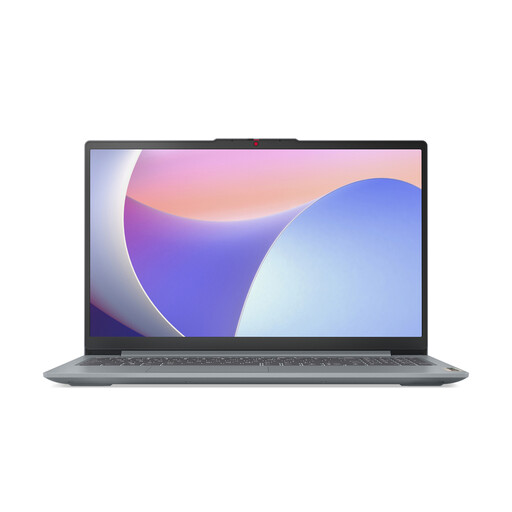
Lenovo IdeaPad Slim 3 15IAH8 laptop

Lenovo IdeaPad Slim 3 15IAH8, Core i5, 8GB, 512GB SSD

A Windows option for general university software, online learning and lighter course workloads where 8GB RAM meets the programme requirement.

15.6-inch FHD anti-glare display, Windows 11 Home, 8GB DDR5 RAM, 512GB SSD, Wi-Fi 6, USB-C, HDMI, webcam privacy shutter and stated weight of 1.62kg.

Check support for course applications, digital exams and specialist tools. Compare 8GB RAM with the programme requirement for advanced programming, rendering, visualisation or video-production work, and confirm expected battery use.

Joybuy
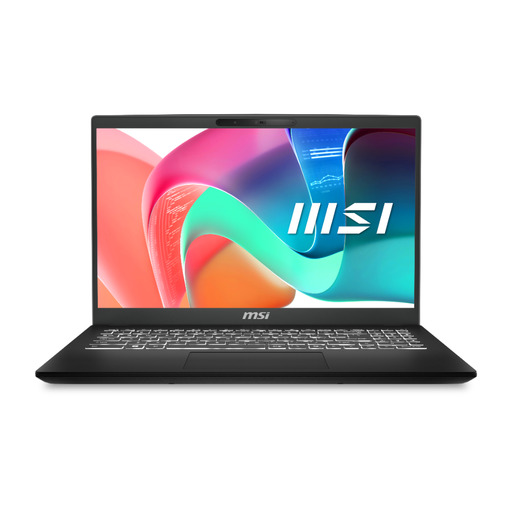
MSI Modern C2RMG-282UK laptop

MSI Modern C2RMG-282UK, Core 5, 16GB, 512GB SSD

A laptop for office software, video calls and browser-based learning, subject to confirmation of the required course platform.

15.6-inch FHD display, Intel Core 5, 16GB DDR4 RAM, 512GB SSD, three USB-A ports, USB-C with Power Delivery, RJ-45 Ethernet and stated weight of 1.86kg.

Check the preinstalled Windows edition, webcam specification, warranty terms and active-use battery runtime. At 1.86kg, compare its carrying weight with your daily travel needs.

Joybuy

Frequently asked questions

Should I buy a Windows laptop or a MacBook before my course starts?

Check the programme’s required software and assessment platform first. UWE Bristol describes Windows as the most compatible choice for most university and specialist software, while noting that MacBooks suit many courses but some specialist applications may be unavailable; Cambridge and Edinburgh recognise both Windows and macOS routes where requirements are met.

Can a Chromebook, tablet or phone be my only university study device?

Do not assume that it can. Cambridge says tablets, smartphones and Chromebooks may not suit all assessments, while UCL says a tablet or smartphone alone will not support effective study; use one as a primary device only when your institution confirms compatibility for the course and its assessments.

Do I have to replace my current laptop for university?

Not automatically. UCL says a computer bought within the last six or seven years should meet most-course requirements subject to specialist needs, and Edinburgh says its recommended new-device specification is not the minimum access level. Test your existing device against named software, storage needs and the assessment platform before replacing it.

What accessories should I plan for besides the laptop?

Start with the charger and check whether the built-in webcam and microphone are suitable for online teaching. UCL says a headset can improve audio for online sessions, and The Open University says a wired headset with microphone is useful for online tutorials; check ports before adding a monitor, mouse, dock or external storage.

Can student finance help with a study device?

Support depends on where in the UK you study and your circumstances. In England, Student Finance England says Disabled Students’ Allowance may cover study-related costs for eligible students and should be applied for early; confirm current eligibility with your university and the relevant funding body before relying on support.