What to check before buying
Start with your department’s software and hardware requirements, then compare a laptop’s portability, configuration, connections and support terms against how you will study day to day.
| Priority |
What to check |
Your needs |
| Software compatibility |
Check named course applications, operating system, processor architecture and required hardware connections. For some engineering workflows, the University of Nottingham advises standard Intel or AMD Windows hardware. |
I need to install and connect to the software and equipment required by my course, rather than relying on an operating system that may not be supported. |
| Campus portability |
Compare screen size, weight, webcam, microphone and charging routine. A 14-inch display is a useful starting point for balancing carrying comfort and workspace, according to the University of Hertfordshire. |
I want a laptop that is practical to carry between accommodation, lectures, the library and group work without making typing or video calls uncomfortable. |
| Memory and storage |
For ordinary study, the University of Hertfordshire suggests at least 8GB RAM and 256GB SSD. Check whether your course needs 16GB or more, 512GB SSD or a dedicated GPU for local specialist work. |
I need enough room for multitasking, development tools, media files and course applications throughout the degree. |
| Repair and support |
Check warranty length, repair options, battery replacement and the seller’s condition statement. For refurbished devices, verify the charger, operating-system support, instructions and recall status. |
I want to know how the laptop can stay usable through my course and what support route is available if it fails. |
| Configuration value |
Compare the exact RAM, SSD, charger and warranty configuration, not only the model name. Confirm the current checkout terms and consider whether an existing device, campus computer or remote desktop already meets the requirement. |
I want to compare the complete laptop and support package rather than treating one advertised configuration as a fixed budget benchmark. |
Joybuy laptop options
Joybuy laptop options for campus study, covering Windows and macOS configurations for general coursework and more demanding local multitasking. Confirm named course software before selecting any model for specialist work.
 No image available
Lenovo IdeaPad Slim 3 15.3-inch, Ryzen 5 7535HS, 24GB, 512GB SSD
A Windows option for coursework with heavier multitasking or larger local files.
Specified with AMD Ryzen 5 7535HS, 24GB DDR5 RAM, 512GB PCIe SSD, Windows 11 Home, Wi-Fi 6 and a 15.3-inch WUXGA display. It weighs 1.59kg and includes a USB-C power adapter.
Check whether its integrated graphics meet any named CAD, CAE, rendering or GPU-intensive module requirement. The stated warranty is one year; confirm repair, return and support terms.
Joybuy
 No image available
ASUS Vivobook 15 X1504VA, Core 5 120U, 24GB, 1TB SSD
A Windows laptop for students who want more local storage and several built-in peripheral connections.
Specified with an Intel Core 5 120U processor, 24GB DDR5 RAM, 1TB SSD, a 15.6-inch anti-glare IPS display, HDMI, two USB-A ports, two USB-C ports and Wi-Fi 6.
Integrated graphics are specified, so check any dedicated-GPU requirement. Its stated battery figure is standby time rather than coursework runtime; confirm charging expectations and support arrangements.
Joybuy
 No image available
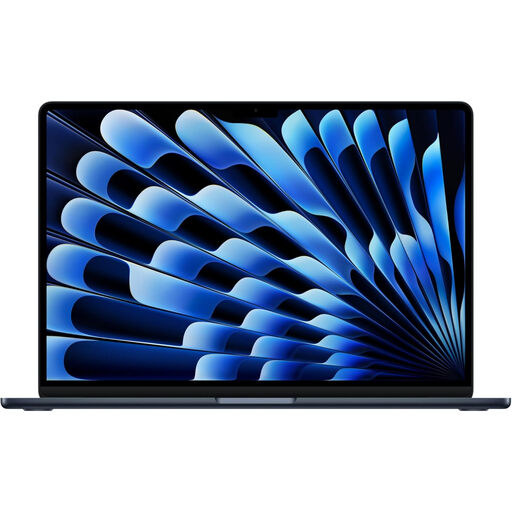
Apple 13-inch MacBook Air M5, 24GB, 1TB SSD
A compact macOS option for portable general study and creative coursework where macOS is confirmed for the course.
Specified with an M5 chip, 24GB unified memory, 1TB SSD, 13.6-inch 2560×1664 display, 12MP camera, two Thunderbolt 4 ports and MagSafe.
Do not choose it for Windows-only engineering software or hardware interfaces. Check adapter needs for USB-A, HDMI or wired-network peripherals, plus warranty and support terms.
Joybuy
 No image available
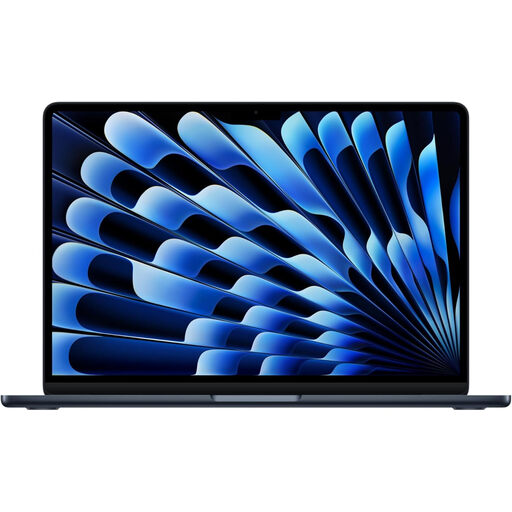
Apple 13-inch MacBook Air M5, 16GB, 512GB SSD
A portable macOS choice for lectures, notes, video calls and everyday coursework with confirmed macOS compatibility.
Specified with an M5 chip, 16GB unified memory, 512GB SSD, 12MP Centre Stage camera, MagSafe and Thunderbolt 4 connectivity.
Confirm that named software and connected hardware do not require Windows, standard Intel or AMD hardware, or a dedicated GPU. Adapters may be needed for some existing peripherals.
Joybuy
 No image available
ASUS Vivobook 14 X1407QA-LY003W, Snapdragon X, 16GB, 512GB SSD
A compact Windows option for general lectures, documents and multitasking when required applications support its Snapdragon ARM platform.
Specified with 16GB memory, 512GB PCIe SSD, a 14-inch 1920×1200 anti-glare display, USB4, HDMI 2.1, Wi-Fi 6E, FHD IR camera and a 65W USB-C adapter. It weighs 1.49kg.
Confirm software and hardware-interface compatibility for Qualcomm Snapdragon ARM before choosing it for specialist courses. The 50Wh battery capacity alone does not indicate a full day of coursework use.
Joybuy
Frequently asked questions
Should I buy Windows or a Mac for university?
For most general courses, choose the operating system you prefer only after checking your department’s software guidance. The University of Edinburgh has no general Windows-versus-Apple preference, but Nottingham and Loughborough advise Windows for some engineering workflows because particular applications, hardware interfaces or support tools may not work on macOS. A Chromebook is not a safe default where a degree may need conventional desktop software.
When do I need 16GB RAM, 512GB SSD or a dedicated GPU?
For ordinary study, the University of Hertfordshire lists 8GB RAM and 256GB SSD as a starting point. Choose 16GB RAM and 512GB SSD when buying for longer use, expecting heavier multitasking, or following course guidance; Nottingham’s Mechanical, Manufacturing and Aerospace recommendations reach 16GB–32GB RAM, at least 512GB SSD and, for certain local CAE work, a dedicated GPU. Confirm exact application requirements before paying for a GPU.
Can a virtual desktop or campus computer room replace a powerful personal laptop?
Sometimes, but not automatically. The University of Nottingham says its Engineering Virtual Desktop supports most software but requires stable, reasonably fast internet and is unsuitable for all hardware-based activities. Check whether your course needs local software, a connected device, offline use or a particular GPU before relying on remote access.
What should I verify before buying a refurbished laptop in the UK?
Use a trusted seller, confirm the exact model and condition, check that instructions are supplied or available, ask whether modifications have been made, and check product-safety recall information. GOV.UK says commercially sold used goods must be safe but can have worn components, missing modern safety features or non-obvious modifications. Also verify battery condition, charger, operating-system support, return route and warranty or guarantee terms before purchase.
Is an extended warranty the same as my legal rights?
No. Citizens Advice says warranties and guarantees add to legal rights and may be useful after the first six months for repair or replacement. Its guidance is explicitly for England and directs readers in Northern Ireland, Scotland and Wales to separate advice pages, so check the applicable local consumer guidance rather than assuming identical wording.


