Choose a laptop only after checking your department’s required applications, operating system and access arrangements. A Windows or Mac laptop can suit general coursework when your course supports it, while specialist software may narrow the choice; a Chromebook or keyboard-equipped tablet is suitable as a primary device only when it can handle every required task. Match memory, storage, portability and the complete setup to your actual study routine rather than assuming every student needs the same specification.
Who needs to choose a university laptop carefully?
Students using specialist course software
If your department names CAD, engineering tools, programming interfaces or other specialist applications, check the operating system, processor architecture and access method before buying. The University of Nottingham’s electrical and electronic engineering guidance warns that some ARM-based devices may not support required software or hardware interfaces.
Students carrying a laptop across campus
If you work in lectures, libraries and at home, consider how the device’s size, weight and charging setup fit your routine alongside its everyday capability. UCAS includes a laptop and chargers in its university preparation guidance.
Students keeping setup costs in check
Before paying for a replacement or higher specification, check whether your current device, university computer access or institution-provided software can meet your course needs. The University of Nottingham describes software provision for its students, while the University of Warwick says its central device guidance can be superseded by department-specific advice.
What matters most when choosing a coursework laptop?
Start with your department’s current requirements, then compare the specifications and complete setup that support your study routine. The University of Warwick’s guidance is central advice for its students, not a universal specification for every course.
| Concern |
What to check when buying |
Who this matters to |
| Course compatibility |
Confirm the named applications, operating system and processor architecture; ask whether approved remote access covers the required work. |
If I need specialist software or course hardware, I want to know that my device can run the tools I am expected to use. Around 33% of consumers put course compatibility first. |
| Everyday coursework and file space |
Compare memory and usable storage with your department’s guidance and the applications and files you use. |
For regular document work, research and saved projects, I want enough capacity for my everyday workload without paying for specifications I will not use. About 27% of consumers prioritise everyday coursework capability and file space. |
| Portability and charging |
Balance screen size and device weight against carrying needs; check battery information, charger inclusion and required adapters. |
If I move between lectures, libraries and home, I want a setup I can carry and charge around my study day. Approximately 20% of consumers make portability their primary concern. |
| Complete setup cost |
Check whether your current device, university software or computer access meets your needs, and review included accessories and cover. |
When I am deciding whether to replace a device, I want to meet course requirements without buying unnecessary extras. Around 20% of consumers prioritise the cost of a suitable complete setup. |
Buying pitfalls to avoid
-
Assuming every Windows laptop runs engineering software
Some ARM-based Windows devices may not support required applications or hardware interfaces. The University of Nottingham’s electrical and electronic engineering guidance recommends checking the specific software and processor architecture.
Ask your department which applications and interfaces you need, and whether they must run locally, before choosing a Windows-on-ARM configuration.
If the device cannot complete required work, you may need access to another computer or approved university facilities.
-
Assuming a keyboard makes a tablet a full laptop replacement
A keyboard does not provide the full range of laptop software. University guidance distinguishes note-taking and online access from running all required applications locally.
Check that your document, assessment and specialist-software workflows work on the tablet before relying on it as your only device.
You may still need access to another computer for tasks the tablet cannot run.
-
Treating general student specifications as course requirements
Central guidance may not cover the needs of every department. The University of Warwick advises students to follow specific departmental guidance where it differs from its general recommendations.
Start with your course’s current requirements, then compare actual device configurations and any university computing access.
-
Comparing laptops without checking the complete setup
Charger inclusion and accessory needs can vary by configuration. A UK HP listing, for example, identifies a configuration supplied without a charger; that does not apply to every HP laptop.
Check the selected model’s box contents, ports and required accessories, as well as any university-provided software or computer access.
A charger, adapter, keyboard or storage device may add carrying weight and become part of the setup you need.
Relevant laptop and device brands to consider
Apple
MacBook and iPad options may suit students whose departments support their operating systems and course workflows.
- Apple lists the MacBook Neo with an A18 Pro chip, 8 GB memory and either 256 GB or 512 GB storage.
- Check course software before choosing macOS: Loughborough University identifies engineering software that is unavailable on Apple devices. An iPad’s keyboard option does not establish that it can replace a Mac laptop for coursework.
Lenovo
The IdeaPad Slim 3x Gen 10 and Chromebook Plus Gen 10 illustrate different operating-system options within Lenovo’s UK range.
- Lenovo lists Windows 11 Home Arm64 for the IdeaPad Slim 3x Gen 10 and ChromeOS for the Chromebook Plus Gen 10.
- These systems should not be assumed to support the same specialist software or hardware interfaces as an Intel- or AMD-based Windows laptop; check your department’s requirements.
HONOR
The MagicBook 16 (2026) is a larger-screen laptop option to consider when workspace matters alongside carrying size.
- HONOR specifies an Intel Core Ultra 5 325 processor and an 80 Wh battery for this model.
- Manufacturer specifications do not establish whether a course application will work; check compatibility for the exact model and configuration.
HP
HP’s UK range includes conventional laptops and 2-in-1 designs for students comparing keyboard work with touch use.
- The range includes different form factors and configurations to compare against your course needs.
- Processors, memory and displays vary between models. Some listings specify that a charger is not included, so check the contents of the particular configuration.
Joybuy laptops for coursework and campus study
These Joybuy options cover Windows laptops and a MacBook for coursework, with configurations suited to different screen, memory and storage preferences. Check each model against your department’s software and hardware requirements before buying.
 No image available
ASUS Vivobook 14 X1407QA-LY003W Copilot+ PC, Snapdragon X, 16GB RAM, 512GB SSD
This Windows laptop may suit document work and multitasking where its listed memory and storage match your course needs; check application compatibility before choosing it.
14-inch WUXGA display; 16GB RAM; 512GB SSD; 1.49 kg; 50Wh battery; USB4 and HDMI ports; FHD camera.
It uses a Snapdragon X processor. The University of Nottingham’s electrical and electronic engineering guidance warns that some Snapdragon-based Windows devices may not support required software or hardware interfaces.
Joybuy
 No image available
Lenovo IdeaPad Slim 3 15.3-inch WUXGA, Ryzen 5 7535HS, 24GB RAM, 512GB SSD, Windows 11 Home (83K7009MUK)
This Windows laptop is one option for coursework involving documents and several applications, with local storage for study files.
Ryzen 5 7535HS; 24GB DDR5 RAM; 512GB PCIe SSD; 15.3-inch WUXGA display; Wi-Fi 6; 1.59 kg.
Joybuy
 No image available
ASUS Vivobook 15 X1504VA, Intel Core 5 120U, 24GB RAM, 1TB SSD
This Windows laptop may suit students who want a larger display and more local file space, provided its configuration meets their course requirements.
Intel Core 5 120U; 24GB RAM; 1TB SSD; 15.6-inch Full HD IPS display; Wi-Fi 6; 1.70 kg; integrated webcam and microphone.
Joybuy
 No image available
Apple MacBook Air 13.6-inch, M5, 24GB, 1TB SSD
This macOS laptop may suit coursework when your department confirms that its required applications and assessment workflow are supported.
13.6-inch Liquid Retina display; M5; 24GB unified memory; 1TB SSD; macOS; Wi-Fi 7; Thunderbolt 4 ports and MagSafe charging.
Loughborough University identifies engineering software that does not run on Apple devices, so check your course’s specific requirements.
Joybuy
 No image available
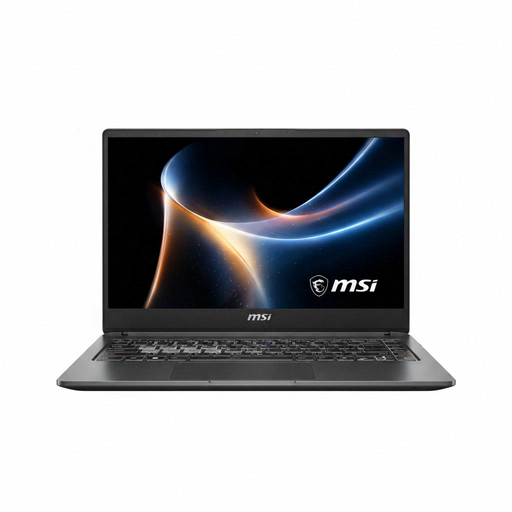
MSI Prestige N16 Flip AI+ C1XMT-044UKY, 16-inch 2-in-1, 32GB RAM, 1TB SSD
This Windows 2-in-1 may suit typed coursework with occasional touch use, if its size and weight fit how often you carry your device.
16-inch 2.8K 120Hz OLED touchscreen; 32GB RAM; 1TB SSD; USB4, HDMI 2.1 and SD card reader; 1.9 kg.
Joybuy
University coursework laptop FAQs
Can I use a Chromebook or tablet instead of a laptop?
Only if your department confirms that your required applications, assessments and support arrangements work on that device. Loughborough University’s guidance supports tablets for notes and online resources but does not support Chromebooks; the University of Bath says tablets and Chromebooks cannot run all of its engineering software locally. These are institution-specific requirements, not a UK-wide prohibition.
What if my preferred computer cannot run specialist software locally?
Ask your department whether an approved virtual desktop or campus computer can handle your particular work. The University of Nottingham describes an engineering virtual desktop that needs a stable connection and does not cover every hardware-based activity; the University of Bath also describes remote CAD access.
Do I need to buy course software or replace a working laptop?
Not necessarily; check your institution’s provision and your existing device against your department’s requirements first. The University of Nottingham describes Microsoft 365 and specialist engineering software access for its students, while the University of Warwick says a reliable existing laptop under three years old is likely to suffice under its central guidance. These arrangements and recommendations are institution-specific.
What rights apply if an online laptop order is unsuitable or faulty?
For an eligible online goods purchase, GOV.UK says you can notify the seller of cancellation within 14 days of receiving the item and then have another 14 days to return it. Faulty or misdescribed goods have separate statutory remedies; check the circumstances and any applicable exceptions, as a warranty or store policy does not replace those rights.


