Course compatibility checker
You need one primary laptop that can run your department’s named learning software and assessments. The University of York and the University of Plymouth advise students to check course requirements before buying.


Check your department’s named software, operating-system and assessment requirements first; then compare compatible laptops for portability, memory, storage, webcam and connections. Windows, macOS and a refurbished laptop can each suit general study, but guidance from the University of York and the University of Plymouth is institution-specific, not a universal UK minimum.
You need one primary laptop that can run your department’s named learning software and assessments. The University of York and the University of Plymouth advise students to check course requirements before buying.
You regularly move between teaching, study spaces and home, so carrying weight and usable connections matter alongside everyday study capability. The University of York offers separate advice for students who carry a laptop around campus.
You are weighing a new laptop against a refurbished one and want to check operating-system support, condition and after-sales terms as well as the purchase cost. Microsoft’s support information and GOV.UK’s consumer guidance can help you check these details.
Start with the course’s named software and assessment rules, then compare supported operating systems and exact configurations. Once compatibility is clear, portability, included connections and the condition of a new or refurbished device can help narrow your choices.
| Concern | What to check when buying | Who this matters to |
|---|---|---|
| Course software and assessment compatibility | Ask your department about named applications, operating-system versions, browsers and assessment arrangements. Respondus Support says LockDown Browser does not support Windows S mode or Windows SE. | If my department requires a particular exam app, I need to confirm its supported system before choosing a laptop. Around 33% of consumers put course software and assessment compatibility first. |
| Portability between study locations | Compare the exact model’s weight, screen size, keyboard and required ports. The University of York suggests a weight below 1.5 kg for students carrying a laptop around campus; this is its guidance, not a universal limit. | When I carry my laptop between teaching, study spaces and home, I want a manageable load without giving up the screen or connections I use. Around 27% of consumers prioritise portability between study locations. |
| Purchase cost and continued use | For the exact listing, check the installed operating system and its support, the device’s condition and battery information, warranty terms, seller and included charger. | If I am comparing a new laptop with a refurbished one, I want to understand its condition and likely upkeep as well as the price. Around 20% of consumers put purchase cost and continued use first. |
| Online participation and assessment equipment | Check whether your course requires a webcam, microphone, headset, compatible browser or particular connections. The University of Law specifies a webcam of at least 720p for its proctored assessments. | For online sessions or assessments, I need the camera and other equipment my course actually requires. Around 20% of consumers prioritise online participation and assessment equipment. |
Institutional guidance differs, and a named assessment application may not work with every operating-system edition.
Ask your programme team about the required software, operating system, browser and proctoring arrangements before comparing models. Respondus Support lists Windows S mode and Windows SE as unsupported for LockDown Browser.
Microsoft says standard Windows 10 support ended on 14 October 2025. A device’s age or low price does not establish that its installed system meets your course requirements or has the updates you need.
Check the exact operating-system edition, current update support and any upgrade eligibility against your university’s requirements.
A Dell UK configuration lists no AC adapter, and a laptop may not have the connection you need for your usual study setup.
Check the selected configuration’s included items and port list before ordering; confirm that any required adapter is compatible.
MacBook models are a macOS option for everyday portable study when your course supports the operating system and required applications.
The OmniBook range includes Windows configurations, including folding touchscreen models, for people who want a laptop keyboard with a convertible design.
IdeaPad Slim 5 configurations provide a Windows option for everyday study, subject to the exact part number.
The Dell 14 DC14250 is a configurable Windows laptop to compare against other models that meet your course requirements.
These Joybuy choices cover Windows and macOS laptops for general study, with configurations ranging from compact everyday models to convertible designs. Check course requirements against each exact model before buying.
 No image available
Consider this configuration if you want a Windows laptop with listed camera and connection details for study and online participation; confirm that its software and assessment setup meets your course requirements.
14-inch WUXGA display; 1.49 kg; Windows 11 Home; 16GB RAM; 512GB SSD; FHD IR camera; USB4 and HDMI connections.
 No image available
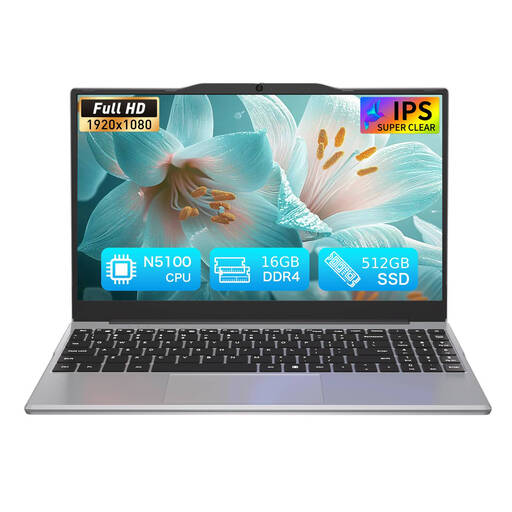
This model is listed for study and everyday computing; check that its operating system and the software required by your course are suitable before choosing it.
14.1-inch Full HD IPS display; 1920 × 1080 resolution; approximate weight 1.214 kg; N5100 processor; 16GB DDR4; 512GB SSD.
 No image available
Consider this macOS configuration for portable everyday study only if your department confirms that its required applications and assessments support the intended setup.
13-inch display; A18 Pro chip with 6-core CPU and 5-core GPU; 8GB memory; 256GB SSD.
 No image available
This macOS configuration offers more listed storage than the 256GB variant; check course compatibility and whether the configuration suits your study files and applications.
13-inch display; A18 Pro chip with 6-core CPU and 5-core GPU; 8GB memory; 512GB SSD; Touch ID.
 No image available
Consider this convertible Windows configuration if you want a folding touchscreen alongside a laptop keyboard, subject to your course’s software and assessment requirements.
16-inch 2K touchscreen; folding 2-in-1 design; Intel Core Ultra 5 226V; Windows 11 Home; 16GB RAM; 512GB SSD; 5MP IR camera.
No. The University of York and the University of Plymouth advise students to check course-specific requirements with their department or programme team before buying, because general guidance may not cover specialist software or assessments.
Do not assume that every device or browser will work. The University of Law advises using a laptop, PC or Mac as the primary device for its course environment, and the assessment provider may set additional software requirements. Check the rules for your own course and assessments.
Buy an accessory only when it meets a confirmed course or connection requirement. The University of Law requires a built-in or external webcam of at least 720p for its proctored assessments; check your own course’s arrangements and the laptop’s ports before choosing a webcam, headset or adapter.
Confirm that its installed operating system is supported and meets your course requirements, and check the seller’s description of condition, battery and warranty. Microsoft says standard Windows 10 support ended on 14 October 2025, so check the exact device’s update and upgrade position rather than relying on the product label.
GOV.UK says online customers generally have 14 days after receiving an item to notify the seller that they want to cancel, followed by another 14 days to return it, subject to applicable exceptions. Faulty-goods remedies are separate from a retailer’s voluntary warranty; check the transaction details and the relevant statutory conditions.