What to prioritise when choosing a course laptop
Check your course’s named software and department guidance first; then compare configuration, portability and the condition or support life of each suitable option.
| Concern |
What to check when buying |
Who this matters to |
| Course software compatibility |
Check the application version, required operating system and processor architecture; confirm whether approved remote access is available. |
If I need a particular application or hardware interface for my course, I want to know it will work on the device I choose. Around 33% of consumers put required-software compatibility first. |
| Affordability without a poor fit |
Compare the actual memory and storage configuration with course guidance, and check battery condition, included components and seller terms for used devices. |
If I am trying to keep costs down, I need a machine that still meets my course requirements, whether new, refurbished or already owned. Around 27% of consumers prioritise an affordable suitable device. |
| Portability for daily study |
Consider screen size and weight for regular travel, and check the webcam, microphone and required ports for your study setup. |
If I move between lectures, home and online sessions, I want a laptop that is practical to carry and use in each place. Around 20% of consumers put everyday portability first. |
| Dependable support and condition |
Check operating-system support, the device-specific update end date for a Chromebook, and the battery and physical condition of a used laptop. |
If I need the laptop to remain usable through my intended period of study, I want to understand its support and condition before buying. Around 20% of consumers prioritise dependable service life. |
Joybuy product options for coursework
These options are Windows laptops for coursework; check each course application’s requirements against the exact configuration before choosing.
 No image available
ASUS Vivobook 14 X1407QA-LY003W Copilot+ PC
This Windows-laptop option may suit coursework when its exact configuration meets the software requirements; check processor compatibility for specialist applications.
Snapdragon X; 16GB RAM; 512GB SSD; Quiet Blue.
Joybuy
 No image available
Lenovo IdeaPad Slim 3 (83K7009MUK)
This Windows-laptop option may suit study across locations; check the screen size and listed configuration against your course and daily setup.
15.3-inch WUXGA; AMD Ryzen 5 7535HS; 24GB DDR5 RAM; 512GB PCIe SSD; Windows 11 Home; Wi-Fi 6; Grey.
Joybuy
 No image available
ASUS Vivobook 15 X1504VA
This Windows-laptop option may suit coursework using Windows applications; confirm the exact application and configuration requirements before buying.
15.6-inch; Intel Core 5 120U; 24GB RAM; 1TB SSD; Windows 11 Home; Cool Silver.
Joybuy
 No image available
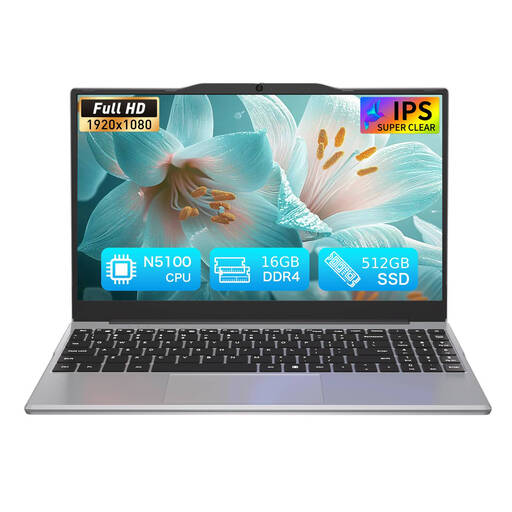
Auusda T141J Laptop
Consider this listed configuration only after checking that its processor and operating system meet your course software requirements.
Intel N5100; 16GB DDR4; 512GB SSD; 14.1-inch, 1920 × 1080 display.
Joybuy
 No image available
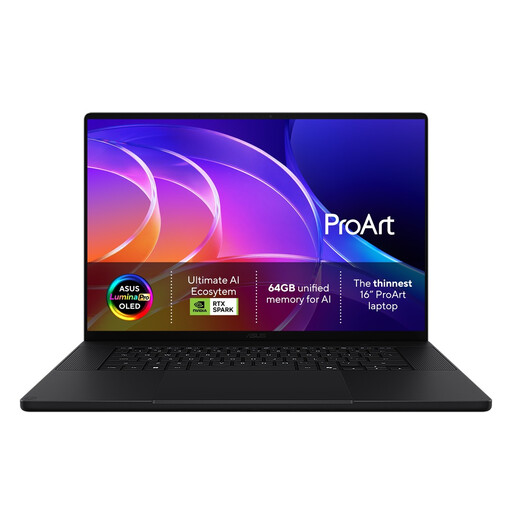
ASUS ProArt H7607BA-SE033W
This creator-laptop option may be relevant to a course involving demanding creative applications; compare its exact configuration with the department’s requirements.
16-inch 4K OLED; NVIDIA RTX Spark N1X; Nano Black.
Joybuy
Laptop questions answered
Is 8GB RAM and a 256GB SSD enough for my course?
It may be a starting point for some courses, but it does not confirm suitability for yours. The University of Hertfordshire recommends at least 8GB RAM and a 256GB SSD for most of its students and advises a higher specification for some specialist software; check your own course and department guidance before buying.
Can I use a Mac or Chromebook for engineering work through a virtual desktop?
Possibly, if your department provides and approves that option. One University of Nottingham engineering department describes access to some software through a virtual Windows PC, which depends on a stable internet connection; do not assume the same arrangement is available for another course.
What should I check when setting up a used laptop?
Check that its operating system is supported, it can connect to required campus services, and its battery and included components match the listing. For a Chromebook, Google explains how to find the device-specific automatic-update date in ChromeOS settings.
Do I need to buy course software separately?
Ask your institution before paying for a licence. The University of Nottingham describes student access to Microsoft 365 and specialist engineering software through university facilities or a virtual desktop, but licences and access arrangements depend on the institution and course.
What UK return rights should I distinguish from a laptop warranty?
For an eligible distance purchase from a trader, GOV.UK says you can notify the seller of cancellation within 14 days of receiving the item and then have another 14 days to return it. Fault remedies and a seller or manufacturer warranty are separate matters, so check who the seller is and the terms for your transaction.


