What to check before buying
Start with your department’s software and assessment requirements, then assess how the device will fit your daily study locations and your plan for keeping coursework accessible.
| Priority |
What to check |
Your needs |
| Course software compatibility |
Check named applications, operating-system restrictions, minimum memory and storage, virtual-desktop access, and assessment tools. Confirm whether Windows, macOS or ChromeOS is required before choosing. |
I need a device that supports my programme’s applications, university services and full coursework workflow throughout the degree. Loughborough University specifically recommends a Windows PC for engineering cases involving Apple-incompatible software. |
| Portable productivity |
Consider laptop form factor, keyboard comfort, screen size, battery capacity and access to sockets. A tablet with a keyboard still needs confirmed support for required software and authoring tasks. |
I want something manageable to carry while still being able to write longer assignments, collaborate and use specialist applications when needed. |
| Continuity when access is interrupted |
Check your institution’s loan-device availability, return period, charging rules and data-clearing policy. Save work to an accessible location before returning a loan machine. |
I need a way to keep studying if my main device is unavailable or out of charge, without treating a short-term loan as my permanent setup. |
| Coursework and account protection |
Set up cloud and/or external-drive backups, use a strong device lock, and keep the operating system and apps updated. Consider how you will recover files if the device is lost, erased or inaccessible. |
I want coursework to remain recoverable when I study in shared spaces or switch between personal and loan devices. The National Cyber Security Centre recommends backing up important data and protecting devices with a strong PIN or password. |
Joybuy laptop options
These Joybuy options are Windows laptop routes for students who need a personal computer for coursework across campus and home. Confirm your department’s software, assessment and hardware requirements before choosing a model.
 No image available
Lenovo IdeaPad Slim 3 15.3-inch WUXGA, Ryzen 5 7535HS, 24GB/512GB
A Windows laptop option for a keyboard-based study workflow across campus, home and shared spaces.
Windows 11 Home, 24GB DDR5 RAM, 512GB PCIe SSD, 15.3-inch WUXGA anti-glare display, Wi-Fi 6, HDMI, USB connectivity and a stated weight of 1.59 kg.
Check course-software and assessment-tool compatibility, and confirm battery expectations for study away from sockets. Plan a separate cloud and/or local coursework backup.
Joybuy
 No image available
ASUS Vivobook 15 X1504VA, Core 5 120U, 24GB/1TB
A Windows laptop route for document work, online teaching and local course files.
Windows 11 Home, 24GB DDR5 RAM, 1TB SSD, 15.6-inch Full HD IPS anti-glare display, Wi-Fi 6, Bluetooth 5.2, HDMI, USB ports, webcam and microphone.
Verify named course-software requirements before purchase. The stated battery figure is standby time, so check active-use battery expectations for lectures and library sessions.
Joybuy
 No image available
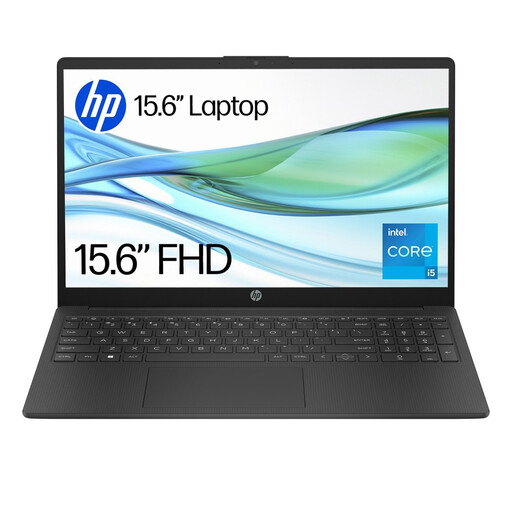
HP 15-fd0064na, Core i5-1334U, 8GB/256GB
A conventional Windows study laptop for essays, research and online teaching while travelling between locations.
Windows 11 Home, Intel Core i5-1334U, 8GB RAM, 256GB SSD, 15.6-inch Full HD display, Wi-Fi 6, HD camera, microphone mute key and physical camera privacy door. Stated weight: 1.59 kg.
Compare the 8GB RAM and 256GB storage with your course requirements and expected project-file sizes. Keep a separate recoverable backup of coursework.
Joybuy
 No image available
HP OmniBook X Flip 16-as0004na, Core Ultra 5, 16GB/512GB
A convertible Windows laptop for students who alternate between typing, reading and touchscreen-based annotation.
Windows 11 Home, Intel Core Ultra 5 226V, 16GB RAM, 512GB PCIe Gen4 SSD, 16-inch 2K IPS touchscreen, 16:10 display, 360-degree hinge, Wi-Fi 7 and 5MP IR camera with privacy shutter.
Check whether the 16-inch format suits your regular journey and bag, and confirm that required course applications support this configuration. Maintain a separate coursework backup.
Joybuy
 No image available
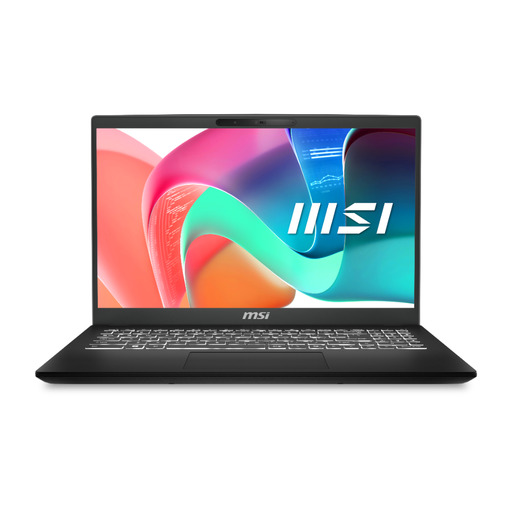
MSI Modern C2RMG-282UK, Core 5, 16GB/512GB
A Windows laptop option for everyday coursework and desk study with several connected accessories.
Intel Core 5 processor, 16GB DDR IV RAM, 512GB SSD, 15.6-inch Full HD display, three USB-A ports, USB-C Power Delivery and RJ-45 Ethernet. Stated weight: 1.86 kg.
Its stated weight may matter for frequent all-day carrying. Check the exact Windows configuration and named faculty software requirements, and retain coursework in a separate backup location.
Joybuy
Frequently asked questions
Do UK university students always need to buy their own laptop?
Not always, but regular access to a laptop or desktop is recommended by several universities. UCL and the University of Edinburgh describe a computer as important for study, while Reading, Leeds and Exeter offer loan schemes with different availability and time limits, so check your own university’s provision before relying on a loan as your main arrangement.
Can a tablet with a keyboard replace a laptop for university?
Only when your course confirms that required applications, assessment workflows and document-authoring tasks work on that tablet platform. UCL and Loughborough University say tablets can be useful for notes and online resources, but their software range can be more limited than a full computer setup.
What should I ask my department before choosing macOS, Windows or a Chromebook?
Ask for named required applications, operating-system restrictions, minimum memory and storage, virtual-desktop options, and any assessment or lab software requirements. Loughborough University identifies an engineering application that does not work on Apple devices, while Loughborough and the University of Edinburgh caution that Chromebook compatibility cannot be assumed.
How should I protect coursework when using a shared or loan laptop?
Save work to university-approved cloud storage or another backed-up location before ending the session. The University of Reading says user data and credentials are cleared when a loan laptop is returned, and the National Cyber Security Centre recommends backing up important data to cloud storage or an external drive.
What UK consumer protection applies if a newly bought laptop is faulty?
Under section 23 of the Consumer Rights Act 2015, where a consumer is entitled to repair or replacement for faulty goods, the trader must provide it within a reasonable time and without significant inconvenience, including necessary costs such as labour, materials and postage. This statutory remedy is separate from any manufacturer warranty.


