What matters when choosing?
Course requirements come before a general laptop specification. Once the required software is accounted for, decide whether daily portability, continued use of an existing device or an approved tablet setup matters most to you.
Windows laptop
Consider it: If your programme requires local Windows applications or specialist engineering tools. UWE Bristol describes Windows as its most compatible option for university and specialist software.
Keep in mind: Windows alone does not establish that a particular laptop meets the course’s processor, memory or graphics requirements.
Mac laptop
Consider it: If your department confirms that its required applications and access methods work on macOS.
Keep in mind: Loughborough University identifies NX as an engineering application that does not work on Apple devices, and UWE Bristol says Windows cannot be installed on Apple-processor Macs.
Keyboard tablet
Consider it: As a primary device only if your programme confirms that its applications and assessments work on the intended tablet.
Keep in mind: The University of Warwick’s Computer Science department says iPads and Android tablets are unsuitable as primary computers for its modules.
Keep, upgrade or buy refurbished
Consider it: If an existing or refurbished computer meets the course workload and runs a supported operating system.
Keep in mind: Condition and configuration matter more than age alone; check battery health and the warranty terms of a refurbished device.
| Concern | What to check | Who this matters to |
|---|
| Course software and operating system |
Confirm required applications, whether they must run locally, and any minimum processor, memory or graphics specification with your department. |
If my course uses specialist software, I need to know it will work on the computer I bring to university. Around 38% of consumers put course compatibility first. |
| Study across locations |
Compare the size and weight you would carry, plus the battery-life conditions and connections you need. |
Moving between lectures, accommodation and home makes a computer’s carrying weight and everyday usability important to me; roughly 31% of consumers prioritise portability. |
| Keeping or replacing a device |
Test your coursework on the current machine; for a refurbished one, check its exact configuration, battery condition and warranty. |
If my laptop still handles the work, I would rather establish whether it remains suitable before replacing it. About 23% of consumers make avoiding an unnecessary replacement their main concern. |
| Tablet-first study |
Ask whether every required application and assessment works on the intended tablet and keyboard setup. |
A tablet would be convenient for my notes and reading, but I need it to handle assessed work too; approximately 8% of consumers put an approved tablet-first setup ahead of the other concerns. |
Windows laptops for study
These Joybuy Windows laptops offer different screen sizes and configurations for general study or courses that specify local graphics capability. Match any model to your department’s software requirements before deciding whether it is suitable; a Windows label alone is not enough.
 No image available
ASUS Vivobook 15 X1504VA, Core 5 120U, 24 GB, 1 TB SSD
Consider this configuration for general study if it meets your department’s software requirements.
It has a 15.6-inch display, an Intel Core 5 120U processor, 24 GB of memory and a 1 TB SSD. Check compatibility with any required applications and peripherals.
View on Joybuy
 No image available
ASUS Vivobook 14 X1407QA-LY003W, Snapdragon X, 16 GB, 512 GB SSD
Consider this 14-inch option for study across locations only after checking that your course applications and assessment tools work with its Snapdragon X Windows-on-ARM configuration.
The listed variant has 16 GB of memory and a 512 GB SSD. Check peripheral compatibility as well as software requirements before buying.
View on Joybuy
 No image available
Lenovo LOQ Essential 15ARP11, Ryzen 7 170, 16 GB, 1 TB SSD, RTX 5050
Consider its dedicated graphics only if your course calls for local graphics work and the department confirms this configuration meets its requirements.
The named variant includes a 15.6-inch Full HD 144 Hz display, an AMD Ryzen 7 170 processor, 16 GB of memory, a 1 TB SSD and GeForce RTX 5050 graphics. Its larger-format design is worth considering if you carry it to campus regularly.
View on Joybuy
 No image available
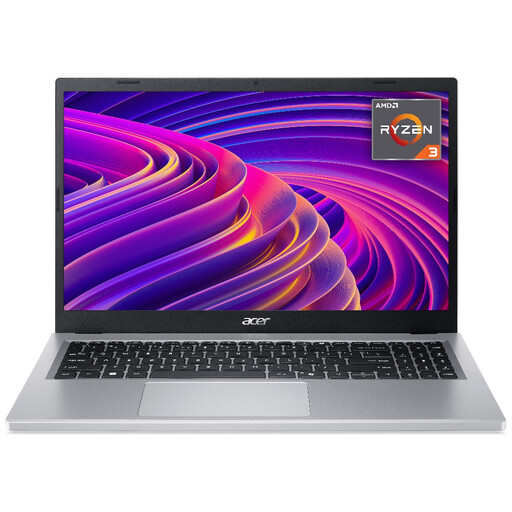
Acer Aspire Go 15 AG15-21P, Ryzen 3 7320U, 8 GB, 256 GB SSD
Consider this configuration for general document and online study if its specification meets your programme’s workload.
Its product title lists a 15.6-inch Full HD display, an AMD Ryzen 3 7320U processor, 8 GB of memory and a 256 GB SSD. Check the exact model and configuration being supplied, as the product details also use the Aspire 3 name.
View on Joybuy
 No image available
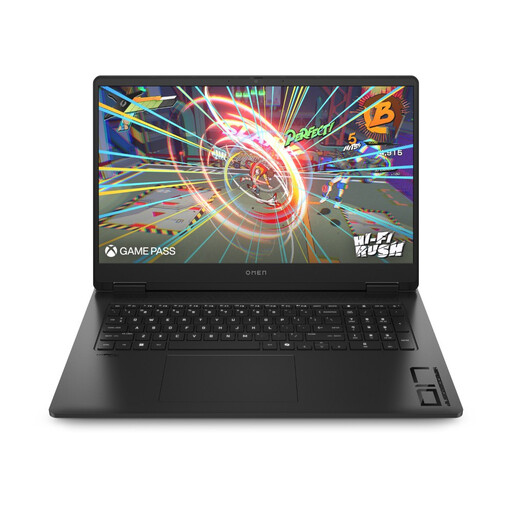
HP OMEN 17-db1000na, Ryzen AI 7 350, 16 GB, 1 TB SSD, RTX 5060
Consider this larger-screen Windows laptop if your course requires a configuration of this kind and you are comfortable carrying a 17-inch device between study locations.
The named variant has a 17.3-inch Full HD display, an AMD Ryzen AI 7 350 processor, 16 GB of memory, a 1 TB SSD and RTX 5060 graphics. Confirm that the exact software and graphics requirements match before choosing it.
View on Joybuy
Common questions
Do I need a new laptop if my current one still works?
No, provided your current computer remains reliable, runs a supported operating system and handles your required coursework. The University of Warwick says a reliable laptop under three years old is likely to be sufficient, while Heriot-Watt University advises against replacing a device solely because recommendations for new purchases exist; your course requirements still take priority.
Can a Chromebook, Linux laptop or tablet be my main university computer?
Only if your department confirms that the intended platform can complete its required work. Loughborough University identifies support and functionality limits for Chromebooks and Linux devices, and the University of Warwick’s Computer Science department says tablets and Chromebooks are unsuitable as primary devices for its modules. Check applications and assessment methods, not just access to a web browser.
Is a MacBook suitable for engineering or computer science?
A MacBook can be suitable where the exact course tools support macOS, but the answer varies by department. Loughborough University identifies NX as an engineering application that does not work on Apple devices, while the University of Nottingham notes that some engineering software may need a virtual Windows PC. Confirm both software access and any internet-dependent remote arrangement with your programme.
What should I check on a refurbished laptop?
Check the individual machine’s operating-system support, processor, memory, storage, battery condition, charger, ports and warranty against your course requirements. Dell’s UK Outlet offers certified-refurbished laptops, but the applicable configuration, condition and warranty terms need to be checked on the particular listing.


