What matters when choosing?
Check compulsory software first, then compare the configuration and carrying demands of laptops that can meet those requirements. A convertible design or refurbished condition does not, by itself, settle operating-system compatibility.
| Priority |
What to check |
Your needs |
| Course compatibility |
Ask for the named applications, required operating system, licence method and any remote-desktop option. Loughborough University says its engineering application NX will not work on an Apple device; the University of Edinburgh warns that some programme software cannot run on Chromebooks. |
I need to complete compulsory work on the device I plan to bring to university, or know exactly how I will access a compatible computer. |
| Memory and storage |
Compare the processor, RAM and SSD with your department’s course-specific requirements, particularly for locally installed engineering, design or simulation tools. Check the space needed for applications and coursework files. |
Specialist applications and several open study tools may make a basic configuration unsuitable for my course. |
| Campus use |
Compare stated weight and battery-use conditions with your journey and access to charging. Check the screen size, camera and microphone you need for reading and online sessions. |
I will carry the laptop between study spaces and may need to join teaching sessions away from a fixed desk. |
| Format and condition |
For a 2-in-1, confirm the full operating system runs your course software; a touchscreen alone does not establish this. For a refurbished device, check its condition, battery, included accessories and warranty terms. |
Handwritten annotation could be useful to me, or I may consider a refurbished machine, but either route still has to support my coursework. |
Brands and operating-system ecosystems
These brands are relevant to the operating-system decision, but a brand name does not establish compatibility with a particular degree.
Apple
Mac laptops are a route when your department confirms that its required applications work on macOS.
- May fit students who already use a macOS workflow and whose course supports it.
- Loughborough University says the engineering application NX will not work on an Apple device; check named specialist tools before choosing a Mac.
Microsoft
Surface devices are a Windows route to consider where a course requires Windows software.
- Microsoft lists Surface devices, including certified-refurbished options.
- Check the particular device’s configuration against your department’s requirements; the Windows operating system alone does not establish that it meets them.
Joybuy laptop options
These options include Chromebook, Windows, macOS and convertible laptops for different approaches to campus study. Check your department’s requirements before deciding which configuration to consider.
 No image available
Acer Chromebook Plus 514 CB514-5H, 14-inch, Iron
Consider this Chromebook for browser-based coursework only if your department confirms that ChromeOS supports every required application and assessment task.
Listed configuration: 14-inch WUXGA (1920 × 1200) display, Intel Core i3-1315U, 8GB RAM and 256GB SSD. The University of Edinburgh warns that some degree-programme software cannot run on Chromebooks.
View on Joybuy
 No image available
Acer Aspire Go 15 AG15-71P, 15.6-inch, Silver
This Windows laptop is a route to examine if your course calls for Windows; confirm that its particular configuration meets the requirements of your applications.
Listed configuration: Intel Core i5-13420H, 8GB DDR5 RAM, 256GB NVMe SSD, 15.6-inch Full HD screen and Windows 11 Home. Check whether 8GB RAM is sufficient for specialist coursework.
View on Joybuy
 No image available
Acer Aspire Lite AL15-36P-C29Z, 15.6-inch, Silver
For general study on Windows, check both course-software compatibility and the space required for your applications and files.
Listed configuration: Intel N150, 8GB DDR4 RAM, 128GB SSD, 15.6-inch Full HD screen and Windows 11 Home. Confirm that the specified memory and storage meet your course requirements.
View on Joybuy
 No image available
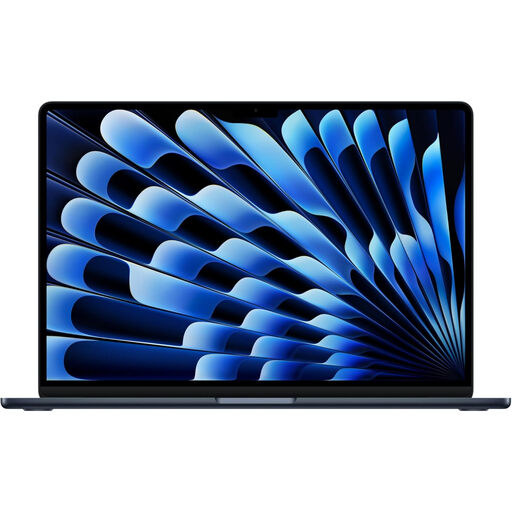
Apple 13-inch MacBook Air (2026), M5, Midnight
Consider this Mac only after your department confirms that your required software runs on macOS or provides a workable alternative for Windows-only tasks.
Listed configuration: M5 chip with 10-core CPU and 10-core GPU, 24GB memory and 1TB SSD. Loughborough University identifies at least one engineering application, NX, that will not work on an Apple device.
View on Joybuy
 No image available
HP OmniBook X Flip 16-as0004na, 16-inch 2-in-1
The convertible touchscreen offers another format for reading and note-taking, but it does not establish that compulsory course applications will run.
Listed configuration: Intel Core Ultra 5 226V, 16GB RAM, 512GB SSD and Windows 11 Home. Confirm software compatibility with your department and check the battery information against your time away from charging.
View on Joybuy
Frequently asked questions
Do engineering students need Windows rather than macOS?
Some do, but the requirement depends on the programme. Loughborough University says NX will not work on an Apple device and recommends Windows for engineering students; the University of Glasgow says its engineering labs and software suite run on Windows. Ask your own department about its current applications and remote-access arrangements.
Can a Chromebook be my only university computer?
Only if your course confirms that every required application and assessment task works with ChromeOS and that the device can receive the support you need. The University of Edinburgh warns that some programme software cannot run on Chromebooks, while Loughborough University says it does not support them or guarantee full functionality.
Is a 2-in-1 the same as relying on a tablet?
No: check which operating system the 2-in-1 runs and whether it supports your course software. A tablet-only setup presents a different risk; Loughborough University notes limits on tablet software availability, and University College London says a mobile device alone is not enough for effective study.
What should I check on a refurbished university laptop?
First confirm that its operating system and configuration meet your course requirements. Then check the stated condition, battery condition, included accessories and warranty arrangements, and keep the seller’s description and purchase documents.


