Check your course’s required applications, operating systems and connected equipment before choosing a laptop. University of Bath and University of Nottingham guidance identifies Windows-dependent engineering work, while a Mac can suit a course that confirms macOS compatibility. For mainly writing, research and online learning, start with the course’s general requirements rather than a specialist-workload configuration; use a Chromebook as your main device only if your provider confirms it will meet the course’s needs.
Who needs which laptop?
Students doing mainly documents and browser-based work
If your course centres on writing, research, presentations, online learning and video meetings, a general-purpose laptop is the starting point. University of York’s student guidance gives a baseline of 8GB RAM and a 256GB or larger SSD; check your department’s requirements before treating that as sufficient for every module.
Students using specialist software or equipment
Engineering, design, computing and media courses can depend on named applications, drivers or connected hardware. University of Bath identifies Windows-only engineering software, so confirm the required operating system and exact application versions before choosing a configuration.
Students carrying a laptop between study spaces
If you regularly move between lectures, home and a desk with external equipment, weigh carrying comfort against screen size and connections. University of York suggests a laptop under 1.5kg for campus carrying; check the ports and charging arrangements your own routine requires.
What should you check before buying?
Start with requirements that could rule out a laptop, particularly course software and hardware connections. Then match its configuration and carrying demands to the work you will actually do.
| Concern |
What to check |
Who this matters to |
| Course-software compatibility |
Ask for the named applications and supported operating systems. Check processor architecture and drivers if course equipment must connect locally. |
If a required application or device works only with particular hardware, I need to establish that before choosing a laptop. About 36% of consumers put this compatibility need first. |
| Workload performance |
Compare the exact processor, RAM, storage and graphics configuration with your applications’ requirements, especially for rendering or visualisation. |
When projects involve demanding software or large files, I need a configuration that meets those workloads rather than a general coursework baseline. About 29% of consumers make workload capacity their primary concern. |
| Campus portability |
Check laptop and charger weight, screen size and the conditions behind any battery-life claim. University of York suggests under 1.5kg for campus carrying. |
Carrying a laptop throughout the day makes weight, a usable screen and charging opportunities important to me. About 21% of consumers prioritise that day-to-day mobility. |
| Connections and study setup |
List the monitor, storage and course devices you will use; check the exact model’s ports and display support before choosing an adaptor or dock. |
If my work depends on an external display or a course device, I need to know the whole setup will connect. About 14% of consumers put connections and setup first. |
Common buying mistakes
-
Choosing an operating system before checking course software
A laptop may be unsuitable if a required application, driver or hardware tool does not work with its operating system or processor architecture. University of Bath identifies Windows-only software in its mechanical engineering guidance.
Ask your course team for application names, versions and peripheral requirements, and whether it supports a remote alternative.
A supported remote workflow or access to another compatible computer may be necessary if the chosen laptop cannot run the work locally.
-
Buying for the wrong workload
Document-based study and specialist rendering or visualisation call for different configurations. Which? describes an all-rounder as sufficient for routine student work, while course-specific application requirements can demand more.
Compare those requirements with the exact model’s memory, storage, processor and graphics rather than relying on its product-family name.
-
Assuming every monitor or course device will connect
Ports and external-display support vary by model, and remote access does not replace a physical connection needed for some hardware activities.
Check your monitor inputs and each required device against the laptop’s ports and supported display configuration.
A compatible adaptor or dock may be needed for the resulting setup.
-
Treating maximum battery life as a timetable guarantee
Lenovo notes that battery life varies with factors including brightness, active applications and battery age. A quoted maximum does not establish runtime for your coursework.
Consider your applications, time away from sockets and whether carrying the charger is practical.
Laptop ranges to consider
Apple
MacBook Air is a macOS option when your course confirms that its required applications and peripherals work with macOS and Apple silicon.
- Apple lists Thunderbolt 4/USB-C ports and external-display support for the MacBook Air; check the exact model and planned display setup.
- UWE Bristol warns that some specialist applications are unavailable for macOS and that Windows cannot be installed on Apple-processor Macs through Boot Camp.
Dell
The Inspiron range offers Windows laptops in different screen sizes for students comparing general-purpose configurations.
- Dell lists 14-, 15- and 16-inch Inspiron options, allowing screen size to be considered alongside carrying needs.
- Connections and other features vary by configuration. Check the exact model’s processor, memory, storage, graphics and ports against your course requirements.
ASUS
Vivobook covers a range of Windows laptop configurations, from smaller general-purpose models to larger options with differing hardware.
- ASUS lists Vivobook configurations with differing memory and storage capacities, including options of up to 32GB RAM and 1TB SSD.
- The range name does not establish the specification or specialist-software compatibility of an individual Vivobook. Check the precise variant.
Joybuy laptop selections
These laptops cover general coursework and configurations to consider for more demanding creative or technical work, including a macOS option. Check each one against your course’s software and equipment requirements before choosing.
 Image unavailable
ASUS ProArt P16 H7606WW-SE006W
Consider this configuration for a course with demanding local creative work, once its applications and peripherals are confirmed compatible. The listed variant has a 16-inch 4K OLED touchscreen, AMD Ryzen AI 9 HX 370, NVIDIA GeForce RTX 5080 16GB graphics, 64GB RAM, a 2TB SSD and Windows 11 Home. Check whether its screen size suits your daily carrying routine.
View on Joybuy
 Image unavailable
ASUS Vivobook 15 X1504VA, Cool Silver
This is a general-purpose option to compare with requirements for writing, research and multitasking. Its listed configuration has a 15.6-inch display, Intel Core 5 120U, 24GB RAM and a 1TB SSD. Confirm specialist graphics or software requirements separately if your course has them.
View on Joybuy
 Image unavailable
Acer Aspire Go 15 AG15-71P, Silver
Compare this model with a general coursework baseline if your applications do not call for a stronger configuration. It lists an Intel Core i5-13420H, 8GB DDR5 RAM, a 256GB NVMe SSD, a 15.6-inch Full HD screen and Windows 11 Home. Check whether its memory and storage meet your course’s requirements.
View on Joybuy
 Image unavailable
Lenovo LOQ Essential 15ARP11
Consider this Windows configuration if your course specifies graphics-capable local hardware, while checking the exact applications and drivers first. It lists an AMD Ryzen 7 170, 16GB RAM, a 1TB SSD, GeForce RTX 5050 graphics and a 15.6-inch 144Hz FHD display. Its gaming-oriented configuration is not a course requirement in itself.
View on Joybuy
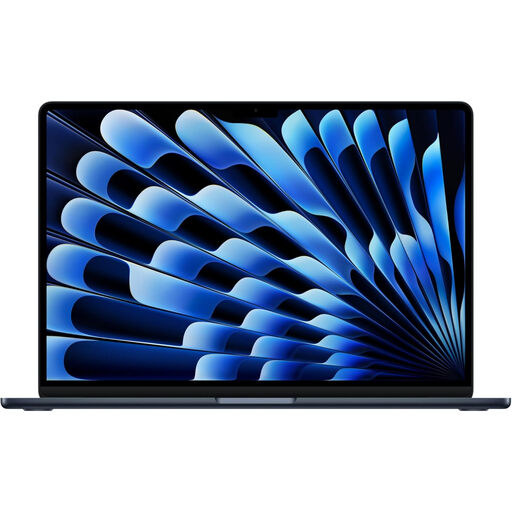 Image unavailable
Apple 13-inch MacBook Air (2026), M5, Midnight
This macOS option is worth considering only after your course confirms support for every required application and peripheral. The listed variant has an M5 chip with a 10-core CPU and 10-core GPU, 24GB unified memory and a 1TB SSD. Do not assume a Windows-only course application can be installed locally through Boot Camp on Apple silicon.
View on Joybuy
Questions about course laptops
Should I choose Windows, a Mac or a Chromebook for university?
Choose an operating system that supports your course’s named applications and equipment. UWE Bristol identifies Windows as the more compatible route for much specialist university software and warns that some applications do not run on macOS; it does not recommend Chromebooks as primary study devices. Ask your course provider before relying on a Mac or Chromebook for required work.
Is 8GB RAM enough for university work?
It can meet a general-study baseline: University of York specifies 8GB RAM and a 256GB or larger SSD for taught students. If your course uses demanding programming, creative or technical applications, compare their published requirements with the exact laptop configuration before deciding that 8GB is sufficient.
Can a university virtual desktop replace a powerful laptop?
It can be part of your study setup if your university provides the required software remotely and your work does not depend on locally connected hardware. University of Nottingham says its Engineering Virtual Desktop needs a stable, reasonably fast internet connection and does not suit every hardware-based activity.
What should I check before buying a monitor adaptor or dock?
Check the exact laptop’s ports and supported number of displays against your monitor’s input and resolution, then account for any course devices you also need to connect. University of York advises checking external-monitor capability and USB ports; a laptop-family name alone does not establish that your complete setup will work.


