What should you check before choosing?
Confirm the course workflow first, then choose a device and accessories that meet it.
| Priority | What to check | Your needs |
|---|
| Main device |
Check whether assessed work needs desktop applications, sustained document editing or a particular browser. UCL says a tablet or smartphone alone is insufficient for effective study; confirm any tablet-first plan with your department. |
I need to complete assignments away from shared computers, not just read and annotate course material. |
| Course software |
Ask for the exact applications, supported operating systems and personal-device licence terms. Loughborough University cites NX as an example of engineering software that does not work on Apple devices. |
My laptop must run the tools used in teaching and assessment, whether I prefer Windows or macOS. |
| Memory and storage |
Compare the exact configuration with department requirements, especially for locally installed software and larger project files. Check whether the listed memory and SSD capacity belong to the model you are ordering. |
For larger files or several applications open at once, I want to check the fitted specification rather than rely on a laptop family name. |
| Study locations |
Consider the stated weight, charging arrangements, Wi-Fi requirements and camera for the places you study and join online sessions. The University of Warwick recommends a portable laptop for use on campus, in residences and at home. |
I carry my computer between study locations and need to participate in online teaching there. |
| Connections |
Match the exact laptop’s ports and display-output support to any monitor, drive or presentation equipment. Check an adapter’s charging and display compatibility before adding it. |
If I use an external screen or storage drive, I want the connection to work with my chosen laptop. |
| University access |
Check your institution’s software portal for applications, installation rights and course restrictions. Newcastle University’s student software catalogue illustrates how access can depend on the software and discipline. |
I want to know which course tools I can install on my personal device before choosing its operating system. |
Relevant brand ranges
A brand range can help narrow the options, but course compatibility and the exact configuration matter more than the name on the lid.
Apple
Apple’s UK MacBook Air specifications include configurations with 16GB unified memory, SSD storage and Thunderbolt 4/USB-C ports. Consider a Mac when your course confirms that its required applications run on macOS.
- Check the chosen MacBook Air configuration and its available connections against your study setup.
- Do not assume macOS supports specialist software: Loughborough University identifies NX as an application that does not work on Apple devices.
Lenovo
Lenovo describes configurable memory and storage options for its UK ThinkPad E14 Gen 7 range. Specifications for that range should not be assumed to apply to a different Lenovo model.
- Compare the fitted memory and storage of the exact model with your department’s requirements.
- Check the individual configuration’s operating system, ports and support arrangements rather than relying on the range name.
ASUS
ASUS lists Vivobook configurations with up to 32GB memory and 1TB SSD storage in its UK range. Those figures describe available options, not every Vivobook.
- Compare the exact Vivobook model’s fitted specification with the applications you need.
- An advertised upper limit for a range does not establish the memory or storage in a particular configuration.
Laptop options on Joybuy
These laptop options address the main-device decision for coursework. Before choosing one, confirm your course software and assessment requirements; a tablet or peripheral serves a different part of the study setup.
 No image available
ASUS Vivobook 14 X1407QA-LY003W Copilot+ PC, Quiet Blue
For coursework and online study where the required applications support this configuration. The listed model has a Snapdragon X processor, 16GB RAM and a 512GB SSD; confirm your course’s operating-system and application requirements before choosing it.
View on Joybuy
 No image available
Lenovo IdeaPad Slim 3 15.3-inch 83K7009MUK, Grey
A Windows 11 Home option for coursework and multitasking, subject to your course’s software requirements. Its listed configuration has an AMD Ryzen 5 7535HS processor, 24GB DDR5 RAM, a 512GB PCIe SSD, a WUXGA display and Wi-Fi 6. Check the exact ports if you plan to connect a display or other peripherals.
View on Joybuy
 No image available
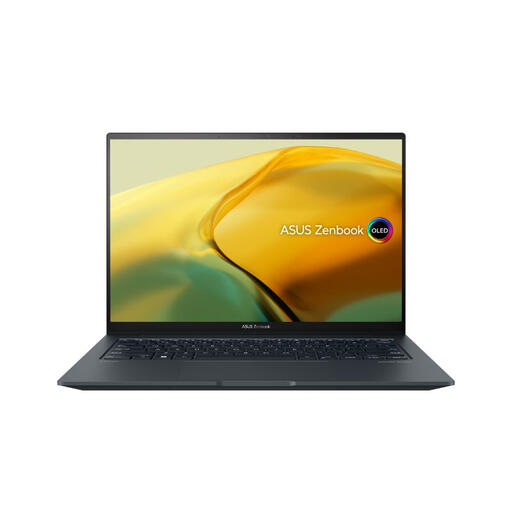
ASUS ZenBook UX3404VC-M3130W 14.5-inch OLED Touchscreen
Consider this configuration if your course calls for local work with larger files or a specified graphics capability, after checking its exact requirements. The title lists an Intel Core i9 processor, RTX 3050 graphics, 16GB RAM, a 1TB SSD and Windows 11 Home; those features alone do not establish compatibility with a particular application.
View on Joybuy
 No image available
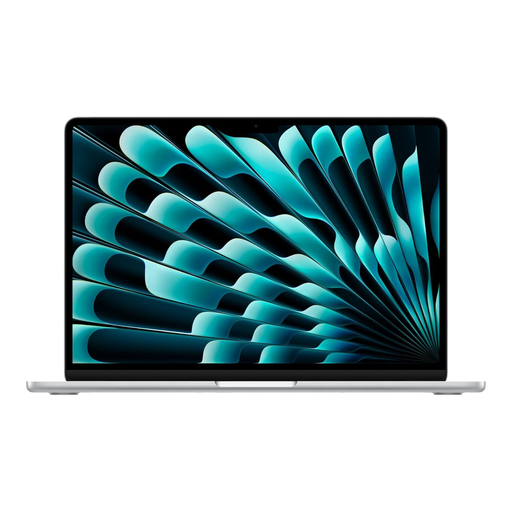
Apple 13-inch MacBook Air (2026), M5, Silver
A Mac option for general coursework when your department confirms macOS support for its required applications. This variant lists an M5 chip with 10-core CPU and 8-core GPU, 16GB unified memory and a 512GB SSD. Check the exact application and peripheral requirements before ordering.
View on Joybuy
 No image available
HP OmniBook X Flip 16-as0004na 16-inch 2-in-1
A touchscreen laptop option for coursework where its configuration meets the course’s application requirements. The title lists an Intel Core Ultra 5 226V processor, 16GB RAM, a 512GB SSD and Windows 11 Home. If you will carry a 16-inch device regularly, check its weight against your needs.
View on Joybuy
Common questions
Can a tablet with a keyboard replace a university laptop?
Do not assume it can. UCL says a tablet or smartphone alone is insufficient for effective study; a tablet-first setup makes sense only if your department confirms that every required application and assessment task works on it.
Should I choose Windows or macOS for engineering, computing or design?
Choose the operating system supported by your course’s exact applications. Loughborough University identifies NX as engineering software that does not work on Apple devices, so ask your department for its software list before deciding.
What should I check about university software before ordering?
Check which applications your institution makes available, whether you may install them on a personal device and which operating systems they support. Newcastle University’s student software catalogue shows why access should be checked by software title and discipline.
What if my department gives no specialist laptop specification?
Start with a current, supported operating system and compare each laptop’s fitted memory, storage and connections with the work you expect to do. The University of York advises checking with your department if you are unsure whether your course has specialist requirements.
Should I buy assistive equipment before a Disabled Students’ Allowance assessment?
No, if you are seeking equipment through the Disabled Students’ Allowance process described by GOV.UK: its guidance says not to buy equipment before you have been assessed. Check the arrangements with the funding body responsible for your support.


