What matters when choosing?
Check required course applications before deciding between a laptop, two-in-one and tablet; then assess how you will carry, use and maintain the device throughout your studies.
Conventional laptop
Choose when: One device must handle typed assignments and locally installed course applications.
Trade-off: A conventional laptop does not offer the same direct-on-screen handwriting format as a pen-equipped two-in-one.
Two-in-one laptop
Choose when: You need laptop software as well as regular touch input or annotation.
Trade-off: A detachable model may need a separately supplied keyboard or pen to suit your work.
Tablet with keyboard
Choose when: Your programme confirms that all required tools work on the tablet, or you have access to a compatible computer for other tasks.
Trade-off: A keyboard does not make unavailable desktop applications run on a tablet; UWE Bristol cautions against relying on tablets for specialist-app coursework.
| Concern |
What to check |
Who this matters to |
| Course software |
Ask which applications your programme requires and whether they run in a browser or on your chosen operating system. Check hardware requirements for specialist work. |
If my assignments depend on installed applications, a device I can carry is little use unless those applications run on it. Around 36% of consumers put course-software compatibility first. |
| Study across locations |
Compare weight, screen size, charging access, webcam and microphone, and the ports your own accessories need. |
When I move between lectures and other study spaces, I need a device I can carry and use for coursework and meetings. Around 29% of consumers prioritise dependable use across locations. |
| Continued access |
Assess your present device, warranty and repair arrangements, then check your institution’s loan and support options. |
If replacing a device would be difficult, I need a workable plan for staying connected to coursework when equipment is unavailable. For around 21% of consumers, continued access is the primary concern. |
| Handwriting and touch |
Check pen support, keyboard provision and coursework-software compatibility before choosing a convertible or tablet. |
When I regularly annotate readings or draw diagrams, direct input matters alongside typing assignments. Around 14% of consumers put pen-and-touch study first. |
Joybuy study-device choices
These laptops and two-in-ones offer conventional typing or convertible formats for personal coursework. Match each model to your required applications, carrying needs and preferred way of taking notes before choosing.
 No image available
HP OmniBook Ultra Flip 14-fh0006na 2-in-1 Copilot+
Consider this convertible if you want one device for typed coursework and touch-based study.
Its named configuration has 16GB RAM, a 1TB SSD and Windows 11 Home.
Confirm the exact display and graphics configuration before choosing this variant, and check battery runtime and whether a pen is included if you need one.
View on Joybuy
 No image available
ASUS Vivobook 15 X1504VA, 15.6-inch, Cool Silver
Consider this conventional laptop if you prefer a 15.6-inch screen for typed coursework.
The named configuration has an Intel Core 5 120U processor, 24GB RAM and a 1TB SSD.
Check the required course applications and expected battery runtime if you regularly work away from charging.
View on Joybuy
 No image available
HP OmniBook X Flip 16-as0004na 16-inch 2-in-1 Copilot+
Consider this larger touchscreen convertible if you alternate between typed coursework and touch-based reading.
The named configuration has an Intel Core Ultra 5 226V processor, 16GB RAM, a 512GB SSD and Windows 11 Home.
Check its weight and battery runtime for regular travel, and confirm whether a pen is included if handwriting matters to you.
View on Joybuy
 No image available
ASUS Vivobook 14 X1407QA-LY003W Copilot+ PC, Quiet Blue
Consider this 14-inch laptop for portable typed coursework once you have checked your required software.
Its named configuration has a Snapdragon X processor, 16GB RAM and a 512GB SSD.
Confirm that your course’s installed applications work with this Snapdragon X model, and check battery runtime against your usual study day.
View on Joybuy
 No image available
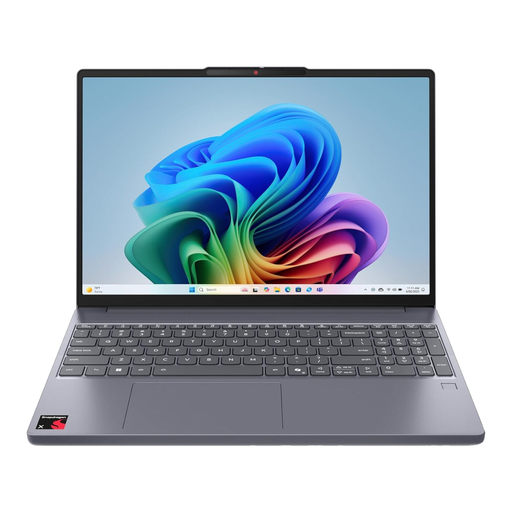
Lenovo IdeaPad Slim 3 15Q8X10 Copilot+ PC, 83N30029UK
Consider this 15.3-inch conventional laptop if its configuration fits your coursework and storage needs.
The named variant has a Qualcomm Snapdragon processor, 16GB RAM and a 256GB SSD.
Check compatibility with your course’s installed applications, whether 256GB meets your file-storage needs, and the battery runtime you can expect during study.
View on Joybuy
Frequently asked questions
Is a Chromebook or tablet enough for university coursework?
It can be, but only if your programme confirms that its required tools work on that device. UWE Bristol cautions against using Chromebooks or tablets as a primary study device where specialist applications cannot be installed; keep access to a compatible computer if your course needs those applications.
What specifications should I start with for ordinary coursework?
Start with your programme’s requirements rather than a universal specification. For general study, UWE Bristol gives an example with an i3/Ryzen 3-class processor, 8GB RAM and a 128GB SSD, while the University of Hertfordshire recommends at least 8GB RAM and a 256GB SSD for most students; specialist courses may need different hardware.
When might 16GB RAM and a 512GB SSD make sense?
Consider them when your course involves demanding applications or larger local files, but check its actual requirements. UWE Bristol uses 16GB RAM and a 512GB SSD in its intensive-work example, which is course-scenario guidance rather than a requirement for every student.
Should I check university laptop loans before buying?
Yes, particularly if your current device is unsuitable or you need temporary access. Schemes vary by institution: University College London, for example, describes a long-term loan route for eligible undergraduate bursary recipients in 2026/27. Check your own university’s eligibility, duration and device terms.
Can Disabled Students’ Allowance help with a computer?
For eligible students in England, it can support specialist equipment when a needs assessment establishes a disability-related study need. GOV.UK says not to buy equipment before the assessment if you want it considered through that route, because an earlier purchase will not be reimbursed. Students elsewhere in the UK should check the arrangements of their relevant funding body.


