What matters when choosing?
Check required course applications first, then decide how you will type, carry the device and work with study files. A convertible adds touch use to a laptop; a keyboard-equipped tablet and a refurbished computer each need their own compatibility checks.
| Concern |
What to check |
Who this matters to |
| Course software and assignments |
Ask your department for its named applications and operating-system requirements. Confirm whether the intended device can handle the required file workflow. |
If I must write long assignments or use specialist applications, I need a device that can run the actual course workload. About 33% of consumers put software and assignment compatibility first. |
| Study across locations |
Compare carrying weight and charging arrangements; check the camera and microphone needed for online sessions. |
Moving between lectures, home and group meetings, I need a device I can carry and use for online collaboration. For about 27% of consumers, dependable study across locations is the primary concern. |
| Handwriting and flexible use |
Check pen compatibility and whether a keyboard is included or needed separately. Confirm course-app support before relying on a tablet. |
If handwritten notes and annotation shape my study routine, I want touch or pen use without losing a workable typing setup. That flexibility comes first for about 20% of consumers. |
| Refurbished-device suitability |
Confirm the exact model, battery condition, included charger, warranty and return arrangements. |
When considering a refurbished computer, I need to know that its condition and configuration will hold up to my coursework. About 20% of consumers place that assurance ahead of the other concerns. |
Joybuy laptop selections
These selections cover conventional and convertible laptops for assignments and study across locations. Compare each model with your department’s requirements before choosing a primary device.
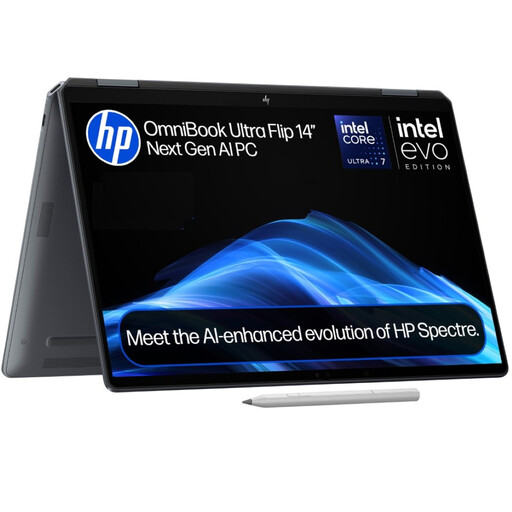 Image unavailable
HP OmniBook Ultra Flip 14-fh0006na, 16GB, 1TB SSD
Consider this Windows 11 Home 2-in-1 if you want a laptop for assignments with occasional touchscreen use. The listing describes a 360-degree hinge and a weight of 1.34 kg; the product name specifies 16GB RAM and a 1TB SSD. Check course-app compatibility and expected battery runtime. Graphics details conflict in the listing, so confirm the exact configuration if graphics capability matters to your course.
View on Joybuy
 Image unavailable
HP OmniBook X Flip 16-as0004na, 16GB, 512GB SSD
This Windows 11 Home convertible is a route for typing assignments and switching to touch use. Its listed configuration has a 16-inch touchscreen, Intel Core Ultra 5 226V processor, 16GB RAM and a 512GB SSD. Confirm required course software, carrying weight and expected battery runtime before relying on it for daily travel.
View on Joybuy
 Image unavailable
ASUS Vivobook 15 X1504VA, Core 5 120U, 24GB, 1TB SSD
Consider this conventional laptop if long-form assignments and connecting study peripherals matter more than touch modes. The listed model has a 15.6-inch display, 24GB RAM, a 1TB SSD, and HDMI, USB-A and USB-C ports. Check course-app compatibility and battery runtime for your study routine: a stated standby figure is not a measure of active study time.
View on Joybuy
 Image unavailable
ASUS Vivobook 14 X1407QA-LY003W, Snapdragon X, 16GB
This conventional 14-inch laptop may appeal if you regularly carry your study device; the listing gives its weight as 1.49 kg. The product name specifies a Snapdragon X processor, 16GB RAM and a 512GB SSD. Check that each required course application supports this processor and Windows configuration, and confirm battery runtime for your workload.
View on Joybuy
 Image unavailable
Lenovo IdeaPad 1 15-inch, Ryzen 3 7320U, 8GB, 128GB SSD
Consider this conventional laptop for general coursework only after checking your department’s applications and local-file needs. The listed model has a 15-inch Full HD display and Windows 11 Home in S Mode, with 8GB RAM and a 128GB SSD. Confirm that required software works in S Mode, that the storage is sufficient and that battery runtime fits your routine.
View on Joybuy
Common questions
Can a tablet be my only university study device?
Do not assume so before checking your course requirements. University College London advises regular access to a laptop or desktop, while the University of Oxford notes that tablets can be limiting for extended document work. A tablet with a compatible keyboard may suit reading, notes and browser-based tasks if your department confirms that the required applications and workflows work on it.
What laptop specification do I need for my course?
Start with your department’s requirements rather than a specification intended for every degree. University College London gives an i5 processor, 8GB RAM and 256GB SSD as an example benchmark for most of its courses, but warns that some require specialist equipment or software. Check the named applications and operating system before choosing a model.
Could a refurbished laptop work for university?
Yes, if the exact model meets your course requirements and its condition is clearly described. Check the battery information, included charger, keyboard layout, warranty and return arrangements rather than relying on the word “refurbished” alone.
Do I need an extended warranty for a laptop?
No: GOV.UK says an extended warranty is optional and does not need to be chosen when buying the laptop. Read the cover and exclusions, compare any protection you already have, and remember that a warranty does not replace your rights if goods are faulty.


