For one fixed upstairs device, check whether a safe, discreet Ethernet route is practical; if not, compare powerline adapters at the intended sockets with a Wi-Fi bridge where the wireless signal is usable. Choose mesh when you also need coverage in several rooms, and check that the satellite has an Ethernet port. Powerline depends on the home’s wiring, while bridges and wireless mesh depend on their Wi-Fi link.
Who each option may suit
One upstairs wired device
If you need Ethernet for one stationary device but want to avoid a conspicuous cable through the house, compare powerline at the intended sockets with a bridge where Wi-Fi already reaches. The scenario was raised in a MoneySavingExpert Forum discussion.
Households considering a discreet cable route
If you can plan a route from the downstairs router to the upstairs device, a direct cable avoids an additional wireless or powerline link. Check the route and any drilling carefully; Electrical Safety First advises taking account of cables concealed in walls.
Homes needing coverage in several rooms
If you need wider Wi-Fi coverage as well as an Ethernet socket upstairs, consider a mesh satellite with a suitable port and a usable link to the main unit. TP-Link’s placement guidance recommends checking the connection between mesh units.
What to check before choosing
For a single fixed device, start with whether a discreet cable route is safe and acceptable; otherwise, compare the actual socket locations and available Wi-Fi before choosing equipment.
| Concern |
What to check when buying |
Who this matters to |
| Avoiding a cable between rooms |
Check that the kit has two adapters, enough Ethernet ports and sockets you can test at both ends. |
If I want one upstairs device connected without a visible run through the house, avoiding that cable is my main concern. Around 36% of consumers put cable avoidance for one device first. |
| Using Wi-Fi for one Ethernet socket |
Check for wireless-to-Ethernet bridge operation, the port speed and a position with a usable incoming Wi-Fi signal. |
If Wi-Fi already reaches a suitable spot, I want to connect one Ethernet-only device without routing cable between rooms. Around 21% of consumers prioritise using existing Wi-Fi for that connection. |
| A direct physical connection |
Plan the route and cable length; before drilling, check for concealed cables and arrange competent help if needed. |
If a discreet route is practical, I want a direct connection rather than relying on a powerline or wireless link. Around 29% of consumers prioritise an acceptable direct run. |
| Ethernet plus wider Wi-Fi coverage |
Check the satellite’s Ethernet ports, its link to the main unit and the main unit’s connection to the router. |
If several rooms also need Wi-Fi, I want the upstairs device connection to be part of a broader coverage setup. Around 14% of consumers prioritise coverage across several rooms as well. |
Common buying pitfalls
-
Taking a powerline rate as the speed your device will receive
Powerline performance depends on the home’s electrical wiring and conditions at the chosen sockets, so a stated link rate does not establish the usable throughput for your device.
Test the router-side and upstairs sockets, and check the requirements for the exact kit.
If the link is unsuitable at those sockets, you may need to return the kit or consider another route.
-
Choosing mesh for its Ethernet ports without checking the backhaul
A device plugged into a wireless satellite has a wired connection to that satellite, but the satellite still relies on its link to the main unit.
Check the exact satellite’s ports and signal at the planned position; consider mesh when wider coverage is also useful. TP-Link says the main Deco unit must connect to the existing router by Ethernet.
A broader mesh setup may involve extra nodes when a more targeted connection would meet the need.
-
Assuming every extender’s Ethernet port is Gigabit
Port specifications vary by model. For example, NETGEAR specifies a 10/100 Mbps Ethernet port for the EX6120, while ASUS specifies a Gigabit LAN port for the RP-AX58.
Check the exact model’s Ethernet port and confirm that its wireless operation provides the connection you need.
-
Ruling out every cable route because one wall is difficult
A difficult exterior wall does not establish whether a different internal route is possible. Any proposed drilling also needs a safety check.
Assess the route separately and locate concealed cables before drilling. Electrical Safety First provides guidance on this risk.
An acceptable route may require planning or installation work.
Relevant brands to compare
TP-Link
Its Deco mesh and HomePlug powerline ranges offer different ways to provide a connection in another room; compare the exact model and setup.
- TP-Link specifies one Gigabit Ethernet port for the TL-PA7017 KIT and three for the remote unit in the TL-WPA8631P KIT.
- TP-Link says the main Deco unit must connect to the existing router by Ethernet; powerline results depend on the home’s wiring.
ASUS
The RP-AX58 is a bridge candidate, while the ZenWiFi AX Hybrid XP4 combines mesh and powerline in a distinct product.
- ASUS specifies media-bridge mode and one Gigabit LAN port for the RP-AX58.
- The XP4’s advertised powerline rate does not establish the connection you will get on your home’s wiring.
devolo
The Magic 2 LAN triple starter kit is a powerline option with several Ethernet ports on its remote adapter.
- devolo specifies three Gigabit LAN ports on the remote LAN triple adapter and says Magic units can be expanded within that series.
- devolo states that older dLAN adapters are unsupported; check compatibility within the exact range.
NETGEAR
The EX6120 is an example of an extender with an Ethernet port for a wired device.
- NETGEAR specifies extender or access-point operation for the EX6120.
- Its Ethernet port is 10/100 Mbps, so check whether that port meets the connected device’s needs.
Belkin
A physical Ethernet cable is an option when a suitable route between the router and device is practical.
- Belkin identifies a Category 6 UTP patch cable in its UK support material.
- Check the length and route needed for your installation; the cable identification does not determine either.
Joybuy products for this setup
These options cover a Wi-Fi extender with Ethernet ports and powerline kits for connecting wired devices in another room. The right fit depends on usable Wi-Fi or the wiring and sockets in your home.
 No image available
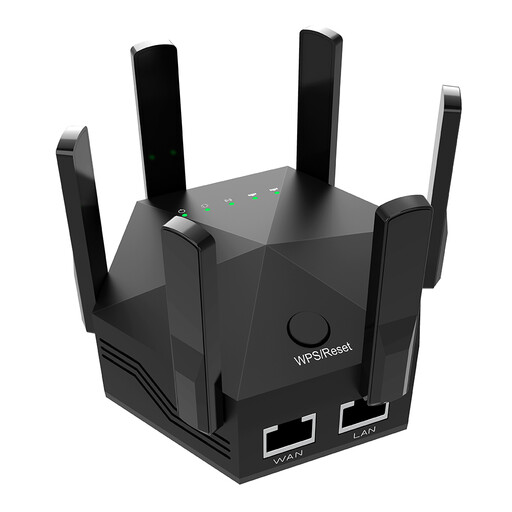
Dual-Band 1200Mbps Wi-Fi Extender, UK Plug
For a wired device where Wi-Fi reaches a suitable extender position; the connection still depends on that incoming wireless signal.
Two 10/100 Mbps Ethernet ports. Check that this port speed suits the device you plan to connect.
View on Joybuy
 No image available
TP-Link TL-WPA8631P KIT AV1300 Gigabit Powerline Wi-Fi Extender Kit
For a wired device in another room when you want to test a powerline connection and also extend Wi-Fi.
Three Gigabit Ethernet ports on the remote unit. Powerline performance depends on the home’s wiring; plug the adapters directly into wall sockets rather than power strips or extension leads.
View on Joybuy
 No image available
TP-Link TL-PA8010P KIT AV1300 Gigabit Passthrough Powerline Adapter Kit
For one wired device in another room when you want to test a powerline route instead of running data cable through the house.
The kit is described as using two adapters and provides a Gigabit Ethernet port for a wired device. Link performance depends on the home’s electrical wiring.
View on Joybuy
Frequently asked questions
Will an Ethernet cable plugged into a wireless mesh satellite make the whole connection wired?
No. The device connects by cable to the satellite, but a wireless satellite still communicates with the main unit over Wi-Fi. Check that the exact satellite has a free Ethernet port and a usable link to the main unit; TP-Link’s mesh guidance covers placement and backhaul options.
Can access-point mode avoid the need for a cable to an upstairs extender?
Not when that mode requires an Ethernet feed from the router. For wireless input and an Ethernet connection to your device, check that the exact model supports bridge mode or the appropriate wireless extender operation.
Do powerline adapters have to be on the same electrical circuit?
Do not assume the answer is the same for every product or home. TP-Link identifies different circuits as a common reason its units may not link, while devolo describes operation across different fuses and phases. Check the chosen model’s guidance and test the intended sockets; neither description guarantees a working connection in your home.
How can I check whether an extender will suit my wired device?
Check both its wireless-to-Ethernet operation and the speed of its Ethernet port. Models differ: NETGEAR specifies a 10/100 Mbps port for the EX6120, while ASUS specifies a Gigabit LAN port for the RP-AX58.
What should I check before drilling for an Ethernet cable?
Plan the route and check for concealed electrical cables before drilling. Electrical Safety First warns that drilling, nailing or screwing into hidden cables is a common DIY mistake; arrange competent help if you are unsure about the route.


