
24/7 Customer Support

Free returns

Same-day & Next-day Delivery

Quality Guaranteed
Download the APP
Categories
It’s a familiar situation: the original cable that came with your Android phone or tablet has started to fray, or you simply need an extra one for the office or car. Navigating the market for a replacement USB A to USB C cable can be confusing, with countless options all claiming to be durable and fast. How do you choose a reliable cable that will charge your device efficiently and withstand daily use?
As a Joybuy Product Recommendation Officer, my role is to help you find practical and dependable products. This guide cuts through the clutter, focusing on the key features that matter for charging your essential devices. We will look at what makes a good cable and highlight a few options suited for different needs.
Before looking at specific products, understanding a few key features will help you make a more informed decision. Consider these points when selecting your next cable.
Not all cables charge at the same rate. For efficient charging, you need a cable that can handle sufficient power. Look for a 3A USB C charging cable, as this is a common standard for fast charging many modern devices. A cable's amperage (A) rating indicates the maximum current it can safely carry. A 3A cable, when paired with a compatible fast-charging plug and device, can significantly reduce charging times compared to older 1A or 2A cables.
A cable is only as good as its construction. Standard plastic cables can be prone to splitting and fraying, especially at the connector joints. For improved longevity, consider a braided USB C data cable. These are typically wrapped in a woven nylon fabric, which provides excellent resistance to tangles, twists and everyday wear and tear. Other durable materials, like flexible silicone, also offer enhanced protection and a premium feel.
Cable length is a practical consideration often overlooked. A standard 1- to 1.2-metre cable is suitable for desktop charging or use in a car. However, if you want to use your device comfortably while it charges on the sofa or in bed, a long USB C cable of 2 or 3 metres provides much-needed flexibility. Think about where you will use the cable most often and choose a length that avoids stretching or tangling.
Based on these criteria, we have selected a few USB A to USB C cables that offer a great combination of performance, durability and practical design for different user needs.
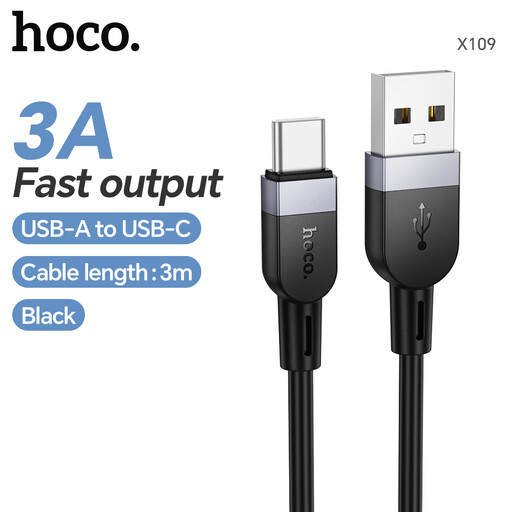
View the HOCO X109 3M Silicone Cable
Why It Stands Out: The standout feature of the HOCO X109 is its generous 3-metre length. This makes it an excellent choice for situations where the power socket is not conveniently located. The cable is constructed from a highly elastic and non-toxic silicone, which feels soft to the touch and is exceptionally resistant to tangling and tearing.
Pros:
Who is it for?: This cable is ideal for home or office users who need to charge their device from a distant power source, such as by the bedside, on the sofa or in a large conference room.
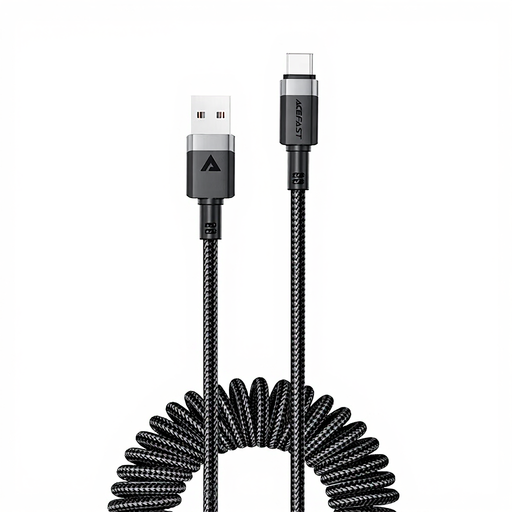
View the ACEFAST C14-04 Coiled Nylon Cable
Why It Stands Out: The ACEFAST C14-04 features a coiled design that keeps your space neat and tidy. It remains compact when not in use but stretches up to 1.2 metres when needed, preventing excess cable from cluttering your car's console or your desk. The nylon coiled jacket is wear-resistant and helps avoid tangles.
Pros:
Who is it for?: This is a great option for drivers who want to keep their car's interior organised, as well as for anyone who prefers a minimalist, clutter-free workspace.
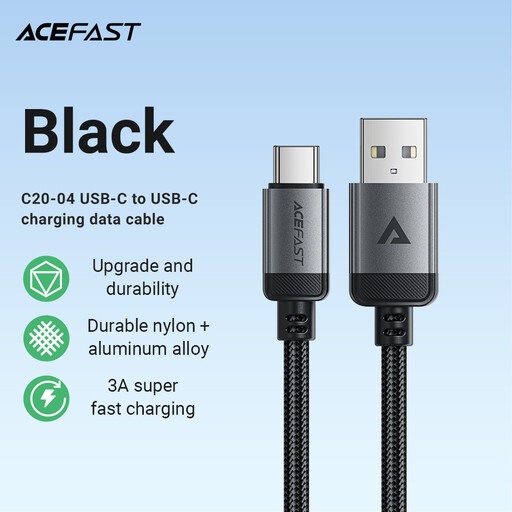
View the ACEFAST C20-04 Aluminium Alloy Cable
Why It Stands Out: The ACEFAST C20-04 is built for reliability. It combines a tough nylon braid with sturdy aluminium alloy connector housings. This dual-layer construction provides excellent protection against the bending and pulling that often leads to cable failure, making it a dependable choice for daily charging and data transfer.
Pros:
Who is it for?: Anyone seeking a robust, all-purpose cable for their USB-C devices. Its durable build makes it a solid workhorse for everyday use, from charging your phone overnight to syncing files at your desk.
Our recommendations cover a range of common uses, but your needs may be different. If you are looking for alternative lengths, colours or specific features, you can browse our complete collection.
Explore our full range of USB-A cables to find the perfect match for your devices.
1. Can I use a USB-A to USB-C cable for fast charging? Yes, provided the cable, your power adapter (the plug) and your device all support a fast-charging standard. To ensure good performance, look for a cable rated for at least 3A current, as this is a common requirement for fast charging many Android phones and other USB-C devices.
2. What is the difference between a charging cable and a data cable? Most quality USB cables are designed to handle both charging and data transfer. However, some very low-cost cables may lack the necessary internal wiring for data, making them "charge-only." All the cables recommended in this guide support both charging and data transfer (typically at USB 2.0 speeds of up to 480 Mbps), making them suitable for syncing photos, files and other media.