
24/7 Customer Support

Free returns

Same-day & Next-day Delivery

Quality Guaranteed

Unlock Your Welcome Offers: FREE Delivery | Up to 80% OFF | Free 30-day JoyPlus trial
Download the APP
A USB adaptor can solve a simple connection problem, but choosing the wrong one can leave you with incompatible ports, slow transfers or a charger that cannot supply enough power. UK shoppers often buy based on the number of ports or a headline such as “fast charging”, without checking how those figures apply to their laptop, phone, tablet or car.
This guide explains the practical details to check before buying a USB adaptor, followed by our top recommendations for different usage profiles.
USB-C and USB-A describe the connector format, not necessarily the speed, video support or charging capacity. A USB-C port may support data only, while another may also support display output through USB-C Alt Mode or Power Delivery.
Similarly, a USB-C to USB-A adaptor may allow a traditional USB flash drive to connect to a newer laptop, but it will not automatically add HDMI, Ethernet or charging functions.
A USB-C hub with HDMI is only suitable for display output if the host device supports compatible video output, usually through USB-C DisplayPort Alt Mode. Connecting an HDMI USB-C adaptor to a USB-C port intended only for charging or data may produce no picture.
Check your device manual before ordering, especially for tablets, budget laptops and some mobile phones.
A USB 3.0 port can support data transfer speeds of up to 5Gbps under suitable conditions, but the actual speed also depends on the connected drive, cable, computer and other devices sharing the hub. A Gigabit Ethernet adaptor may support up to 1,000Mbps, but your broadband package, router and network conditions still determine real-world internet performance.
Identify both sides of the connection:
Do not assume two adaptors with similar appearances work in the same direction. Check whether the product has a male plug, female socket or both.
For external drives and other peripherals, look for USB 3.0 or USB 3.2 Gen 1 when faster transfers are important. For wired networking, a USB Ethernet adaptor with 10/100/1000Mbps support is suitable for Gigabit Ethernet networks, provided the host port and network equipment support the same standard.
For monitors and projectors, check the stated resolution and refresh rate. Some adaptors support 4K at 30Hz, while others may support different resolutions through HDMI or VGA. A dual-display claim also needs careful checking: some compact adaptors support only one active display at a time.
A USB-C PD charger or hub with PD pass-through can deliver power to a compatible laptop or tablet while accessories are connected. However, the wattage printed on the product is not always the amount delivered to the host device, as the hub itself may use some power.
For mains products, check the UK plug type, maximum current rating and intended environment. The Status plug-through adaptor listed below is rated for 13A / 3250W total socket load and is intended for indoor use. Never exceed the stated limit or use a mains adaptor near water.
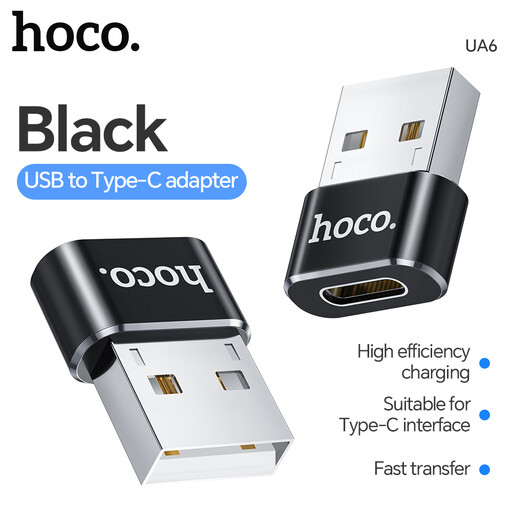
Why This Fits Their Persona: A compact option for students, home users and office workers who need to connect a USB-A accessory to a USB-C device without buying a full hub.
Its USB-A female to USB-C male layout makes the connection direction clear. It also states that OTG depends on device support and is not intended for high-power devices.
Simple USB-C to USB-A conversion; compact black design for everyday carry.

Why This Fits Their Persona: A practical match for remote professionals, presenters and business travellers who may need HDMI, VGA, wired networking, USB expansion and charging from one laptop connection.
The specifications clearly state USB-C Alt Mode is required, HDMI supports up to 4K at 30Hz, VGA supports up to 1920x1200 and the display mode is single-display SST.
Two USB 3.0 ports, Gigabit Ethernet, USB-C data/PD, HDMI, VGA and stated 100W PD pass-through.

Why This Fits Their Persona: Suitable for desktop users, remote workers and households that need several USB peripherals alongside a wired network connection.
It specifies three USB 3.0 ports and an RJ45 Gigabit Ethernet port, while clearly warning that it is primarily for data transfer rather than charging high-power devices.
Up to 5Gbps USB 3.0 transfer rate; 10/100/1000Mbps Ethernet; aluminium alloy and ABS construction.
We have compiled a complete, real-time list of products that fully satisfy these strict selection criteria and UK safety regulations.
For a home office, a USB-C multiport hub with HDMI, SD and PD can reduce cable clutter. A USB Ethernet adaptor is useful when Wi-Fi is unreliable or unavailable. Drivers with factory-wired smartphone integration may prefer a wireless CarPlay adaptor, but compatibility must be checked carefully: the vehicle needs factory-wired CarPlay or Android Auto and aftermarket head units may not work.
For bedside tables or hotel rooms, the Status USB-C & USB-A Plug Through Adaptor provides one USB-A port, one USB-C port and a remaining UK mains socket. Its combined USB output is 15.5W, so it is intended for everyday charging rather than high-wattage laptop power.
It can. Basic USB adaptors are generally designed for data or low-power connections, while charging performance depends on the adaptor, cable and host device. For laptops and tablets, check for USB-C PD and confirm the stated wattage is suitable.
Lifespan depends on insertion frequency, cable strain, heat and storage conditions. Avoid pulling an adaptor by its cable, forcing connectors or leaving it under pressure in a laptop bag. Disconnect storage devices through the operating system before unplugging a hub.
Not necessarily. USB-C hubs may require host support for particular functions, such as video output, PD pass-through or high-speed data. Confirm the laptop’s port specifications before purchasing, particularly when HDMI, VGA or external display support is required.