
24/7 Customer Support

Free returns

Same-day & Next-day Delivery

Quality Guaranteed

Unlock Your Welcome Offers: FREE Delivery | Up to 80% OFF | Free 30-day JoyPlus trial
Download the APP
USB-C accessories have become essential for UK households, offices and travel bags. iPhone 15 and newer models, Android phones, tablets, laptops, cameras and gaming devices increasingly use USB-C, but a matching connector does not always guarantee the right performance.
A cable may charge a laptop slowly, an adapter may support charging but not data, and a USB-C hub may fail to output video if the laptop port lacks DisplayPort Alt Mode. Before buying, focus on the specifications that affect everyday use rather than relying on vague phrases such as “fast”, “universal” or “high performance”.
USB-C describes the physical connector, not the cable’s charging wattage or data speed. Two USB-C cables can look identical while one supports USB 2 speeds and another handles USB 3.2 data transfer.
For charging a phone, USB 2 may be sufficient. For moving video files from a camera or portable SSD, a slower cable can create unnecessary waiting. Check whether the listing specifies data speed, power rating or both.
A USB-C to USB-A adapter and a USB-A to USB-C adapter are not interchangeable in practical terms. A USB-C male to USB-A female model is generally used to connect older USB-A accessories to a USB-C host, such as a phone, tablet or laptop.
Conversely, a USB-A male to USB-C female adapter can connect a USB-C charging cable or peripheral to an older USB-A port. Direction, OTG support and the host device’s capabilities should be checked before ordering.
A cable marked 100W or 240W does not force a device to charge at that level. The charger, cable, device and charging protocol must all support the required output. A laptop may also limit charging according to its own power-management system.
Use a certified or compatible charger, avoid damaged cables and stop using any accessory that becomes unusually hot, deformed or discoloured.
For a basic USB-C charging cable, check the maximum stated power. The Apple USB-C to USB-C Woven Charge Cable supports up to 60W, while the ACEFAST 100W USB-C to USB-C Charging Cable is specified for up to 100W. These figures are useful for comparing suitability, but actual charging depends on the connected equipment.
A multi-device cable may include USB-C, USB-A and Lightning connectors, making it convenient for travel. However, the charging output may vary by connector and protocol. For example, a USB-C to Lightning cable is intended for Lightning-equipped Apple devices, while newer USB-C iPhones use a USB-C charging cable instead.
Look for a clearly stated standard such as USB 2, USB 3.2 Gen 1 or USB 3.2 Gen 2. The Apple woven cable listed here supports USB 2 data speeds, suitable for everyday syncing. The ACEFAST J1 USB-A to USB-C Fast Charge Adapter and ACEFAST J2 USB-C to USB-A Adapter specify transfer speeds of up to 5Gbps, provided the host, accessory and cable support the same standard.
A USB-C flash drive or portable SSD can be a practical choice for photographers, video creators and commuters moving large files. The MOVESPEED 1TB dual-interface flash drive specifies up to 1090MB/s read and 1030MB/s write speeds, while the Lexar ES4 Portable SSD specifies up to 1050MB/s read and 1000MB/s write. These are maximum stated figures, so real-world performance may vary.
A USB-C hub is only as useful as the port on the host device. Video output usually requires DisplayPort Alt Mode. If the laptop or tablet does not support it, an HDMI port on the hub may not produce a display signal.
The Baseus Metal Gleam Series II 10-in-1 USB Hub includes HDMI, USB-A, USB-C, RJ45, SD/TF and USB-C PD ports. Its listed outputs include HDMI up to 4K at 120Hz and a USB-C PD input up to 100W. A Mokin hub provides HDMI 4K at 60Hz, USB-A, USB-C and SD/TF connectivity. Confirm your laptop’s supported resolution, refresh rate and power requirements before purchase.
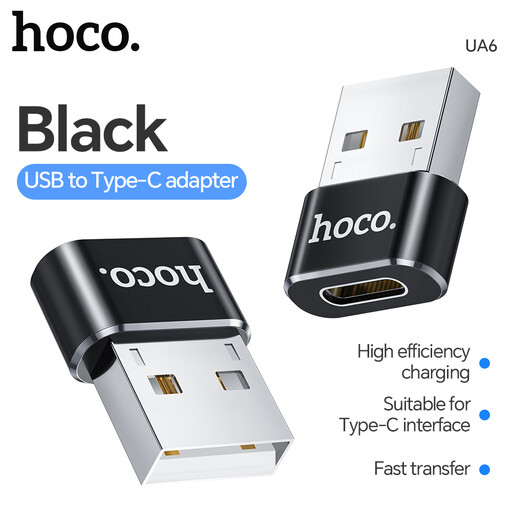
Why This Fits Their Persona: A compact option for connecting selected USB-A accessories to compatible USB-C devices at home, in the office or while travelling around the UK.
Its USB-A female to USB-C male direction is clearly specified, helping avoid buying the wrong connector orientation. OTG support still depends on the host device.
Small black adapter; suitable for compatible low-power accessories. Not intended for high-power devices such as externally powered HDDs.
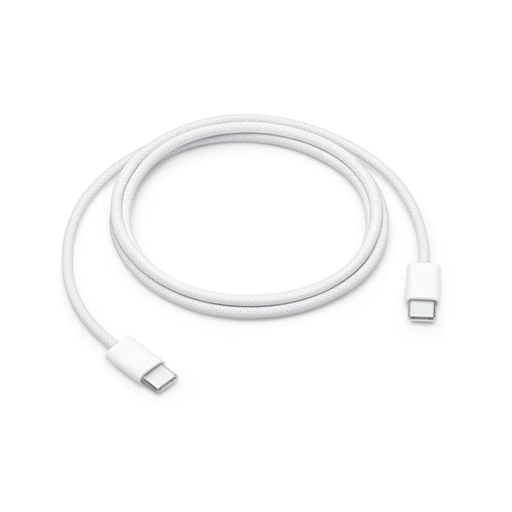
Why This Fits Their Persona: A straightforward 1-metre cable for Apple and other USB-C devices at a desk, bedside table, office or in a travel bag.
The listing states both the 60W charging limit and USB 2 data performance, reducing confusion between charging capability and file-transfer speed.
Woven construction; 1-metre length; supports charging, syncing and everyday data transfer between USB-C devices.
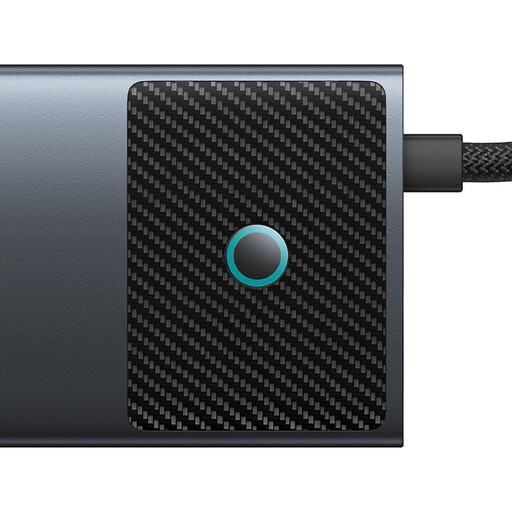
Why This Fits Their Persona: Suits laptop owners, home-office workers and content creators needing HDMI, network, card-reader and USB expansion from one USB-C connection.
The port list and maximum figures are stated individually. Video still requires a compatible USB-C DisplayPort Alt Mode port on the host device.
Includes dual HDMI outputs, RJ45, SD/TF, USB-A and USB-C ports, plus USB-C PD input rated up to 100W.
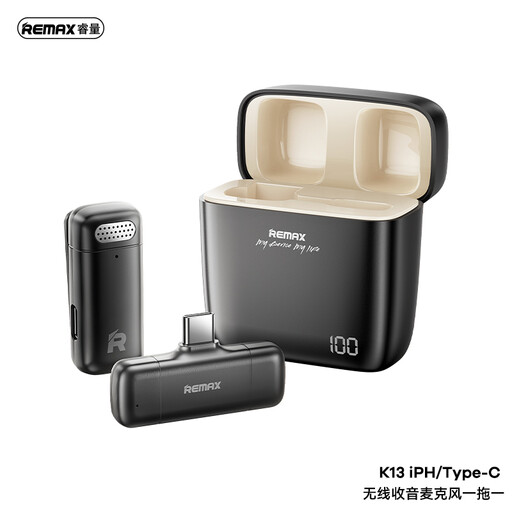
Why This Fits Their Persona: Designed for vloggers, interviewers and live-streamers using USB-C phones, tablets or cameras in indoor and outdoor locations.
The USB-C receiver, 2.4G wireless connection and 3.5mm monitoring jack are specified, making the setup easier to assess before purchase.
Includes a transmitter, receiver and furry wind muff; built-in rechargeable batteries support portable recording.
We have compiled a complete, real-time list of products that fully satisfy these strict selection criteria and UK safety regulations.
No. Check the cable’s stated power rating and ensure it supports the laptop’s charger and USB Power Delivery requirements. A USB 2 cable may charge a compatible laptop but offer slower file transfers.
No. Confirm that the laptop supports USB-C data, charging pass-through and, for external displays, DisplayPort Alt Mode. The number of screens and supported resolution can also vary by device.
Lifespan depends on bending, heat, moisture, connector strain and storage. Choose suitable power and data ratings, unplug by the connector rather than the cable, avoid tight bends and replace accessories showing fraying, exposed wiring, discolouration or unusual heat.