
24/7 Customer Support

Free returns

Same-day & Next-day Delivery

Quality Guaranteed

Unlock Your Welcome Offers: FREE Delivery | Up to 80% OFF | Free 30-day JoyPlus trial
Download the APP
Finding suitable USB-C adapters and chargers UK shoppers can use across phones, tablets, laptops, cars and office equipment is not simply a matter of choosing the product with the most ports. A compact charger may not provide enough power for a laptop, while a multiport hub may lack the display support or data speed your workflow requires.
The main risks are usually hidden in compatibility details rather than appearance. Before buying, check the following common pitfalls.
USB-C describes the connector shape, not the functions it supports. A port may handle charging only, or it may also support data transfer, video output through DisplayPort Alt Mode or Power Delivery (PD).
This matters when choosing a USB-C hub, USB-C to HDMI adapter or USB-C multiport adapter. A hub cannot create video output if the host device’s USB-C port does not support video. Check the laptop, tablet or phone specification before ordering.
A charger labelled “30W” refers to its maximum supported output under stated conditions. When several devices are connected, the available power may be shared. Cable capability, charging protocol and the device’s own power requirements also affect charging speed.
For example, a 30W GaN charger can suit many phones, tablets and lightweight laptops, but it is not automatically suitable for a high-power workstation. A USB-C fast charger should be matched with a compatible cable and device.
A USB-C to USB-A adapter is useful for connecting older accessories, but a small data adapter may not be designed to power external hard drives, tablets or multiple phones. Some hubs are primarily intended for data transfer and have limited charging capacity.
Also check the direction of conversion. USB-A female to USB-C male and USB-C female to USB-A male adapters serve different connection layouts. Buying the wrong direction can make an otherwise compatible accessory unusable.
For a mains charger, look for:
The Baseus Quick Charger 2U+C 30W, for example, has one USB-C and two USB-A ports. Its listed single-port output reaches up to 30W, while USB-A plus USB-A use is listed at up to 15W total. That distinction is more useful than the headline wattage alone.
USB 2.0 and USB 3.x can use similar-looking connectors but offer different transfer rates. If you regularly move photos, video or large work files, look for a stated speed such as 5Gbps.
For wired networking, a USB Gigabit Ethernet adapter should state 10/100/1000Mbps support. This is separate from your broadband package: the actual connection speed also depends on your router, Ethernet cable and network service.
A hub with HDMI may support only a particular resolution and refresh rate. Check whether the specification lists 4K at 30Hz or 60Hz, and whether it supports one display or multiple displays.
For laptop use, a hub with PD pass-through can reduce cable clutter. However, a “100W PD” input does not necessarily mean the laptop receives the full 100W; the hub itself may reserve some power. Use a certified charger and cable with suitable ratings.
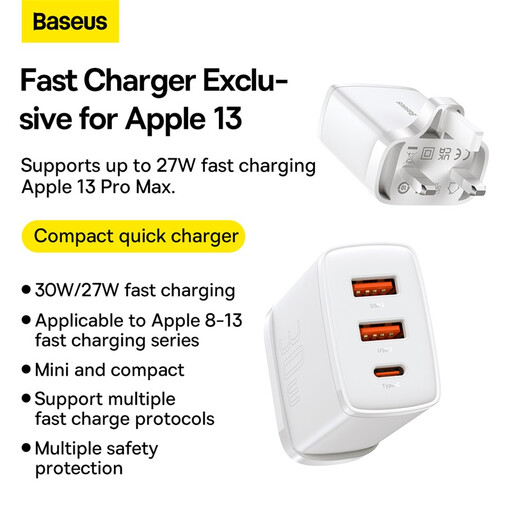
Why This Fits Their Persona: A practical option for commuters, students and households charging several everyday devices from one UK socket.
Its specifications distinguish single-port 30W output from shared output when multiple ports are used, helping avoid unrealistic expectations.
UK plug, 30W maximum output, one USB-C port, two USB-A ports and a compact 81g design.
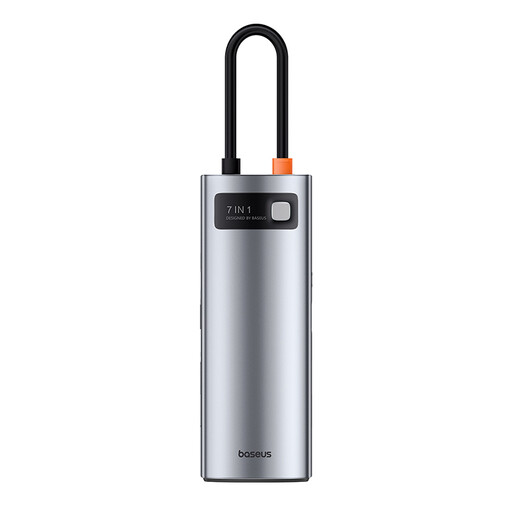
Why This Fits Their Persona: Suits home-office users and MacBook or Windows laptop owners who need one compact connection point for displays, storage and memory cards.
The listed specifications state the HDMI resolution, USB data rate and need for a separate PD power supply rather than implying unlimited laptop charging.
Seven-in-one layout with HDMI, three USB 3.0 ports, SD and TF card slots, plus USB-C PD input; USB transfer is listed up to 5Gbps.

Why This Fits Their Persona: Designed for professionals presenting in offices, connecting to wired networks or working with several USB accessories.
It clearly specifies single-display operation, HDMI up to 4K at 30Hz, VGA up to 1920x1200 and USB-C Alt Mode requirements.
Includes HDMI, VGA, Gigabit Ethernet, two USB 3.0 ports and 100W PD pass-through; USB data is listed at 5Gbps.

Why This Fits Their Persona: Suitable for drivers who want to convert compatible factory-wired smartphone integration to a wireless connection.
The compatibility conditions are explicit: the vehicle needs factory-wired CarPlay or Android Auto, and aftermarket head units are excluded.
Supports USB-A and USB-C input, Bluetooth 5.2 and dual-band Wi-Fi; the product information lists iPhone and Android compatibility requirements.
We have compiled a complete, real-time list of products that fully satisfy these strict selection criteria and UK safety regulations.
Usually, a compatible USB-C charger can be used, but charging speed depends on the device, cable and supported protocol. Check the required wattage and PD compatibility, particularly for laptops.
Not necessarily. The stated figure may describe the hub’s PD input limit. Some power is used by the hub, and the connected charger must provide sufficient power. Check the hub’s pass-through specifications before purchase.
Lifespan depends on heat, cable strain, storage and daily usage. Keep accessories dry and ventilated, avoid forcing connectors, and replace any item showing cracks, loose ports, melting, smoke or unusual odour.