
24/7 Customer Support

Free returns

Same-day & Next-day Delivery

Quality Guaranteed

Unlock Your Welcome Offers: FREE Delivery | Up to 80% OFF | Free 30-day JoyPlus trial
Download the APP
Is your laptop taking an age to charge? Have you found yourself wrestling with a frayed or tangled cable that came with your device? With USB-C now the standard for everything from MacBooks and flagship Samsung phones to tablets and portable gaming consoles, choosing the right replacement or upgrade cable has become surprisingly complex. Not all cables are created equal, and a poor choice can lead to slow charging, data transfer issues or a short lifespan.
As the Joybuy Product Recommendation Officer, my role is to help you navigate the options. This guide cuts through the marketing clutter to focus on what truly matters: power, durability and reliability. We will explore the key features to look for in a USB C to USB C cable and present a few standout options to suit different needs and devices.
Before choosing, it helps to understand a few key specifications. Getting this right ensures you get the performance you pay for, whether you need a fast charging type C cable for your phone or a powerful laptop charging cable USB C.
The most critical factor for charging speed is the cable's power handling capacity, measured in watts (W). A standard cable might only support 15W, which is fine for older devices but insufficient for modern hardware. For fast charging, look for cables that support Power Delivery (PD).
The cable that comes with your device is often designed for cost-effectiveness, not longevity. When buying a replacement, material choice is paramount for a durable type C cable.
Consider where you will be using the cable. A standard 1-metre cable is fine for desktop use, but a longer 2m USB C data cable can offer much more flexibility for charging on the sofa or in a hotel room. For data, most charging-focused USB-C cables support USB 2.0 speeds (480Mbps), which is sufficient for syncing photos and music. If you frequently transfer large video files, you may need to seek out a specialised USB 3.1 or Thunderbolt cable, though for most users, 480Mbps is perfectly adequate.
Based on features, materials and user needs, here are our recommendations for a high-quality USB C to USB C cable.
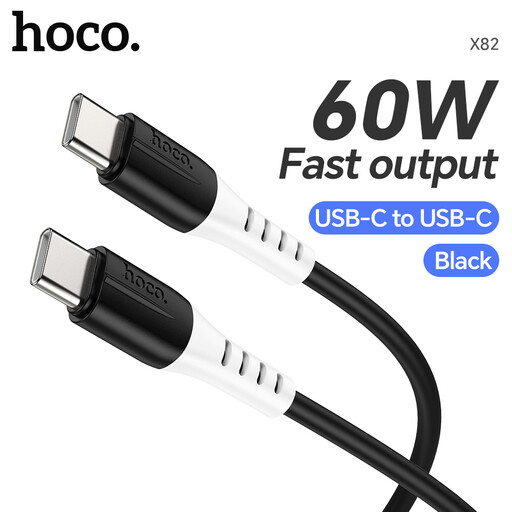
Why It Stands Out: The HOCO X82’s main appeal is its food-grade silicone jacket. This material gives it a uniquely soft and smooth texture that prevents it from tangling, whether it is pulled from a bag or uncoiled from a desk. It remains flexible and manageable, a noticeable improvement over stiff, standard cables.
Pros:
Who is it for? This is an excellent daily driver for users who prioritise convenience and a tangle-free experience. It is perfect for charging smartphones, tablets and lightweight laptops, making it a versatile choice for home and office use.
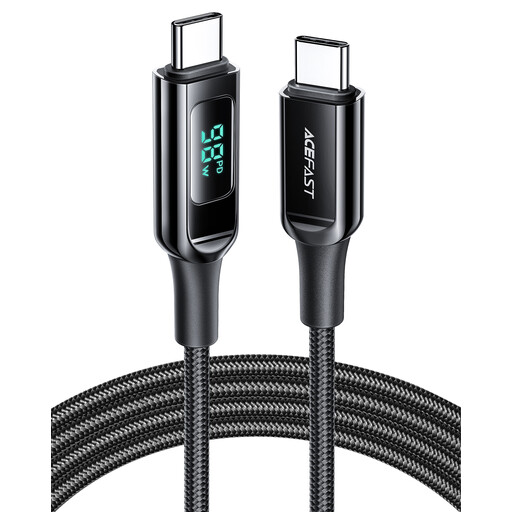
Why It Stands Out: The ACEFAST C6-03 is built for power users. Its standout feature is the integrated digital display on the connector, which shows the real-time wattage being delivered to your device. This allows you to instantly verify that you are getting the fast-charging speeds you expect.
Pros:
Who is it for? This is the ideal PD charging cable for tech enthusiasts and professionals with high-performance laptops like a MacBook Pro or Dell XPS. The power display and 2-metre length make it a practical and powerful tool.
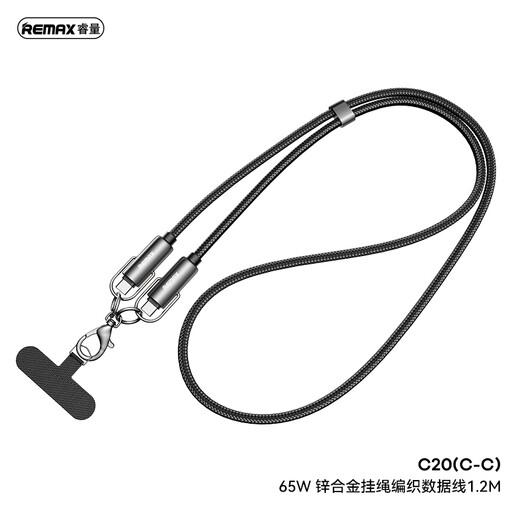
Why It Stands Out: The REMAX cable combines robust construction with a balanced power output. The tough, braided USB C cable exterior is built to withstand daily wear and tear, while the zinc alloy connectors add a premium feel and extra durability. Its 65W output hits the sweet spot for a wide range of modern laptops and tablets.
Pros:
Who is it for? This is a fantastic all-rounder for anyone seeking a durable, reliable cable that can handle both laptop and mobile device charging. It is a great choice for students and commuters who need a cable that can survive being thrown in a bag every day.
If these recommendations do not quite fit your specific needs, whether you are looking for a different length, colour or feature set, there are many other quality options available.
? Explore our wider selection of Type-C charging cables to find the perfect match.
1. Do I need a 100W USB C cable for my phone? Not necessarily. Most smartphones, including the latest from Samsung and Apple, fast-charge at rates between 25W and 45W. A 60W or 65W cable is more than sufficient. A 100W cable will work perfectly fine, but it will not charge your phone any faster than a lower-wattage PD cable, as the phone itself regulates the power it draws.
2. Are all USB C to USB C cables the same? No. They differ significantly in power delivery capacity (wattage), data transfer speed (e.g., USB 2.0 vs. USB 3.1), build materials (braided, silicone, PVC) and overall quality. Using a low-quality cable with a high-power device can result in slow charging or even damage to the device or charger.
3. What makes a USB C cable durable? Durability comes from a combination of factors. A strong outer jacket, like braided nylon or high-grade silicone, protects against abrasion and tangles. Furthermore, robust strain relief at the connector ends prevents the internal wires from breaking due to bending and pulling. Finally, high-quality metal connectors ensure a secure fit that will not wear out over time.