
24/7 Customer Support

Free returns

Same-day & Next-day Delivery

Quality Guaranteed

Unlock Your Welcome Offers: FREE Delivery | Up to 80% OFF | Free 30-day JoyPlus trial
Download the APP
Buying USB-C chargers in the UK can look straightforward until you compare wattage, charging protocols, plug types and port layouts. A compact charger may be convenient for a phone but unsuitable for a laptop, while a high-output multi-port model may divide its power when several devices are connected.
The right choice depends on your devices, daily routine and where you intend to use the charger. This guide from the Joybuy Product Recommendation Officer explains the key specifications to check, common buying traps and our top recommendations for different user profiles.
A 100W USB-C power adaptor does not force every device to charge at 100W. Phones, tablets and laptops draw only the power they support. A phone may require 20W or 30W, while a laptop could need 45W, 65W or more.
Charging speed also depends on the cable and protocol. A charger labelled 65W may not deliver that output through every port, particularly when other devices are connected. Check the output table and not just the headline wattage.
Some listings use “travel charger” to describe a product with an EU plug, rather than a charger ready for UK wall sockets. An EU-standard model may require a separate adaptor and could be less convenient for everyday use.
For a UK USB-C charger, look for a UK three-pin plug or confirm that interchangeable UK plugs are included. International travellers should also check whether the charger supports 100–240V input and which regional plugs are supplied.
The Apple 20W USB-C Power Adaptor, for example, includes the adaptor but not a charging cable. You may need a USB-C to USB-C cable for compatible iPhone and iPad models, or a USB-C to Lightning cable for older devices.
A cable should also match the intended power. A laptop USB-C charger operating at higher wattage needs a suitable USB-C cable, and some high-power cables use an E-marker chip to manage power safely.
Use your device’s original charger or manufacturer specification as a starting point:
Higher wattage can provide flexibility, but it may also mean a larger or more expensive unit. For a single phone, a 20W or 30W charger may be more proportionate.
A USB-C PD charger uses USB Power Delivery to negotiate a suitable voltage and current with the connected device. Some Android phones also benefit from PPS, while other devices may use Quick Charge or related protocols.
Look for compatibility with the protocols your device supports. “Fast charging” is not a universal standard, so compare the actual output profiles, such as 5V, 9V, 15V or 20V, rather than relying only on promotional wording.
A single-port USB-C wall charger is simple and usually delivers its stated maximum output to one device. A multi-port USB-C charger is more useful for a phone, tablet, laptop and accessories, but its total power is divided.
Check whether the product has:
A GaN USB-C charger uses gallium nitride components, allowing a compact design at higher power levels. This can be helpful in a crowded UK socket, office bag or cabin luggage. However, GaN does not automatically indicate a particular charging speed or safety level. Still check wattage, certifications, ventilation guidance and the included plug configuration.
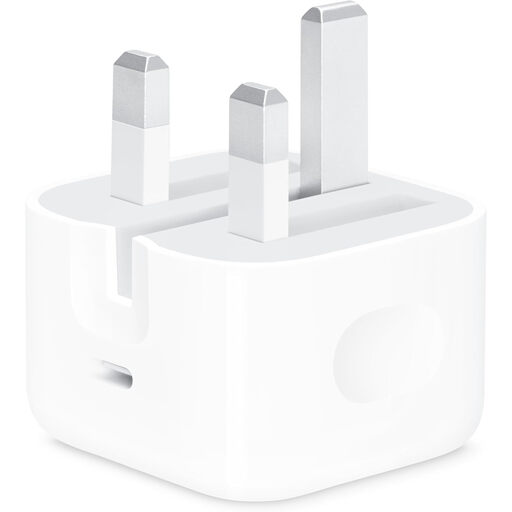
Why This Fits Their Persona: A straightforward single-port option for UK users who mainly charge a compatible phone, iPad or small USB-C device at home, in the office or while travelling.
Its stated output is clear at 20W and it has a UK three-pin plug. Remember that a compatible cable must be purchased separately.
20W output, one USB-C port, compact construction and a UK plug for standard wall sockets.
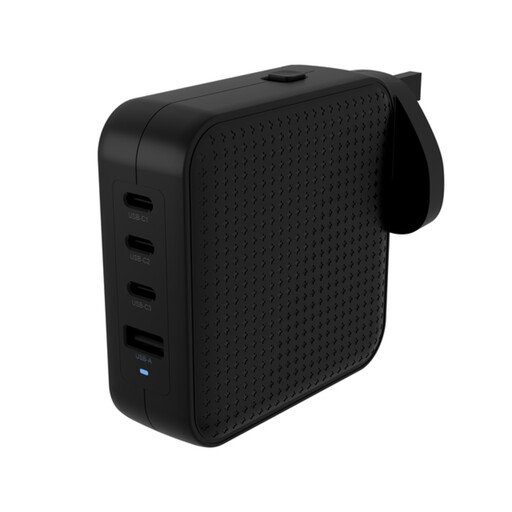
Why This Fits Their Persona: Suitable for professionals and frequent travellers who want one charger for a laptop, tablet, phone and accessories across the UK and overseas.
It specifies 100–240V input, interchangeable US, EU, UK and AU plugs, plus dynamic power distribution rather than relying on a single headline figure.
Three USB-C ports, one USB-A port, up to 100W PD output and an included C8 desktop adaptor.
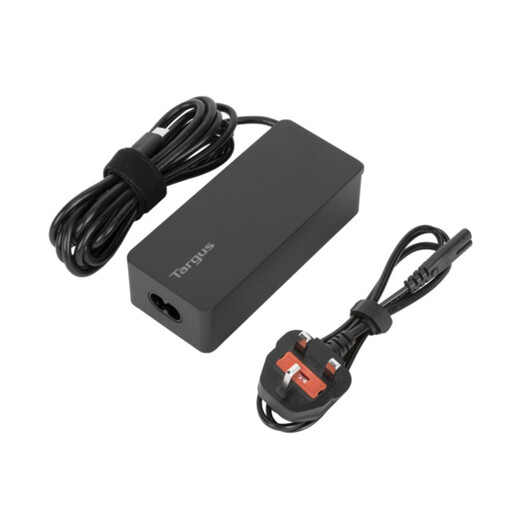
Why This Fits Their Persona: A practical laptop USB-C charger for business travellers, remote workers and users who need to power a USB-C laptop as well as a tablet or phone.
Its 65W PD rating is more appropriate for many compact laptops than a phone-focused charger, and EU and UK power cords are included.
Up to 65W output, USB-C Power Delivery, a 1.8-metre cable and cable tie for storage.
We have compiled a complete, real-time list of products that fully satisfy these strict selection criteria and UK safety regulations.
For many modern phones, 30W is sufficient for fast charging, provided the phone and cable support the same charging protocol. It can also offer extra capacity for smaller tablets and accessories. Confirm your device’s stated input requirements before buying.
Yes, if the laptop supports USB-C charging and the adaptor provides enough wattage through a compatible Power Delivery profile. Many compact laptops work with a 45W or 65W USB-C charger, while performance laptops may require 100W or more. Check the laptop manufacturer’s specification and use a suitable cable.
The charger draws electricity according to the connected device and charging conditions, rather than continuously using its maximum wattage. A 100W charger does not normally consume 100W when charging a small phone. Unplugging chargers when not in use can reduce standby consumption and keeps the setup tidy.