
24/7 Customer Support

Free returns

Same-day & Next-day Delivery

Quality Guaranteed

Unlock Your Welcome Offers: FREE Delivery | Up to 80% OFF | Free 30-day JoyPlus trial
Download the APP
Buying a USB-C charger in the UK can seem straightforward until you compare wattage, plug types, ports and charging protocols. A small charger may be convenient for a phone but unsuitable for a laptop, while a high-output model can be unnecessary for a basic smartphone.
The right choice depends on your device, daily routine and the cables you already own. This guide explains the main buying traps and highlights practical options for commuters, students, travellers and people charging several devices.
A charger labelled 30W, 65W or 100W does not automatically make every device charge at that rate. The connected phone, tablet or laptop controls how much power it accepts. Charging speed can also vary according to the cable, battery level, temperature and supported charging protocol.
For example, a 20W charger is commonly suitable for compatible smartphones and smaller tablets, whereas many USB-C laptops require 45W, 65W or more. Check your device manufacturer’s recommended input before choosing a fast USB-C charger.
Some compact chargers are supplied with a UK three-pin plug, while others may be designed for EU sockets or supplied with separate power cords. An EU-standard charger may require a suitable travel adaptor for use in UK wall sockets, adding bulk and another connection point.
For regular home use, a UK charger with an integrated three-pin plug is usually simpler. Business travellers may prefer a model with interchangeable UK and EU power cords, especially when visiting different European destinations.
A multi-port USB-C charger can be useful, but the total output may be shared when two or more devices are connected. A 40W dual-port model, for example, may provide up to 20W per port when both ports are in use rather than 40W to each device.
Before buying, check both the single-port output and the combined output. This is particularly important if you plan to charge a laptop and phone at the same time.
USB Power Delivery, often shown as USB PD, allows compatible devices and chargers to negotiate a suitable voltage and current. Look for output details such as 5V, 9V, 12V, 15V and 20V rather than relying only on the headline wattage.
As a general guide:
A laptop USB-C charger should match or exceed the laptop’s recommended power rating. Using a lower-wattage adaptor may result in slow charging or continued battery drain while the laptop is in use.
A single USB-C wall charger is compact and straightforward, but a dual-port or multi-port USB-C charger can reduce the number of adaptors in your bag. Some models also include USB-A for older cables and accessories.
Consider what you actually carry. A student with a phone, tablet and earbuds may benefit from two USB-C ports, while a laptop user may prioritise one high-output port to avoid shared power. A 4-port GaN charger can suit a desk or travel bag, but it is generally larger and heavier than a single-port phone charger.
GaN chargers use gallium nitride components and can offer high output in a compact form. Size alone, however, should not be the deciding factor. Check for clear output specifications, suitable ventilation instructions and protection features such as over-voltage, over-current, short-circuit and over-temperature protection.
Use a compatible, certified USB-C cable rated for the required power. Do not cover a charger during use, place it near flammable materials or continue using it if the casing is damaged, unusually hot, smoking or making unexpected sounds. Products intended for the UK should also have appropriate product and safety information for the market; inspect the packaging and instructions before use.
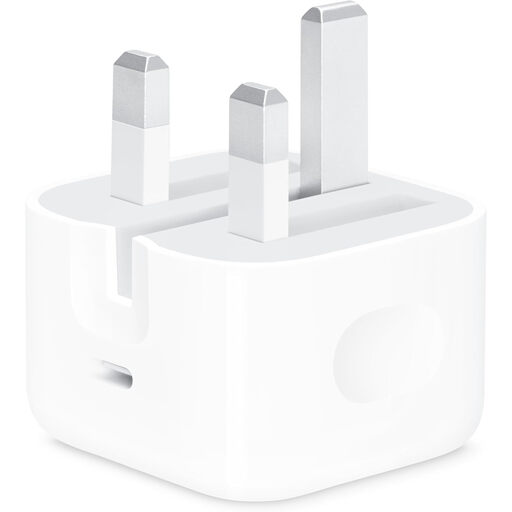
Why This Fits Their Persona: A straightforward option for UK users who mainly charge one compatible phone or tablet at home, in the office or while travelling.
Its 20W maximum output is clearly specified, and the UK three-pin design avoids the uncertainty of an unsuitable plug. A charging cable is not included, so check your cable before ordering.
Single USB-C port, compact design and up to 20W output for compatible devices.
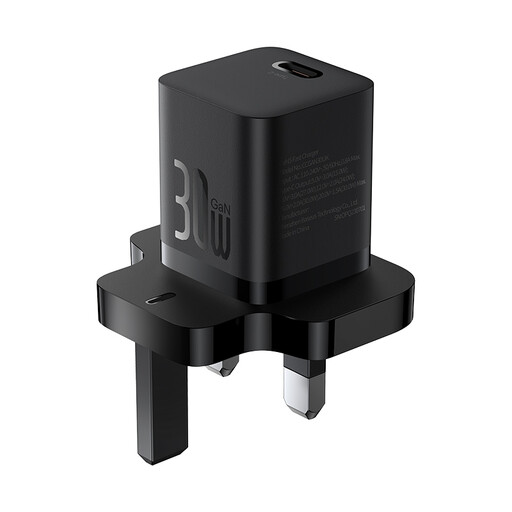
Why This Fits Their Persona: Suitable for commuters and travellers who want a small UK plug charger with more capacity than a basic phone adaptor.
The specification states 30W output, USB-C PD support and a UK configuration, rather than relying only on a “fast” label. It has a single port, so there is no shared-output confusion.
GaN5 design, approximately 51.5g weight and compatibility with phones, tablets and selected compact laptops.
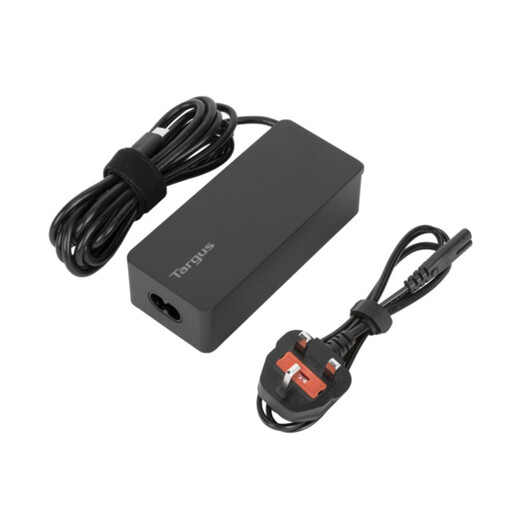
Why This Fits Their Persona: A practical laptop USB-C charger for office workers and business travellers carrying a compatible laptop, tablet and phone.
Its stated 65W output is more appropriate for many USB-C laptops than a phone-only adaptor. The package includes UK and EU power cords, helping avoid plug compatibility problems when travelling.
USB PD, over-current and overheating protection, 1.8-metre cable and cable tie.
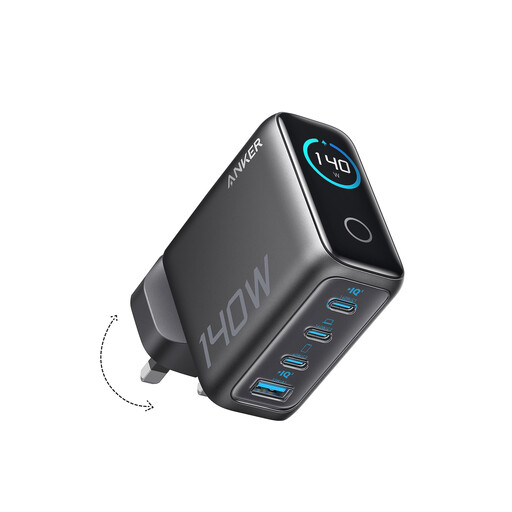
Why This Fits Their Persona: Designed for users powering a high-output laptop alongside phones, tablets and other accessories from one charging point.
Four ports reduce the need for separate adaptors, while the stated 140W capacity is clearly positioned for higher-demand setups. Confirm the required cable rating and how power is distributed between ports.
GaN technology, four-device charging, two high-speed USB-C ports and an integrated colour display for charging information.
We have compiled a complete, real-time list of products that fully satisfy these strict selection criteria and UK safety regulations.
For many compatible smartphones, 20W is sufficient for everyday charging and supported fast-charging functions. Check the phone’s specification and use a suitable USB-C cable. A 20W adaptor is not generally suitable for laptops that require a higher input rating.
Usually, a compatible phone will negotiate the power it needs rather than automatically receiving the full 65W. Confirm that the charger supports the phone’s charging protocol and use an appropriate cable. The higher capacity can also make the adaptor useful for a tablet or compatible laptop.
Electricity use depends mainly on the device’s battery capacity, charging time and energy lost during conversion, rather than the maximum wattage printed on the charger. A 140W charger does not constantly draw 140W; it supplies power according to the connected device and charging conditions. Unplugging unused adaptors and avoiding damaged cables can support safer, more efficient use.