Who is shared charging for?

Households sharing one charging spot

If phones, tablets, earbuds or a laptop often charge at the same desk or bedside table, a multi-port charger can reduce the number of adapters there. Check its output with several ports in use, not just its port count.

Households with different phones

An iPhone, a Samsung phone and other USB-C devices may have different fast-charge requirements. Match the adapter and cable to each device’s stated charging standard rather than relying on the connector shape.

Shoppers replacing an uncertain charger

When a charger’s origin or plug suitability is unclear, check its manufacturer and model, the seller, its suitability for the socket and any relevant product-safety alert before using it at home.

What should you check before buying?

One multi-port wall charger

Consider it when: Several devices regularly charge together at one socket and the documented shared output suits that combination.

Trade-off: The maximum available to a device can fall when other ports are occupied, as Apple notes in its guidance on multi-port charging.

Separate power adapters

Consider them when: Devices charge in different rooms or one needs a charging mode you cannot confirm with a shared charger.

Trade-off: Each adapter needs a place to plug in, adding equipment around the home.

PriorityWhat to checkYour needs
Mains connection For a charger plugging directly into a BS 1363 socket, check that its plug is suitable for that socket. Check the manufacturer and model against current product-safety alerts. Department for Business and Trade guidance dated March 2026 lists UKCA or CE marking for electrical equipment in Great Britain, and CE or CE with UKNI where required in Northern Ireland. I need a charger suitable for the socket and the part of the UK where I will use it, especially if the seller or product identity is unfamiliar.
Shared output Compare total output and the maker’s figures for the exact ports used together. Count the USB-C and USB-A connections needed, but do not treat port count as a power rating. Several devices charge at the same time, so I want to know what each connected device can receive rather than relying on the headline wattage.
Charging protocol Check each device’s required wattage and USB Power Delivery (USB-PD) support. Check any additional fast-charge conditions: Apple specifies USB-PD adapter conditions for compatible iPhones, while Samsung specifies USB PD 3.0-compatible Direct Charging for its Super Fast Charging 2.0 mode. Fast charging matters for a particular phone or laptop; a USB-C socket alone will not tell me whether that device’s charging mode is available.
Cables Match each cable’s stated charging capability to the device and adapter. Check manufacturer-specific cable conditions for the charging mode you intend to use. A longer cable would help at my desk, but I also need it to suit the device and the adapter it connects.
Charging area If using an extension product, check its marked rating and condition; do not connect one extension lead to another. Keep chargers uncovered and look for heat damage or damaged cables. I want a shared charging spot without relying on an overloaded extension block or leaving damaged equipment in use.

What can go wrong with a shared setup?

  • Assuming every USB-C combination fast-charges

    A matching connector does not establish that the device, adapter and cable meet the conditions for its faster charging mode.

    Check the device maker’s charging standard and cable requirements, then check the adapter’s output for the port arrangement you will use.

  • Choosing a UK-style plug by appearance

    In a July 2026 report, the Office for Product Safety and Standards identified one USB-C adapter with a high fire risk because its plug failed BS 1363 dimensional requirements. That finding concerns the reported product, not USB-C adapters generally.

    Check the charger’s manufacturer and model, seller and UK socket suitability. Search current product-safety alerts if the listing or product appears questionable.

  • Reading headline wattage as power for every port

    The advertised maximum may apply to one port or a particular port combination. Apple notes that a multi-port charger’s maximum output can fall when other devices are connected.

    Compare the maker’s output figures for the number of devices you expect to charge together.

  • Adding extension products without checking their limits

    Overloaded or daisy-chained extension devices can overheat. Damaged leads or scorch marks are warning signs, not reasons to keep charging as usual.

    Electrical Safety First advises one socket extension device per wall socket. Stay within its marked rating and stop using visibly damaged equipment.

Brand and product-line references

UGREEN

UGREEN describes its Nexode 100W 5-Port charger as having four USB-C ports and one USB-A port, a configuration to consider when several cables meet at one charging spot.

  • The port arrangement accommodates USB-C and USB-A connections.
  • Before choosing this model, check its documented output with multiple ports occupied, its plug arrangement and each device’s protocol requirements.

Anker

Joybuy’s listing for the Anker Prime A2688 describes a three-port charger with two USB-C ports, one USB-A port and a 100W total rating.

  • The listing states a maximum of 100W with two ports in use and 89W with three, giving buyers figures to compare with their simultaneous charging needs.
  • Check the product’s UK plug details and the output and protocol needed by your particular devices before choosing it.

Belkin

Belkin describes its BoostCharge Pro Dual USB-C GaN Wall Charger with PPS 65W, model WCH013myBK, as a two-port USB-C option.

  • Belkin states up to 65W from one port or 45W plus 20W with both in use, and lists USB-PD 3.0 and PPS support.
  • Two ports will not connect three devices at once; check the documented split and each device’s requirements before pairing them.

Joybuy cable option

This USB-C cable is an option for connecting a compatible device to a charger at a shared charging spot. A cable does not add charging ports or determine how a multi-port adapter divides its output.
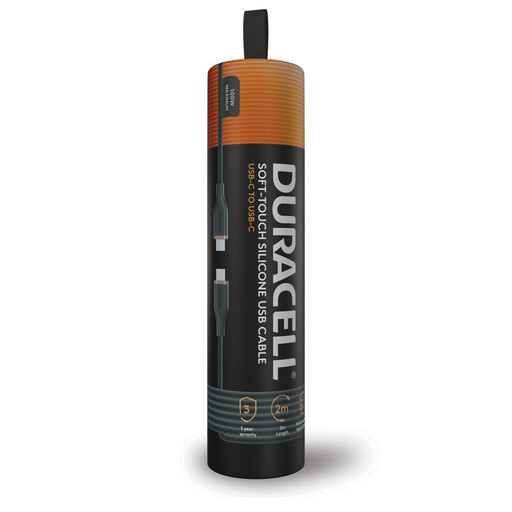
Duracell 2 m USB-C to USB-C charging cable

Duracell USB-C to USB-C charging cable, 2 m, 100W

The 2 m length offers reach between a compatible device and adapter at a desk or bedside charging spot. The product name states 100W charging; check the device’s and adapter’s required charging mode before relying on that rating for a particular device.

View on Joybuy

Common questions

How much power does a shared charger need?

Choose against the devices you will charge together, using the maker’s total-output and multi-port figures for that combination. Apple notes that a multi-port charger’s maximum output may fall as connected devices’ combined demand changes; multiplying a single-port maximum by the port count will not give you a reliable shared-output figure.

Will any USB-C charger fast-charge my phone?

No: the phone, charger and cable must meet the conditions for the phone’s charging mode. Apple specifies USB-PD adapter and cable conditions for compatible iPhones; Samsung specifies USB PD 3.0-compatible Direct Charging support for its Super Fast Charging 2.0 mode.

Which marking should I check on a mains charger?

Check the marking applicable to the market where the charger is offered, alongside its identity and plug suitability. Department for Business and Trade guidance dated March 2026 lists UKCA or CE for electrical equipment in Great Britain, and CE or CE with UKNI where required in Northern Ireland. A marking alone does not establish that an unfamiliar listing or plug is suitable.

Can I use an extension lead for a shared charging spot?

Yes, if the extension product is suitable for the intended equipment and you stay within its marked rating. Electrical Safety First advises using only one socket extension device per wall socket, rather than connecting extension leads to each other; stop using equipment showing damage or scorch marks.

How do I check whether a charger has a safety alert?

Search the Office for Product Safety and Standards product safety alerts, reports and recalls using the brand and model where available. Follow the instructions in any alert that identifies your product, and register the charger with its manufacturer if registration is offered.