
24/7 Customer Support

Free returns

Same-day & Next-day Delivery

Quality Guaranteed

Unlock Your Welcome Offers: FREE Delivery | Up to 80% OFF | Free 30-day JoyPlus trial
Download the APP
A suitable USB-C charger UK shoppers can rely on should do more than fit into a wall socket. It needs to provide enough power for the device, use the right charging standards and remain practical for everyday use in a home, office, university accommodation or travel bag.
The difficulty is that charger packaging can make similar products appear interchangeable. A compact 20W model may be suitable for a phone but inadequate for a laptop, while a high-wattage multi-port USB charger may divide its output when several devices are connected. Before buying, check the details below to avoid paying for power you cannot use or choosing a charger that does not match your routine.
USB-C describes the connector shape, not the charging speed. A USB-C wall charger may support basic charging, USB Power Delivery (PD) or other protocols such as PPS and Quick Charge. Your device and cable must also support the relevant standard.
For a phone, a 20W USB-C charger is often a practical starting point. A 30W USB-C charger can provide additional capacity for compatible phones and tablets. This does not mean every device will draw the full rated output.
A charger marked 65W or 100W may advertise its maximum single-port output. When two or more ports are used, the total power can be shared between them. For example, the Baseus GaN5 Pro 40W model specifies up to 20W + 20W when both USB-C ports are in use.
Always look for single-port and multi-port figures. This is particularly important when buying a dual-port charger for a phone and tablet, or a multi-port USB charger for a laptop, phone, earbuds and power bank.
A product described as an EU-standard charger may not include a UK three-pin plug. Travellers should confirm whether a UK lead or suitable travel adaptor is included. A charger also cannot deliver its stated power through an unsuitable or damaged cable. For laptop charging, use a USB-C cable rated for the required wattage.
Match the charger to the largest device you expect to power:
A 65W USB-C charger is not automatically suitable for every laptop. Check the original adaptor or the computer manufacturer’s stated input requirement. Some laptops may need more than 65W, particularly during demanding use.
USB-C PD chargers negotiate an appropriate voltage and current with a compatible device. This can support faster charging while helping prevent unsuitable power delivery. Some models also support PPS, QC, AFC or FCP, which may improve compatibility with selected phones.
PD is not a guarantee of a particular charging time. Actual performance depends on the device, cable, battery level, temperature and whether the device is being used during charging.
Look for clearly stated protection features such as overcurrent, overvoltage, overheating and short-circuit protection. UK-facing products should also display relevant conformity information, such as the UKCA mark, where applicable. These markings should not be treated as a substitute for checking the seller’s product information and instructions.
GaN, or gallium nitride, can help manufacturers create smaller high-power chargers. However, GaN alone does not confirm charging speed, reliability or compatibility. Compare the actual output profiles, port arrangement and dimensions.
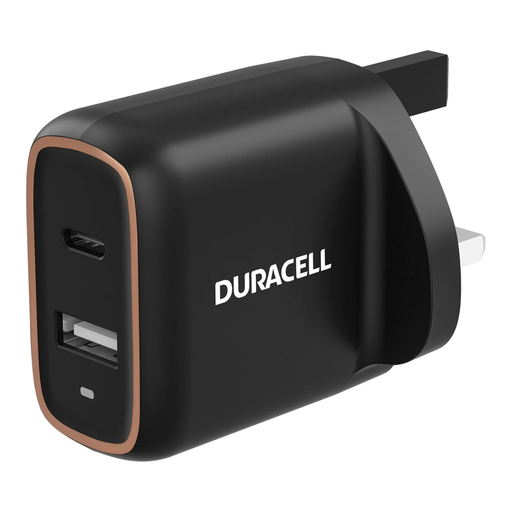
Why This Fits Their Persona: A straightforward choice for students, commuters and households charging a phone alongside an older USB-A device from a UK socket.
The listing states the UK plug, total 20W PD output and simultaneous USB-C plus USB-A charging, reducing uncertainty about plug type and port compatibility.
One USB-C PD port and one USB-A port; supports charging two devices at once; includes a three-year warranty according to the product details.
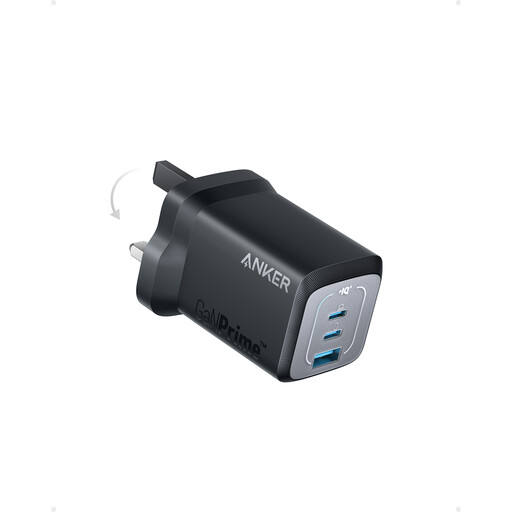
Why This Fits Their Persona: Suitable for professionals and frequent travellers who want one compact charger for a laptop, phone and smaller accessory.
Its stated output distinguishes single-device charging up to 67W from two-port operation up to 65W, helping buyers understand shared power rather than relying on the headline figure.
Two USB-C ports and one USB-A port; up to 67W with one connected device; GaN construction and stated temperature protection.
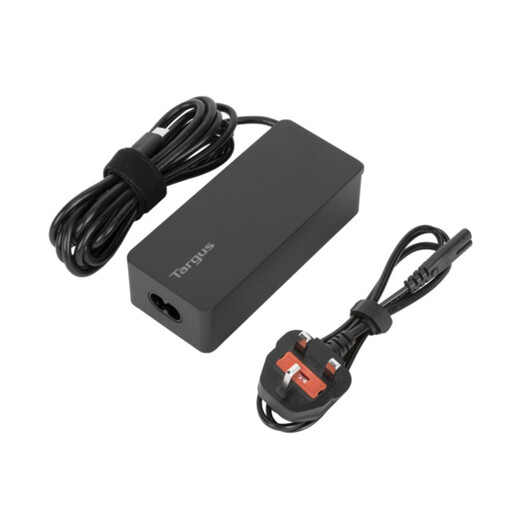
Why This Fits Their Persona: A practical laptop charger for office workers and business travellers carrying a compatible USB-C laptop, tablet and phone.
The specification states up to 65W, PD support, a 1.8-metre cable and both EU and UK power cords, making travel requirements clearer.
Up to 65W output; overcurrent, overheating and overvoltage protection listed; cable tie included for storage.
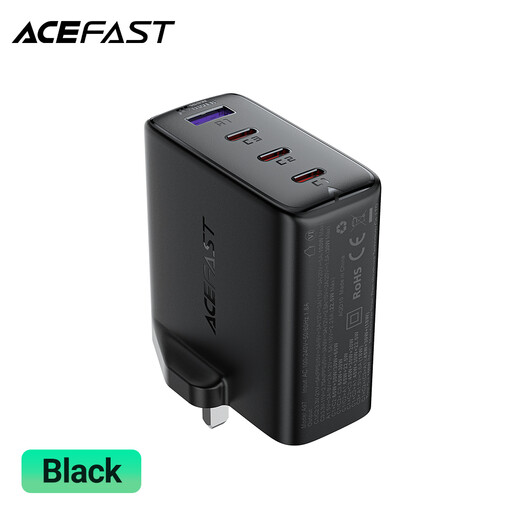
Why This Fits Their Persona: Intended for users powering higher-demand laptops and several USB-C or USB-A devices from one desktop location.
The product name specifies three USB-C ports plus one USB-A port and 100W PD, while the listing also advises replacing damaged units and leaving ventilation around the charger.
100W class output; four charging ports; GaN design; suitable for a mixed USB-C and USB-A setup, subject to the individual device requirements.
We have compiled a complete, real-time list of products that fully satisfy these strict selection criteria and UK safety regulations.
It can be suitable for compatible smartphones, particularly when the phone supports USB-C PD. The actual charging rate is controlled by the phone and may be lower than 20W. Use a compatible cable and check the phone manufacturer’s specification.
A compliant charger should negotiate an appropriate power level with a compatible device. However, compatibility, cable quality and charger condition still matter. Avoid damaged, modified or unverified products, and follow the device and charger instructions.
There is no fixed lifespan. Daily handling, heat, moisture, cable strain and power surges can affect service life. Store the charger dry, keep ventilation clear and replace it if the casing, plug or cable shows damage.